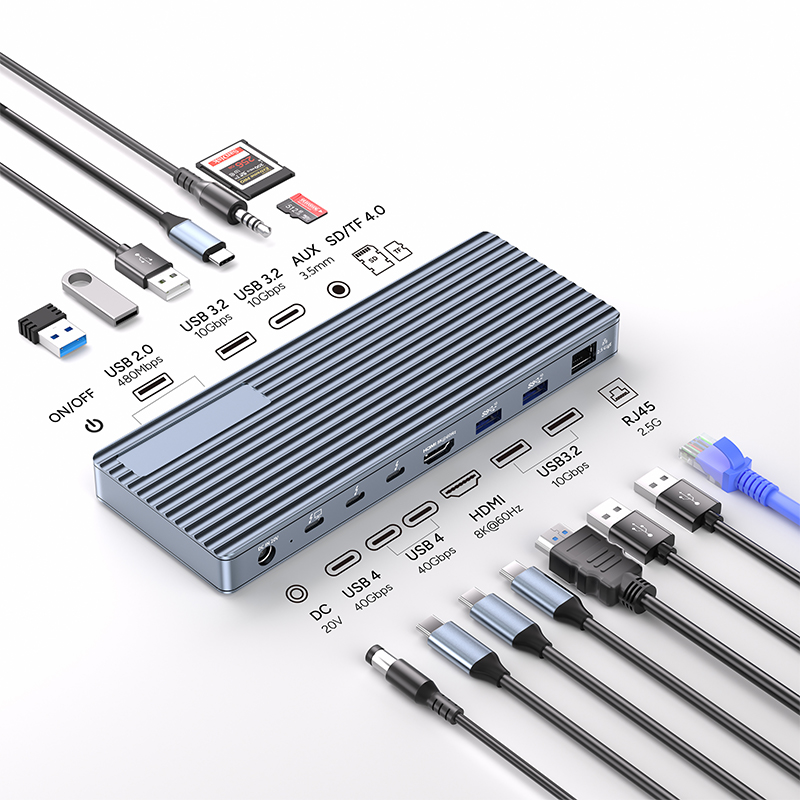
Can laptops with USB4 ports use Thunderbolt 4/5 docks? The answer is yes, but it's a bit complicated. USB4 is compatible with Thunderbolt 3, and in theory can be comparable to Thunderbolt 4 and even the future Thunderbolt 5 in terms of functionality and bandwidth. However, not all USB4 ports are the same, and compatibility is not 100% guaranteed. To understand the bandwidth you can use, users need to carefully check the data bandwidth of the device's USB4 port.
Today, most laptops sold around the world are equipped with Intel processors, and there are also many products equipped with USB Type-C Thunderbolt ports. The Thunderbolt standard is becoming more and more popular in modern Windows PCs, which is certainly a good thing, but it also excludes non-Intel users from this technology. If the PC you choose is equipped with AMD or Qualcomm hardware, it is likely equipped with USB4 ports instead of Thunderbolt ports. So, can such users use the existing Thunderbolt accessory ecosystem, such as docks and hubs? Fortunately, the answer is yes; unfortunately, like other USB formats, compatibility is a complex issue. USB4 ports are great, but the fragmentation problem that has plagued USB technology for generations remains. Different manufacturers have equipped laptops with different versions of USB4 ports, and the performance is also uneven. Below, we will explore these questions in detail to clearly answer: Can your USB4 laptop use a Thunderbolt 4 or Thunderbolt 5 dock?
Understanding USB and Thunderbolt
Despite the widespread adoption of the USB Type-C interface in most countries around the world, USB itself still has multiple conflicting versions, which can be confusing. This situation is not improved even though the USB standard is basically controlled by two entities: USB-IF (Universal Serial Bus Implementers Forum) is responsible for the basic functions, specifications, and branding of all USB ports and cables; while Intel owns the Thunderbolt brand, which greatly improves the performance and adds many features based on USB.
Specifications:
Transfer Speed: 40Gbps (Compatible with USB4/3.2/3.1/3.0/2.0)
1x DC Power in 20V, Device host PD 85W
2xType C, TBT/USB4 40gbps interface downward compatibility
(Video output up to Single 8K@30Hz or Dual 4K@60Hz orThree 4K@30Hz), power output up to 15W
1*HDMI 8K@60Hz video output
3* USB A 3.2 Gen2 (Max 10Gbps data transmission)
2xUSB A 2.0 (Max 480Mbps data transmission)
1xTF/Micro SD 3.0 ( Up to 104Mb/s)
1xSD/MMC 3.0 (Up to 104Mb/s)
1xAudio (3.5mm Audio&Mic )
1xRJ45 Gigabit Ethernet,10M/100M/1000M
Chipset:JHL8440
Aluminum housing
The universal USB port has a serious fragmentation problem between generations. Different generations of ports are compatible with each other, but they vary in data bandwidth and protocol support, and have undergone multiple rebrandings. In contrast, Thunderbolt is a highly standardized standard with strict requirements that manufacturers must meet, which makes Thunderbolt technology easier to understand. However, the fact that it is dominated by Intel also means that only Intel PCs can use Thunderbolt technology. Laptops with AMD Ryzen or Qualcomm Snapdragon X-series chips will rarely support Thunderbolt. But this does not mean that users must avoid these laptops in order to get a high-speed and feature-rich port. The latest generation of non-Thunderbolt USB Type-C ports, namely USB4 ports, are very powerful and can basically do everything Thunderbolt ports can do, but there are some limitations. Next, we will compare the two in detail.
For a comprehensive understanding of USB4, Thunderbolt 4 and Thunderbolt 3, we have prepared an in-depth guide. Here is a brief summary for you. USB4 is the latest USB standard released by the USB-IF, which aims to continue to improve the universal USB Type-C port that almost all new electronic products on the market have. Compared with previous USB standards, USB4 is unique in that it is based on Thunderbolt 3, which was open sourced by Intel. This means that USB4's functions are comparable to Thunderbolt 3, and it may even compete with Thunderbolt 4 and the upcoming Thunderbolt 5. Of course, USB-IF is not satisfied with just developing an open source Thunderbolt alternative, so USB4 is not completely consistent with the Thunderbolt standard. The reason why Thunderbolt is so important to professionals, creative workers, and many users is that every Thunderbolt port, cable, and accessory must pass strict minimum certification requirements.
USB4, on the other hand, has much more relaxed requirements. This means that on one laptop, a USB4 port may perform as well as Thunderbolt, but on another laptop, it may not. At present, from a technical perspective, there are three different versions of USB4 ports worth paying attention to. The difference between Thunderbolt and conventional USB Type-C ports is that it can achieve multi-directional data type and protocol splitting at the same bandwidth, has higher minimum requirements for display output and supported PCIe channels, and has better device charging power output capabilities.
Quickly and easily charge any laptop that supports Thunderbolt 3 or hdmi video adapters.
USB-C laptops must support the power supply function. Ideal for devices requiring higher power, such as MacBook Pro.
TU001 Thunderbolt HUB: USB-A3.1*1+USB4.0/Thunderbolt*3+DC power supply interface.
USB4.0/Thunderbolt interface: Supports USB4.0 (40Gbps rate transmission).
USB 3.2 gen 2 ports: supports USB 3.1 and is backward compatible with USB3.0/2.0/1.1/1.0.
Supports Mac OS, Windows, Linux and other systems.
USB4 has made significant improvements in all three aspects, introducing multiple bidirectional channels, supporting DisplayPort 2.0 (which can connect more high-resolution, high-refresh-rate monitors), and enhancing charging capabilities. However, the USB4 2x2 version only supports a maximum transfer speed of 20GBps, which is much lower than the 40GBps upper limit of Thunderbolt 3 and Thunderbolt 4. The USB4 2x3 version can achieve a bidirectional bandwidth of 40GBps and achieve unidirectional transmission of 80GBps through DisplayPort, resulting in better display effects. However, due to relatively loose requirements in other aspects, even if a laptop is equipped with a USB4 2x3 port, it cannot be guaranteed to be 100% compatible with all the functions of the Thunderbolt 4 port. Still, the performance of a USB4 2x3 port is far superior to any previous generation of USB ports. There's also a brand new version of USB4 that supports up to 80GBps bidirectional bandwidth and 120GBps unidirectional bandwidth via DisplayPort 2.1, as well as 240W of power delivery. It also uses a new naming scheme and is called USB4 2.0 or USB4 80GBps. However, this port is so new that you'll hardly see it on existing laptops, but it may even give Thunderbolt 5 a run for its money. Currently, USB 2.0 transfers at 5GBps, USB 3.2 Gen 1 at 10GBps, USB 3.2 Gen 2 at 20GBps, USB4 2x2 at the same 20GBps (but with some USB4 features, such as better DisplayPort support), USB4 2x3 at 40GBps, and USB4 2.0 at 80GBps. All this complex data and standards can be confusing, but the important thing is that there are USB4 ports available today that can work with Thunderbolt 3 and even Thunderbolt 4 docks and accessories, and there will be USB4 ports available in the future that can work with Thunderbolt 5 docks and accessories.
Finding the right port on your laptop
So how do you determine what type of USB4 port you have on your device? Unfortunately, this is largely up to the laptop manufacturer. Users can check the type of USB ports on their laptop through the Device Manager (Win + R, type devmgmt.msc and hit Enter, find "Universal Serial Bus controllers" in the list and expand it to view USB ports), but the Device Manager may not show the specific specifications of each port. Ideally, the laptop manufacturer should correctly label the port information on the device.
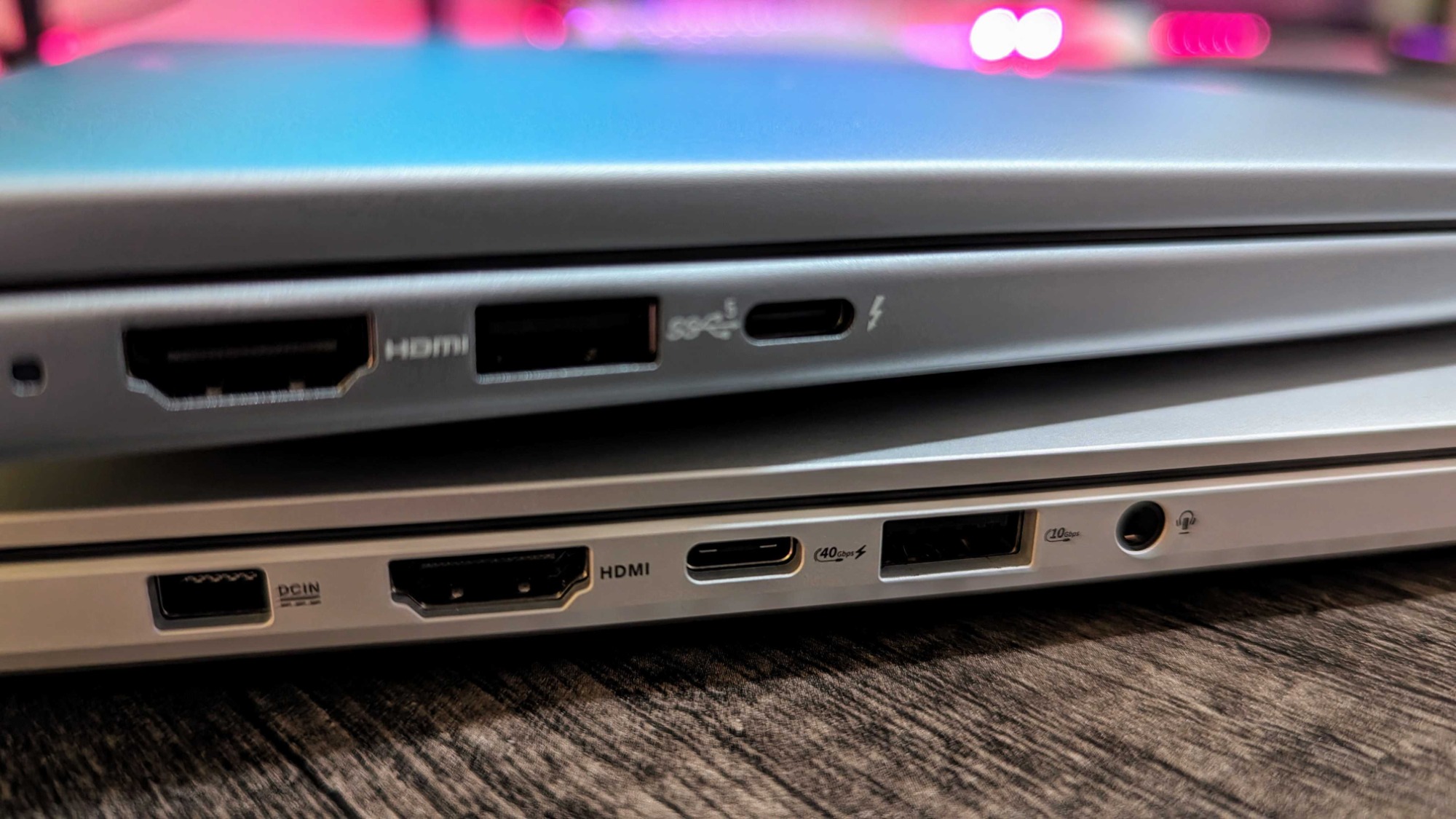
USB ports are usually labeled with the word "USB" and a small icon representing the bandwidth speed, and sometimes there will be other icons, such as a small lightning bolt (indicating support for Power Delivery) or "DP" (indicating support for display output). Users need to carefully look at each USB Type-C port on their computer. If you find a port labeled "USB 40GBps," then it is a USB4 port and it should be able to support Thunderbolt 3 and Thunderbolt 4 accessories. If the port is marked with a large lightning bolt and an arrow on the end, it is a Thunderbolt port and users in this category probably don't need to read any further. As ARM-based Windows PCs equipped with Qualcomm's latest hardware gradually come to market, the use of USB4 ports will become more widespread. Hopefully, most manufacturers will adopt the higher-end USB4 standard to ensure that users can enjoy cross-compatibility with Thunderbolt 3 and Thunderbolt 4 accessories, but at present, some companies may have difficulty meeting this standard.