With the advent of Thunderbolt 4.0 technology, consumers have a clearer direction when purchasing Thunderbolt computers, devices and USB-C cables. If you pursue the ultimate quality, Thunderbolt 4.0 cables are undoubtedly the best choice, and USB 4.0 and USB-C cables are also worthy of attention.
Powerful compatibility: worry-free connection
The most significant advantage of USB 4.0 and Thunderbolt 4.0 is backward compatibility with all devices. This compatibility not only allows new devices to seamlessly connect to old devices, but also purchases cables and devices that meet the specifications to reserve space for future upgrades, effectively avoiding the problem of device obsolescence caused by technology iteration.
What is Thunderbolt 4.0?
As the latest version of Intel's Thunderbolt series, Thunderbolt 4.0 has many advantages. It is backward compatible with USB Type-C and Thunderbolt 3.0. All certified Thunderbolt 4.0 cables are compatible with USB 2.0, USB 3.1, USB 3.2 and USB 4.0 devices.
In terms of transmission performance, Thunderbolt 4.0 provides 40GB/s data transfer speed and 100W PD power supply capability, and supports fast charging, which is the same as Thunderbolt 3.0 specifications. However, some laptops and Windows computers use a simplified version of Thunderbolt 3.0, and there are performance differences.
Thunderbolt 4.0 Vs Thunderbolt 3.0
In addition, manufacturers' Thunderbolt 4.0 products can only be officially certified by Intel if they meet the highest specifications. Thunderbolt 4.0 also supports 8K USB Type-C displays with a maximum resolution of (7,680 x 4,320). Compared with HDMI or DisplayPort cables, Thunderbolt 4 USB Type-C cables are thinner and can simultaneously transmit data and charge devices, making them more powerful.
Features of Thunderbolt 4
-Offers 40 GB/s bandwidth.
-Can support one 8K monitor or two 4K monitors.
-Comes with PCIe at 32 GB/s for up to 3,000 MB/s data-storage speeds.
-Offers up to 100-watt PD (Power Delivery) charging.
-Has support for docks with up to 4 ports.
-Allows you to wake your laptop or computer by moving the mouse or pressing a keyboard key if connected with a Thunderbolt 4.0 dock.
-Comes with Intel VT-d DMA (Direct Memory Access) protection that offers protection against physical DMA attacks.
What is USB 4.0?
USB 4.0 is the latest USB specification, integrated into USB Type-C cables, replacing USB 3.2 and 3.0, with data transfer speeds of up to 40GB/s or 20GB/s. It uses the same Type-C reversible circular connector as Thunderbolt 4.0.
It is worth noting that Thunderbolt 4.0 cables can be called USB 4.0 cables, but the reve-rse is not true, because not all USB 4.0 cables are Thunderbolt 4.0 certified. As the latest version, USB 4.0 is superior to other USB versions in efficiency and speed, and can dynamically monitor the bandwidth requirements of connected devices and reasonably allocate the remaining bandwidth for data transfer, which is an advantage that earlier USB versions do not have.
In terms of power supply and compatibility, USB 4.0 is the same as Thunderbolt 4.0, supporting 100W PD power supply and backward compatibility with Thunderbolt 3.0, USB 2.0, USB 3.0, USB 3.1 and USB 3.2. Certified USB 4.0 cables will have the USB logo and the number 40 or 20 to indicate its transfer speed.
Difference Between USB 4.0 and Thunderbolt 4.0
Although USB 4.0 and Thunderbolt 4.0 use the same USB Type-C interface and are based on the same underlying protocol, there are obvious differences in actual use.
From the performance point of view, all Thunderbolt devices support USB 4.0, and devices equipped with Thunderbolt 4.0 interface have stronger performance. For example, the maximum bandwidth of Thunderbolt 4.0 interface of Apple devices is 40GB/s, and it can connect two 4K monitors; while the maximum bandwidth of USB 4.0 interface of many Windows computers is only 20GB/s, and it can only connect one 4K monitor.
From the perspective of cost and certification, the advantage of USB 4.0 is that it is more affordable and does not require official certification from Intel. This also leads to uneven quality of USB 4.0 devices on the market, and consumers need to carefully identify them when purchasing.
USB 4.0 vs Thunderbolt 4.0: Comparison Chart
Which Apple Products Support USB 4.0 and Thunderbolt 4.0?
If you’re not sure whether your Apple device supports USB 4.0 or Thunderbolt 4.0, the following list has got you covered. You can also use the following steps to find out the port specifications of your Apple device.
1、Go to the “Apple Menu” and click on the “About This Mac” option.
2、Double click on your Mac’s serial number and copy it by pressing “Command + C”
3、Open the official Tech Specs page, and paste the copied serial number in the “Search Tech Specs” bar by pressing “Command + V”.
4、Click on the “Search” button to see the port specification of your Mac.
Apple Devices with Thunderbolt 4.0 Support
The following Mac models come with the Thunderbolt 4.0 specification:
MacBook Pro 16-inch - 2021 Model
MacBook Pro 14-inch - 2021 Model
Apple Devices that Come with USB 4.0 Support
The following Apple laptops come with the USB 4.0 specification:
Mac mini M1 - 2020 Model
MacBook Air M1 - 2020 Model
MacBook Pro 13-inch M1 - 2020 Model
iMac 24-inch M1 - 2021 Model
Other Considerations
Some Apple products are also coming with the latest HDMI 2.1 specification like Apple TV and the upcoming iMac 8K. In order to utilize the full potential of these devices, you’ll need to use cables that support an 8K display. You can use HDMI 2.1 Rated 8K 60Hz Cable for this purpose.
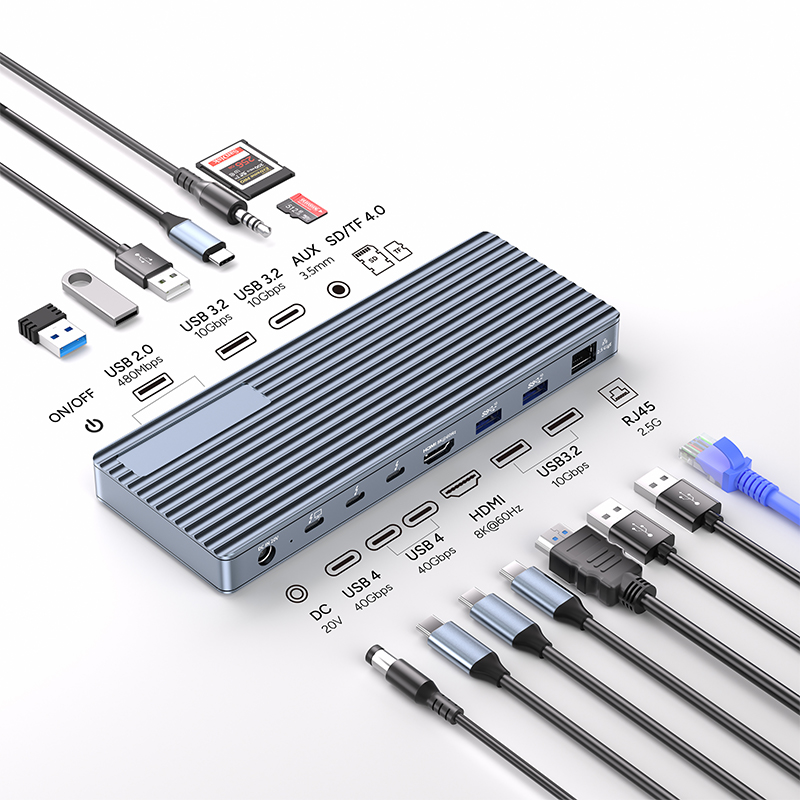
Additionally, if you’re using an Apple laptop with thunderbolt 4.0 support, then you can use different tools to complete your laptop’s ports. For example, you can use the Purplelec Thunderbolt 4.0 dock that offers a vast range of different ports including:
Transfer Speed: 40Gbps (Compatible with USB4/3.2/3.1/3.0/2.0)
1x DC Power in 20V, Device host PD 85W
2xType C, TBT/USB4 40gbps interface downward compatibility
(Video output up to Single 8K@30Hz or Dual 4K@60Hz orThree 4K@30Hz), power output up to 15W
1*HDMI 8K@60Hz video output
3* USB A 3.2 Gen2 (Max 10Gbps data transmission)
2xUSB A 2.0 (Max 480Mbps data transmission)
1xTF/Micro SD 3.0 ( Up to 104Mb/s)
1xSD/MMC 3.0 (Up to 104Mb/s)
1xAudio (3.5mm Audio&Mic )
1xRJ45 Gigabit Ethernet,10M/100M/1000M