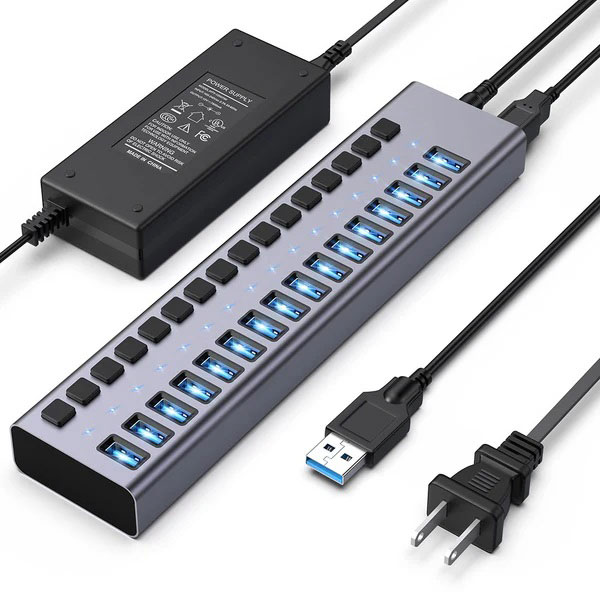
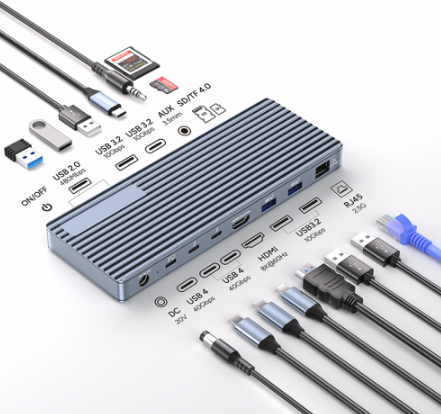
In today's mobile work era, laptops are becoming increasingly thin and light, but the number of ports is constantly shrinking. To connect peripherals like a mouse, keyboard, external display, or even an Ethernet cable, we must rely on external devices: the Hub and the Docking Station. Although they may appear similar, their functions, performance, and application scenarios have vast differences.
1. Core Purpose: Temporary Needs vs. Fixed Workstation
USB-C Hub: The Light and Flexible "Splitter"
A hub is fundamentally a tool for extending a single port. It splits a single USB-C port on your laptop into several, allowing you to connect basic peripherals (like a flash drive, mouse, or keyboard). It's important to note that all devices connected to the hub must share the bandwidth supplied by the host device. It is best described as a "portable toolkit" for solving urgent connection problems during travel or temporary meetings.
Docking Station: The Integrated "Desktop Command Center"
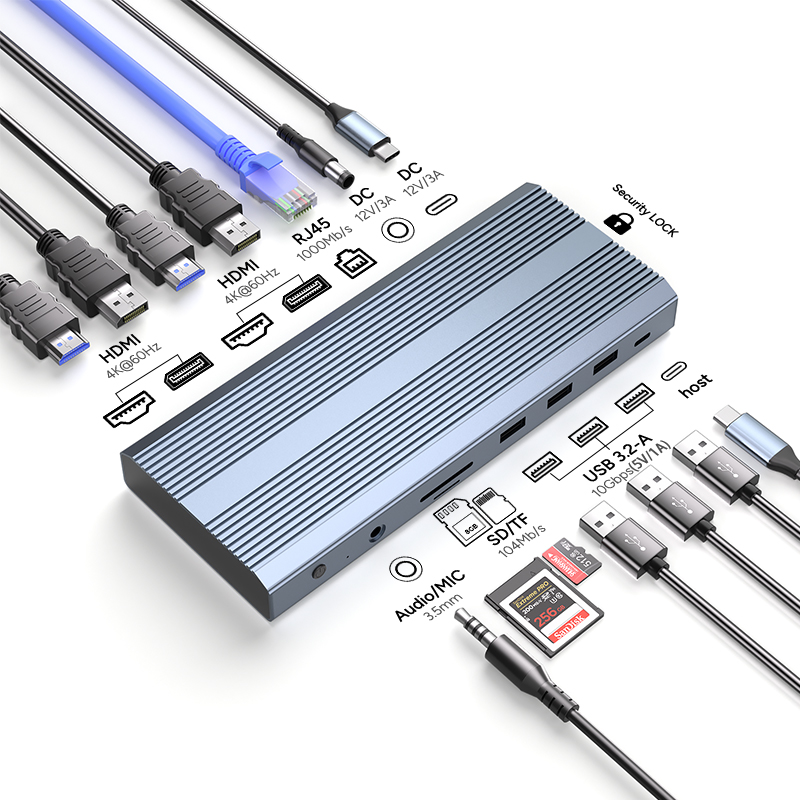
The docking station is designed to seamlessly integrate your laptop into a fixed desktop environment. It offers a wider and more speci-alized range of ports, such as professional video output ports and Gigabit Ethernet. In an office setting, employees only need one cable to connect their laptop to the Dock to instantly take over all peripherals, transforming the laptop into a fully functional desktop machine.
2. Performance Differences: Speed and Multi-Screen Capability are Key
The performance gap between the two determines their maximum limits of use:
Key FeatureUSB-C HubDocking Station
Function RichnessFocuses on extending USB ports; the variety of ports is basic and limited.Comprehensive port variety, covering video, network, data transfer, audio, etc.; functions are more professional.
Data Transfer SpeedLimited by interface standards; speed bottlenecks exist (commonly around 5 Gbps).Supports faster standards, capable of offering 10Gbps or even higher speeds for faster large file transfer.
Video OutputPerformance is limited; generally supports only one lower-resolution external display.Can easily drive multiple high-resolution displays (e.g., dual or triple 4K@60Hz screens).
Simply put, a Hub is sufficient if you only need to connect a mouse and a flash drive. If you need to connect two 4K displays simultaneously and use a high-speed network, only a Dock can handle the task.
3. Power Logic: Who Can "Fuel" Your Laptop?
Hub: Self-Sufficient or "Borrowing Power"
A hub typically runs by drawing power from your laptop. If it features a Power Delivery (PD) port, you can plug your laptop's original charger into the Hub to enable simultaneous charging and use (known as pass-through charging).
Docking Station: The True "Power Center"
This is one of the docking station's strongest advantages. A fixed docking station comes with an independent power supply and must be connected to a wall outlet. This allows it to not only power all peripherals but also charge your laptop at a faster rate, providing stable power management. While portable docks rely on the laptop's power, the high-power output of a fixed dock is something a Hub cannot match.
4. Who Is It For? Finding Your Perfect Match
Scenario RequirementRecommended DeviceSuitable User Group
Mobile/Light ExpansionUSB-C HubBusiness travelers, students, light office users.
Professional Fixed WorkstationDocking StationVideo editors, designers, programmers, professionals requiring multi-screen and high-speed connections.
The Hub is designed for users who need temporary or mobile expansion, prioritizing compactness and portability. The Dock is prepared for users who demand complex setups and stable performance, suitable for all-day desktop work.
5. Software and Cost: Compatibility and Budget Considerations
Compatibility: Hubs are generally plug-and-play, requiring no driver installation, thus offering high compatibility with various devices and operating systems. Due to their complex functionality, docking stations may require specific drivers or software tailored for particular laptop models or brands to achieve optimal performance.
Cost and Size: Hubs are small in size and more affordable, making them the first choice for budget-conscious users. Docking stations are larger and more expensive, but considering their capabilities for high-speed data, multi-screen support, and charging, they represent a worthwhile long-term investment for professionals.
Conclusion: Subtract Based on Needs, Not Just Choose
The core question in making your choice is: Do you need to run multiple high-load tasks and connect multiple screens simultaneously?
If the answer is No, and you only need to connect a mouse, keyboard, and flash drive, then buy a Hub—it's portable and affordable.
If the answer is Yes, and your workflow is complex, requiring stable high-power charging, dual 4K displays, and Gigabit Ethernet, then a Docking Station is the correct investment for building an efficient workflow.
Regardless of which you choose, they will help you break free from the limitations of traditional laptop ports and achieve a leap in work efficiency.