USB and Thunderbolt technologies have been around for years, with Thunderbolt being jointly developed by Apple and Intel. Meanwhile, the USB C interface has become the industry standard for data transmission. These two technologies each have their own preceding models, though Thunderbolt and Thunderbolt 2 were initially only compatible with Apple devices, while USB interfaces are widely used in various devices such as radios, lamps, and automobiles.
When it comes to purchasing Thunderbolt 3 and USB C docking stations, consumers often need clearer guidance. This article will delve into the uses of these two types of docking stations to help you gain a thorough understanding of their features and differences.
What is USB-C?
USB Type C, commonly referred to as USB C, is an advanced connector that is gradually becoming the mainstream method for data transmission between devices. It is the latest upgrade from the USB A interface and is well-known for its unique curved-edge design.
The USB C interface employs a symmetrical design, meaning there's no need to worry about the orientation when inserting it, thus avoiding the hassles of rotation and twisting associated with previous generations. This design not only simplifies the connection between computers and phones but also allows for connecting gaming consoles and other devices.
The USB ports on laptops and smart devices mainly fall into three categories:
USB 3.1: Offers data transmission speeds of up to 10 GB per second.
USB 3.2: Boasts an astonishing data transmission speed of 20 GB per second.
Thunderbolt 3 on Apple Computers: Delivers lightning-fast data transmission speeds of up to 40 GB per second.
With a USB C docking station, you can connect your computer to other devices to build a computer network. This functionality is widely applied in commercial entities such as hospitals, companies, and schools.
What is Thunderbolt 3?
Thunderbolt 3 is the latest solution for information transmission between computers, boasting a transmission speed eight times faster than USB 3.0. It supports simultaneous connection to multiple monitors and LCD displays and comes with various other features.
Based on the USB C interface, Thunderbolt 3 can be easily connected to personal computers, enabling seamless connections and rapid data sharing. Its information transmission speed reaches up to 40 GB per second, and it reserves a portion of the bandwidth for video signal transmission, such as to 5K displays. Additionally, it has sufficient bandwidth to maintain storage devices or monitor the connections of other peripheral devices.
Notably, Thunderbolt 3 supports daisy-chaining, allowing up to six devices to be connected through a single port. For example, you can simultaneously connect storage, networking, power, and output devices. These devices will leave other ports available for additional connections when needed.
Thunderbolt 3 cables are versatile, capable of not only transmitting high-speed data but also providing up to 100 watts of power. When connected to bus-powered devices, they can also supply 15 watts of power, meeting the needs of high-performance devices like the G-Drive Pro SSD.
Although Thunderbolt 3 and USB C docking stations may seem similar to the untrained eye, there are notable differences between them. These differences make each unique in terms of performance and application.
Speed Differences:
Thunderbolt 3 stands out with its astonishing data transmission rates, outperforming the USB C interface. Moreover, Thunderbolt 3 supports video output to two 4K displays and one 5K screen, whereas the USB C interface is limited to a single 4K display.
Compatibility Differences:
Both Thunderbolt 3 and USB C are backward compatible. However, when using a USB C docking station in a Thunderbolt port, the data transmission speed will be limited to 10 GB per second. If a Thunderbolt cable is connected to a USB C port, the operation will fail. Even though it can charge the laptop, it won't work properly with output devices. In this case, the user will receive a message indicating that the computer cannot recognize the device.
Daisy-Chaining Support Differences:
USB C does not support daisy-chaining, a feature exclusive to Thunderbolt 3 cables. This means each device requires a separate USB-C port for connection, which not only increases costs but may also lead to cable tangling issues.
Conclusion: Choosing the Right Docking Station Based on Your Needs
Although Thunderbolt 3 excels in terms of transmission speed and versatility, multiple factors should be considered when selecting a docking station. In some cases, you may not need to choose between Thunderbolt 3 and USB C docking stations. For example, if your laptop is equipped with both ports, there's no difference between them when charging the battery.
6 in 1 Full-function Type-C Docking Station
Specifications:
·Input USB C x1(Connect to host)
·1xType C(PD 100W)
·1 x HDMI(4K@60Hz)
·1 x USB A.3.2(10Gbps)
·2 x TypeC3.2(10Gbps)
·1 x Type C(Displaying port/10Gbps)
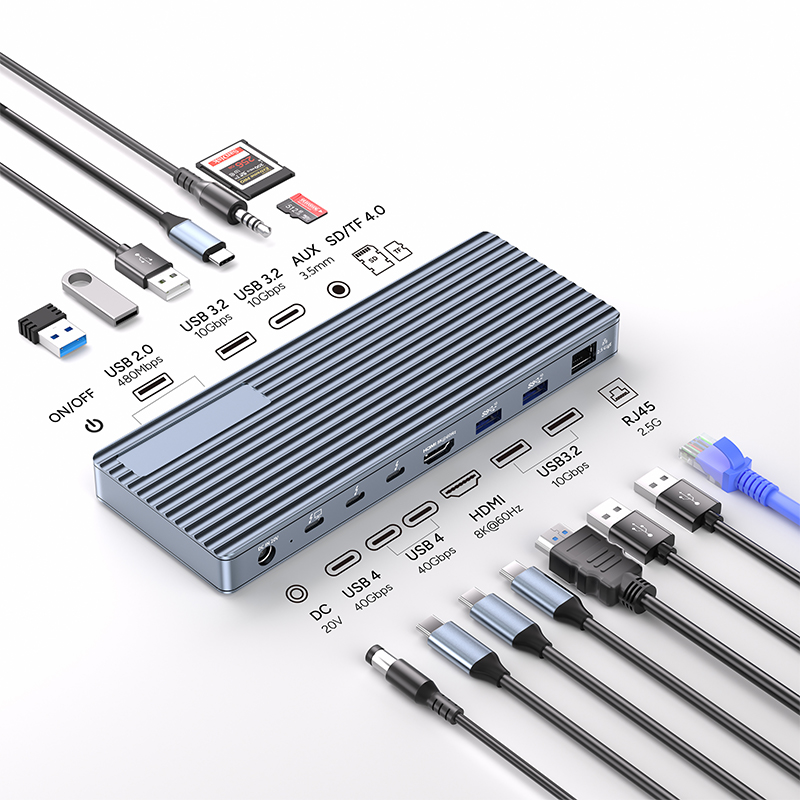
13 in 1 thunderbolt4 docking station
Specifications:
Transfer Speed: 40Gbps (Compatible with USB4/3.2/3.1/3.0/2.0)
1x DC Power in 20V, Device host PD 85W
2xType C, TBT/USB4 40gbps interface downward compatibility
(Video output up to Single 8K@30Hz or Dual 4K@60Hz orThree 4K@30Hz), power output up to 15W
1*HDMI 8K@60Hz video output
3* USB A 3.2 Gen2 (Max 10Gbps data transmission)
2xUSB A 2.0 (Max 480Mbps data transmission)
1xTF/Micro SD 3.0 ( Up to 104Mb/s)
1xSD/MMC 3.0 (Up to 104Mb/s)
1xAudio (3.5mm Audio&Mic )
Another scenario where USB can be used instead of Thunderbolt 3 is when connecting a Thunderbolt 3 terminal to an incompatible device. For instance, you can use a USB C cable to connect a phone or remote storage device. Although the data transmission speed will be slower, it won't affect the normal operation of output devices like mice, keyboards, scanners, and printers.
However, in certain specific situations, such as when media professionals and editors frequently interact with images and videos, choosing a Thunderbolt 3 docking station would be more appropriate. Despite its high cost, for these professionals, rapid data transmission is crucial for achieving creative output. They typically purchase computers that support Thunderbolt 3 to meet this demand.