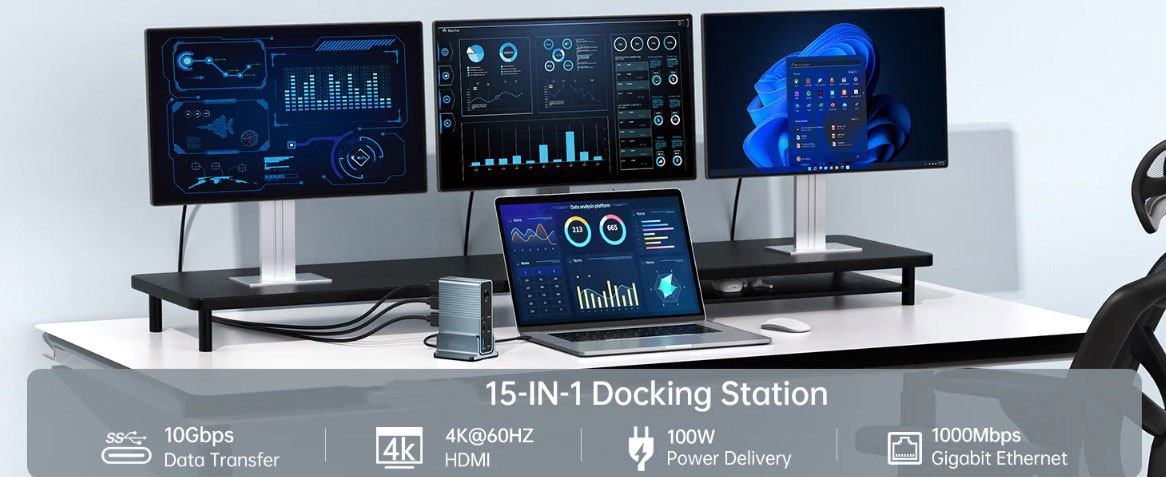
In the digital age of office work, laptops have become trusted companions for people in their work and studies thanks to their portability. However, limited by the number of interfaces on the body, laptops often struggle when it comes to connecting multiple devices. This is where laptop docking stations (sometimes called Thunderbolt docking stations) come into play. With just one hub, they can meet users' diverse needs for connecting keyboards, external monitors, external hard drives, and more. Whether you're a freelancer working from home, or an office worker on a budget eager to upgrade your system or short on desk space, a docking station allows you to break through the inherent limitations of laptops and enjoy greater device usability.
Key Considerations When Purchasing a Type-C Docking Station
When we're ready to buy a laptop docking station, we need to take multiple factors into account to ensure we get a product that suits our needs.
Connectivity Type: The Bridge to Device Compatibility
The connectivity type is a core element when choosing a docking station. Nowadays, most new laptops support USB Type-C connections. Therefore, it's crucial to select a docking station with a matching USB Type-C port. Older laptops usually support USB 3.0, and correspondingly, you need a docking station with the same input interface. Once the connectivity type of the docking station doesn't match that of the laptop, functions like video signal transmission and data transfer won't work properly.
Power Supply: The Guarantee for True Single-Cable Connection
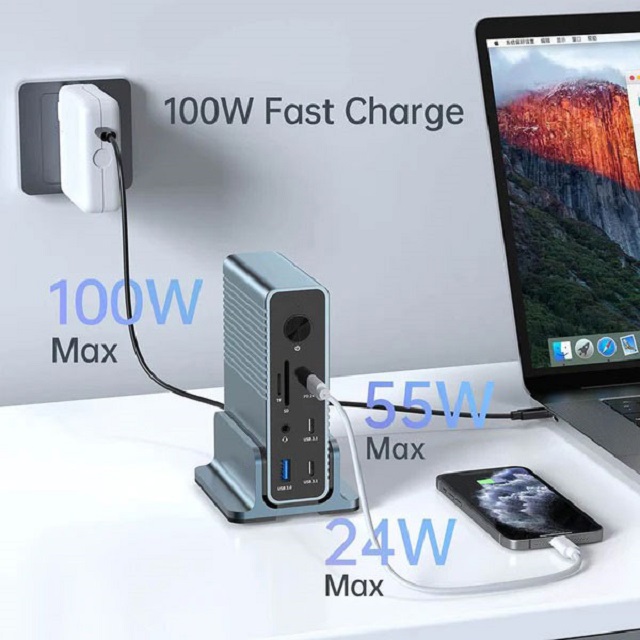
An ideal docking station should be able to power the laptop, thus enabling a true single-cable connection. Some relatively inexpensive docking stations lack this function and can only be used to connect peripheral devices. Some docking stations even require you to use the laptop's own charger to power them. When shopping, if you want to get rid of the extra charger, you need to pay attention to the power supply function of the docking station.
Video Output: The Key to Meeting Visual Needs
Different video usage scenarios have varying requirements for the video output specifications of docking stations. If you only need to transmit the video signal to a single 1080p monitor via an HDMI cable, an ordinary docking station will do. But if you need to support two or more 4K external monitors, you must choose a docking station with a DisplayPort interface or a newer version of HDMI.
Ports: The "Storage Box" for Device Adaptation
The types and quantity of ports on a docking station determine how many devices it can connect. Common USB ports on docking stations come in Type-A, Type-C, or both. Some docking stations are also equipped with Ethernet ports, enabling stable wired network connections and saying goodbye to unstable Wi-Fi signals. At the same time, you should also check whether the docking station has the device charging function to avoid affecting the device usage experience.
Audio Input/Output: The Tool for Enhancing the Auditory Experience
Although docking stations with audio I/O ports are not common, for users who pursue a high-quality audio experience, having dedicated external speaker and microphone interfaces can significantly enhance the audio enjoyment.
Specifications:·Input Type Cx1(Connect to host)·1xType C(PD3.0 with max 100W)·1xHDMI(Max4K@30Hz)·1xHDMI(Max4K@60Hz)·1xDP(Max4K@60Hz·1xRJ45 Gigabit Ethernet,10M/100M/1000M ·1xTF/Micro SD 3.0(Up to 104Mb/s)·1xSD/MMC 3.0 (Up to 104Mb/s)·1xAudio (3.5mm Audio&Mic·2xType C 3.2(Max 10Gbps data transmission)·3xUSB A 3.0(Max 5Gbps data transmission)
Criteria for Scientifically Selecting High-Quality Type-C Docking Stations
To help users choose high-quality laptop docking stations, we've formulated the following selection criteria by comprehensively considering factors such as device specifications, important functions, and prices, through practical testing and extensive research.
Connectivity Type: Keeping Up with Modern Standards
The connectivity type directly affects the functions, performance, and compatibility of a docking station. Choosing a docking station that supports modern standard ports can greatly improve work efficiency. For example, the Purplelec DS018R docking station is equipped with a Thunderbolt 4 port. It's compatible with Windows laptops, MacBooks, and Chromebooks. It can also transmit video signals to monitors through the DisplayPort and Thunderbolt 4 ports and has rich interfaces such as audio jacks and Ethernet inputs. The Baseus 10-in-1 docking station, although lacking an audio jack, supports Thunderbolt 4 and is suitable for users who prefer compact and portable devices.
Power Delivery: The Assurance of Fast Charging
The power supply function is an important plus for docking stations. Many docking stations support charging laptops via USB-C or Thunderbolt ports, freeing users from the burden of carrying an extra charger. In our tests, the NewQ 16-in-1 docking station showed excellent charging speed, quickly replenishing the energy of laptops with low battery levels.
Data Transfer Speed: The Catalyst for Efficient Work
The data transfer speed determines the efficiency of file transfer in a small network. When transferring large files such as videos, high-resolution images, or computer backups, high-speed transfer is particularly important. Through testing, some high-quality docking stations can transfer a 10GB file within seconds, greatly enhancing work efficiency.
Display Connectivity: Creating a Multi-Screen Workspace
Connecting a laptop to multiple external monitors to achieve a multi-screen operation experience similar to that of a desktop is a major feature of docking stations. When screening, we focused on selecting docking stations that can output to multiple high-resolution monitors at high refresh rates and conducted actual tests by connecting a pair of 4K screens to ensure excellent display performance.
Price Point: The Balance of Cost-Effectiveness
When recommending docking stations, we fully consider the budgets of different users. Although there are high-end docking stations on the market with rich ports and fast charging speeds, not all users need or can afford them. We've carefully sele-cted a variety of affordable and practical docking stations. These cost-effective models are not only compact and easy to carry but also support the necessary technical standards, truly delivering value for money.
In the vast market of laptop docking stations, as long as you master these purchasing points and selection criteria, you can choose the most suitable Type-C docking station, bringing more convenience and efficiency to your work and life.