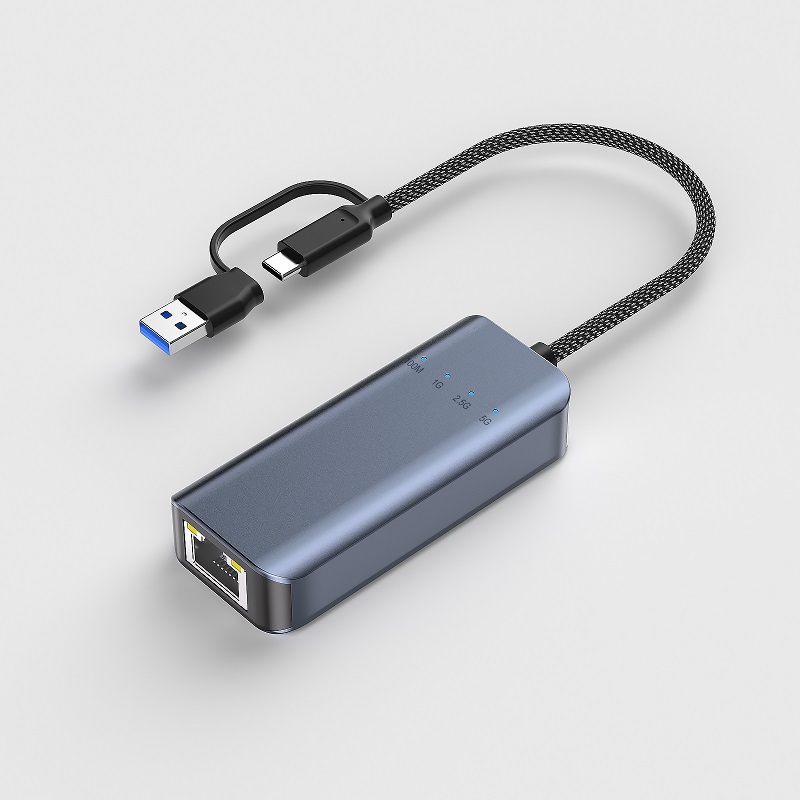
When connecting devices, you have the option to choose between WiFi and wired connections. However, wireless connections can sometimes be unstable, slow, or have weak signals. If you are in pursuit of high-speed and stable internet, a wired connection is a better choice, which is often achieved with the help of an Ethernet adapter (NIC, Network Interface Card), among which USB Ethernet adapters are the most common. The following is a detailed introduction to wired Ethernet adapters.
What is a Wired Network Adapter?
An Ethernet adapter is hardware that enables devices or workstations to access Ethernet connections. It connects computers or laptops to the Internet or local networks via wired connections, leveraging existing home wiring to improve network performance. Nowadays, with limited ports on new USB-C laptops and desktops, an external Ethernet adapter is required to achieve wired connections.
Why Choose a Wired Ethernet Connection Over WiFi?
Stability: WiFi signals are susceptible to interference from external blockers and can be unstable. Wi-Fi devices typically operate at a frequency of 2.4 GHz and may be interfered with by other electronic devices or walls between you and the WiFi signal source. Moreover, the coverage range of wireless networks is limited (usually 50 - 300 feet). Getting out of the coverage range can be extremely frustrating as it leads to disconnection. In contrast, a wired connection ensures stability when all connected devices are in good condition, putting you in full control.
Speed: WiFi connections are significantly slower than wired ones (in 802.11ac wave2 mode, the maximum rate of 1x1 160 MHz is approximately 800+ Mbps). Additionally, as the number of users increases, the speed of WiFi decreases, slowing down workflows. A wired connection operates at the same speed as your paid internet plan, allowing you to make full use of it. For example, uni's 2.5G USB C Ethernet adapter can provide fast 2.5G Ethernet.
Security: Wireless networks are more vulnerable to hacker attacks, which may result in unauthorized access to your personal network and the theft of sensitive information. Therefore, setting a strong password for your wireless network is crucial. On the other hand, a wired solution can minimize the possibility of security vulnerabilities.
1、Types of Adapters/NICs
By Network Connection Method: There are wired adapters and wireless adapters. This article mainly focuses on wired adapters.
2、By Bus Interface Type
USB Ethernet Adapter: The USB bus is an external bus standard with various transmission rates. It can be used with a wide range of USB devices and is the most common external adapter in daily life.
PCIe Network Adapter: PCIe is a popular standard for computer and server motherboards. There are five versions of PCIe network cards, each supporting different speeds. You can add 10/100/1000Mbps Ethernet ports to any PC through PCI-E slots. These are internal adapters.
PCI-X Network Adapter: PCI-X is an enhanced PCI bus technology that supports 64-bit operation and can reach a maximum speed of 1064 MB/s. In most cases, PCI-X slots are backward compatible with PCI network cards.
PCI Bus Network Adapter: Released in the 1990s, PCI replaced the previous ISA standard. It has fixed bandwidths of 32 bits (133MB/s) and 64 bits (266MB/s). Nowadays, most computers use embedded network cards instead of expansion cards.
ISA Bus Network Card: Released in 1981, the ISA bus is an IBM-compatible bus structure. Due to the slow speed of 9Mbps network cards, ISA bus interfaces have gradually been phased out and are rarely seen in the market today.
3、By Interface Type: There are four types of network adapters on the market: RJ-45 ports (for connecting twisted-pair cables, such as Cat5 and Cat6, and are the most common), AUI ports (for connecting thick coaxial cables, such as AUI cables), BNC ports (for connecting thin coaxial cables, such as BNC cables), and optical ports (for connecting modules, such as 10G/25G optical modules).
4、By Transmission Speed: There are network adapters with speeds of 10Mbps, 100Mbps, 10/100Mbps adaptive cards, 1000Mbps, 10G, 25G, and even higher speeds. 10Mbps, 100Mbps, and 10/100Mbps adaptive network cards are suitable for small local area networks, homes, or offices. 1000Mbps network adapters can provide higher bandwidth for Fast Ethernet. 10Gb/25Gb network adapters and higher-speed NICs are popular in large enterprises and data centers.
5、By Application Field
Computer Network Adapter: Most new computer motherboards now come with built-in network cards (NICs), eliminating the need to purchase them separately. These network cards typically support speeds of 10/100Mbps and 1Gbps, enabling communication between a computer and other computers or networks.
Server Network Adapter: The main function of a server network card is to manage and process network traffic. Compared with ordinary computer network cards, server network cards require higher data transmission speeds, such as 10G, 25G, 40G, or even 100G.
Conclusion
The performance of an Ethernet adapter directly affects the data transmission speed of the entire network. For laptops or desktops without Ethernet ports, you can purchase an external USB Ethernet adapter for connection. Mac computers also support Thunderbolt Ethernet adapters. Since most laptops now support USB-C interfaces, having a USB-C to Ethernet adapter is extremely helpful for remote work. Desktop computers can also use internal Ethernet cards, which are connected to PCI or PCIe slots on the motherboard.