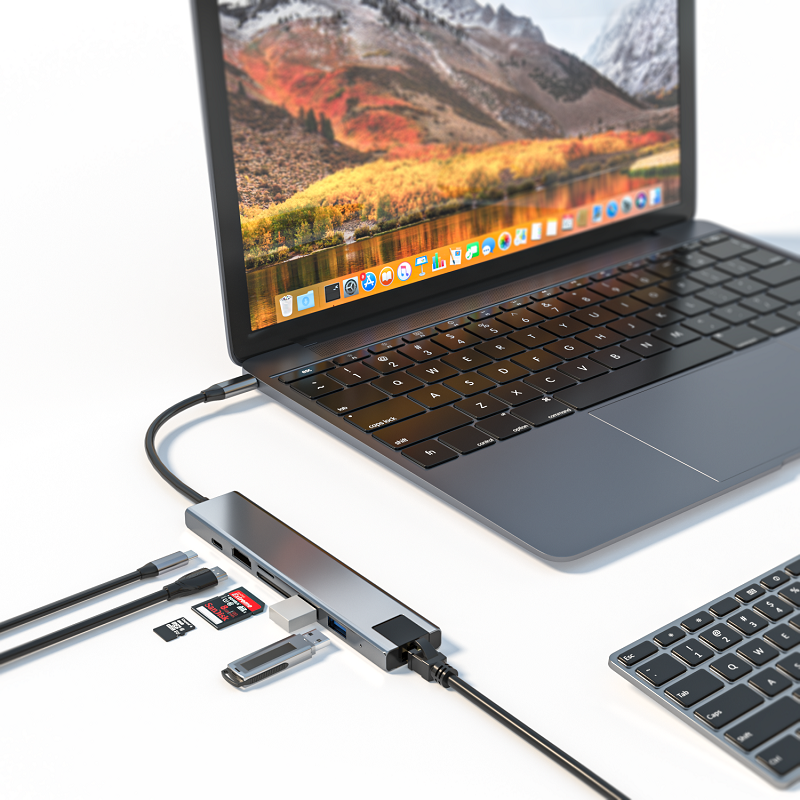
As laptops become thinner and lighter, USB-C hubs have become a must-have accessory for many people. However, faced with a wide range of choices on the market, people often get tangled up: Is an expensive USB-C hub worth investing in? Are cheap ones reliable? Next, let's analyze the cost of USB-C hubs and explore the true value of this accessory.
Overview of USB-C Hubs
In recent years, technological connectivity has developed rapidly, and versatility and diversity have become the main advantages of Hub expansion. USB-C Hubs are small devices that can easily connect multiple essential peripherals and accessories. This article will explore the advantages, costs, and other features of USB-C Hubs in depth, while introducing its efficient and convenient alternatives in the open technology market.
USB-C Hub Price Analysis
USB-C hub prices vary greatly, ranging from a low of $15 to a high of $200. Its price is affected by factors such as quality, brand reputation, number of ports, and additional features. Generally speaking, high prices for technology products often mean that they are versatile and have a wide range of uses. However, when purchasing, you must be clear about your needs, carefully evaluate, and avoid overspending.
Evaluating the price-performance ratio of USB-C hubs
Buying a USB-C hub is not an easy task. Each hub has its own unique advantages and features. When purchasing, you need to consider the following factors to ensure that you buy a product that meets your needs.
1. Number of ports: USB-C hubs come in a wide variety of types, ranging from 2 to more than 12 ports. The ideal hub should be able to meet current and future connection needs, as well as peripheral device setup needs.
2. Data transfer speed: The data transfer speed of USB-C hubs varies greatly, ranging from nearly 5Gbps to more than 20Gbps. If you often transfer large amounts of files, in order to avoid unsmooth transfers, you should choose a hub with fast data transfer speeds to improve efficiency.
3. Power supply capacity: USB-C hubs can power electronic devices, and some hubs can provide more than 100W of power for charging devices, which is very practical for people who need to charge handheld devices.
4. Additional functions: This is a highlight of USB-C hubs. Many hubs are equipped with SD card reader ports, external HDMI output ports, Ethernet ports, etc., which can achieve diversified functions. Users should choose the right hub according to their needs and preferences.
Specifications:
·Input USB C x1(Connect to host)
·1xType C(PD 100W)
·1 x HDMI(4K@60Hz)
·1 x USB A.3.2(10Gbps)
·2 x TypeC3.2(10Gbps)
·1 x Type C(Displaying port/10Gbps)
Features and advantages of USB-C hubs
After understanding the factors to consider when buying a USB-C hub, let's take a look at its practicality and advantages.
1. Versatility: USB-C hubs provide rich choices and unlimited versatility, which can help users easily create an efficient workspace and avoid connection interruptions.
2. Portability: Carrying a USB-C hub with you can bring convenience and comfort to work and make travel easier.
3. Future-proof: USB-C hubs are expected to become a universal technology product connection standard and are a worthwhile investment. After purchase, you can connect and convert devices without multiple devices.
4. Improve productivity: USB-C hubs reduce the number of cables between devices, making the workspace tidier, thereby improving productivity, and can easily achieve multitasking synchronization, effectively preventing interference between devices, and achieving efficient workflow.
Alternatives to USB-C hubs
USB-C hubs are not suitable for everyone, here are some alternatives.
1. USB-A hubs: For devices that are still using USB-A ports, USB-A hubs are a convenient alternative. It is more affordable and has a wider range of connections.
2. Thunderbolt docking station: With lightning-fast data transfer speeds and a variety of advanced features, this docking station is compatible with Thunderbolt 3 and 4 ports, and can transfer data at speeds of up to 40Gbps. However, its price is higher than that of USB-C hubs, but the transmission effect may be better due to higher data transmission speed and efficiency.
3. Adapter: Standalone adapters cost less than USB-C hubs and can quickly solve connection problems. Although the functions may be limited, they generally include HDMI or Ethernet connection functions.
4. Wireless solution: If you want to minimize cable clutter, Bluetooth device connection is a good choice. Bluetooth mouse, keyboard and speakers can make the workspace neater and easier to manage, but may not completely solve the cable clutter problem.
Summary
USB-C hubs are versatile and efficient, but they are also relatively expensive. When purchasing, be sure to make a choice based on your budget and needs, combined with your own preferences and workspace necessities. If the USB-C hub does not meet your needs, you may consider other alternatives such as Thunderbolt docking stations, adapters, USB-A hubs, and Bluetooth and wireless connection solutions. I hope that through this article, you can clearly understand what equipment you need to invest in to meet your workspace needs, so that you can make effective and necessary investments to improve your work efficiency.