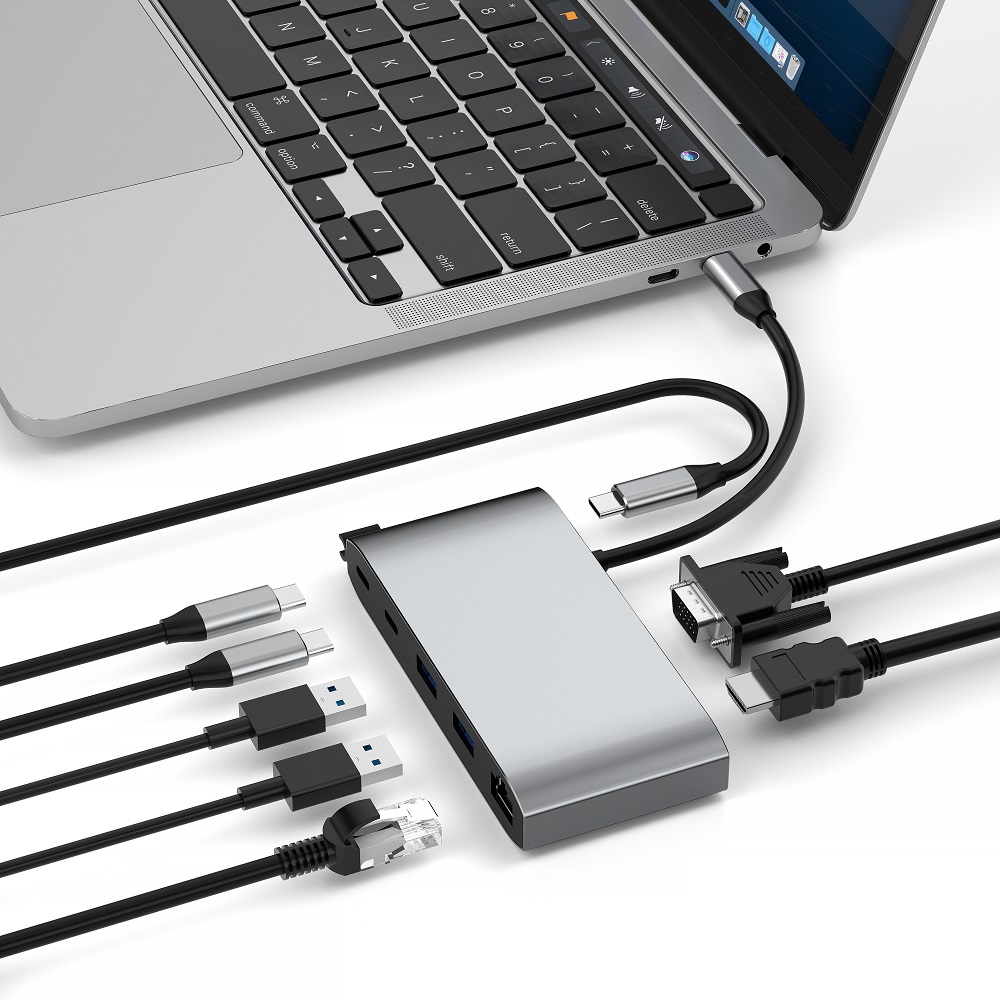
For a long time, MacBook has been highly favored by professionals and creative individuals for its stylish design and powerful performance. However, its all - in - one design characteristics sometimes limit connection options and ergonomic flexibility. The emergence of laptop stands with integrated hubs is a game - changing accessory that effectively addresses these challenges. Next, through this comprehensive guide, we will deeply explore how these innovative stands transform the MacBook usage scenario and enhance its functionality and comfort.
The design concept of MacBook has always prioritized simplicity and elegance, which has created its extremely visually appealing appearance. However, this design sometimes falls short in terms of connectivity and ergonomics. In the traditional MacBook usage scenario, users often face troubles due to limited ports and an unsatisfactory screen viewing angle. At this time, a laptop stand with an integrated hub comes in handy. It cleverly bridges the gap between the appearance design and practical functions of MacBook.
Connectivity Challenges
In recent years, MacBook has simplified its port selection. Although this makes the appearance more concise, it poses challenges for users who rely on multiple peripheral devices or older devices. Its built - in ports often cannot meet the needs of advanced users, resulting in an endless stream of adapters and making the workspace messy.
The laptop stand with a hub effectively solves this connectivity problem by expanding the connection options of MacBook. These stands usually come with a rich variety of ports, as follows:
Multiple USB - A ports: Suitable for traditional devices, convenient for connecting older peripherals such as some early printers and USB flash drives.
USB - C ports: Support modern peripheral devices and have fast data transfer capabilities. They can transfer large files at high speed and meet the needs of devices such as external high - speed mobile hard drives and docking stations.
HDMI output interface: Used to connect external monitors, facilitating users to perform dual - screen or multi - screen display and improving work efficiency. For example, in design work and video editing, users can view materials and the editing interface simultaneously.
SD card reader: Very practical for photographers and videographers. It can directly read the SD cards of cameras and quickly transfer photo and video materials.
Ethernet port: Provides a stable wired Internet connection. Compared with wireless networks, it can effectively avoid network fluctuations during large - data - volume transmission or in work scenarios with high requirements for network stability, ensuring smooth work.
By integrating these ports into a well - designed stand, users can not only greatly simplify the device connection setup but also enhance the functionality of the device. The complexity of cables is reduced, and the work process becomes smoother, allowing for quick connection and disconnection of various devices.
Ergonomics: A Often - Overlooked Key Factor
Although the display of MacBook is undoubtedly excellent, its fixed position may cause ergonomic problems after long - term use. Many users unconsciously bend over or twist their necks to look at the screen. Over time, this can easily cause discomfort and even long - term health hazards.
The laptop stand with a hub provides a solution to this problem by raising the MacBook to a more ergonomic height. This seemingly simple adjustment has many benefits:
Relieve neck and eye fatigue: A suitable screen height allows users to maintain a natural line of sight, reducing neck stretching and eye fatigue, and reducing the risk of neck pain and vision loss caused by long - term poor posture.
Improve body posture: Keep the body in a more natural and healthy sitting position, helping to correct bad postures and reducing spine problems caused by hunchback. In the long run, it is crucial for the healthy development of the body and maintaining a good posture.
Enhance the comfort of long - term work: A comfortable user experience enables users to maintain better concentration and work status during long - term work, reducing irritability caused by physical discomfort and improving work efficiency.
Potentially reduce headaches and upper back pain: A good posture and a comfortable viewing angle can relieve the pressure on the head and upper back, reducing the frequency of headaches and upper back pain caused by muscle tension.
Many such stands also have an adjustable height function, allowing users to flexibly adjust the settings according to their own needs. This personalized customization ensures that users of different heights can obtain the best screen viewing angle, further optimizing the posture and reducing the risk of repetitive strain injuries.
Aesthetic Advantages
In addition to practical functions, laptop stands with hubs can also significantly enhance the visual appeal of the workspace. These stands are usually designed to complement the stylish style of MacBook and have the following characteristics:
Aluminum structure: Echoes the appearance material of MacBook, with a unified texture and a coordinated overall style, showing a high - end and exquisite temperament.
Minimalist design: Highly compatible with Apple's design concept, with simple and smooth lines and no excessive decoration, creating a simple and comfortable visual experience for users.
Cable management function: Can effectively organize various connection cables, avoid cable tangling, keep the desktop clean and tidy, and make the workspace look more refreshing and professional.
By raising the MacBook and creating a centralized connection center, these stands help create a more organized and aesthetically pleasing working environment. This has a positive impact on work efficiency and overall job satisfaction, because a clean and orderly environment often helps to improve users' attention and creativity.
Selecting the Right Laptop Stand with Hub for Your MacBook
When choosing an ideal laptop stand with a hub for your MacBook, several factors need to be carefully considered. There are many products on the market, and it is crucial to clarify your specific needs and work processes and select a product with corresponding functions.
Compatibility: Ensure a Perfect Fit
The first and most crucial factor is compatibility with the specific MacBook model. Not all stands are compatible with all MacBooks. Using an incompatible stand may damage the device or cause it to be unstable.
When evaluating compatibility, the following aspects need to be considered:
Screen size: Ensure that the stand can bear the weight and size of the MacBook display. Most stand products will indicate the applicable MacBook screen size range, and users need to choose according to the screen size of their own devices.
Port configuration: Check whether the ports of the stand hub match the existing connections of the MacBook. For newer MacBook models with only USB - C ports, ensure that the stand provides USB - C connections to ensure stable data transfer and power supply between devices.
Power supply situation: Some stands provide power supply functions through USB - C connections. If this function is very important to you, confirm whether its power is suitable for your MacBook model to avoid insufficient power supply or overload.
Be sure to refer to the specification parameters provided by the product manufacturer and compare them with the detailed information of your MacBook to ensure a proper fit.
Port Selection: Expand Connection Possibilities
The hub component of the stand is a major selling point, so it is particularly important to evaluate whether its ports meet your own needs. When choosing, consider the current peripheral devices you use and the devices you may add in the future.
Pay attention to the following key ports:
USB - A ports: Indispensable for connecting traditional devices and many common peripheral devices at present, such as common mice, keyboards, and USB flash drives.
USB - C ports: Suitable for modern devices and have high - speed data transfer capabilities. They can meet the fast data interaction needs of devices such as external high - speed storage devices and high - performance docking stations.
HDMI port: If you have the need to connect an external monitor, this port is essential, facilitating multi - screen display and expanding the work area.
SD card reader: For photographers and videographers, this is a very practical port. It can quickly read the materials in the camera memory card and improve work efficiency.
Ethernet port: Can provide a stable wired Internet connection and play an important role in work scenarios with high requirements for network stability, such as online video conferencing and large - data - volume file downloads.
According to your own usage frequency and quantity requirements for various ports, give priority to choosing a stand that can meet this configuration. For example, some users need multiple USB - A ports to connect a variety of peripheral devices, while some users value multiple USB - C ports more to meet future device upgrade needs.
Ergonomics and Adjustability: Customize Your Own Settings
Laptop stands with hubs have obvious advantages in ergonomics, but the degree of adjustability varies among different models. Users need to consider the degree of personalization required according to their own usage scenarios.
Pay attention to the following ergonomic features:
Height adjustment: Allows users to adjust the MacBook display to the best line - of - sight level. Whether working while standing or sitting, a comfortable viewing height can be found.
Tilt function: By adjusting the angle of the display, the best viewing effect can be obtained, and at the same time, screen glare can be reduced, improving visual comfort. This function is more significant especially in complex lighting environments.
Rotation function: If users need to share screen content with others frequently, this function is very practical. The screen can be easily rotated to the appropriate direction to improve collaboration efficiency.
Some stands provide a variety of adjustment ranges to meet the diverse needs of different users, while some stands may only have a fixed position. When evaluating these functions, it is necessary to consider your own work environment and personal usage habits.
Make the Most of Laptop Stands and Hubs to Fully Tap the Potential of MacBook
After selecting and installing a laptop stand with a hub, you can fully utilize its functions to enhance the MacBook user experience. These accessories open up new possibilities for improving work efficiency, inspiring creativity, and enhancing comfort.
Laptop stands with hubs represent an important innovation in the field of MacBook accessories. It solves the main limitations of the all - in - one design of MacBook and at the same time strengthens its advantages. By expanding connectivity, optimizing ergonomic design, and continuing the stylish style loved by MacBook users, these stands provide a comprehensive solution for optimizing the workspace.
Whether you are a creative professional looking to simplify your work process, an advanced user who needs to expand device connections, or an ordinary user who just wants to improve the daily computer use experience, a laptop stand with a hub can change the way you use your MacBook. When selecting a product, combine your specific needs, workspace limitations, and future device expansion plans to select the perfect stand for your work scenario.
Ultimately, investing in a high - quality MacBook laptop stand with a hub is an investment in work efficiency, comfort, and the overall computer use experience. By enhancing the MacBook user experience (both physically in terms of height and functionally in terms of optimization), a foundation is laid for a more efficient, comfortable, and enjoyable work experience.