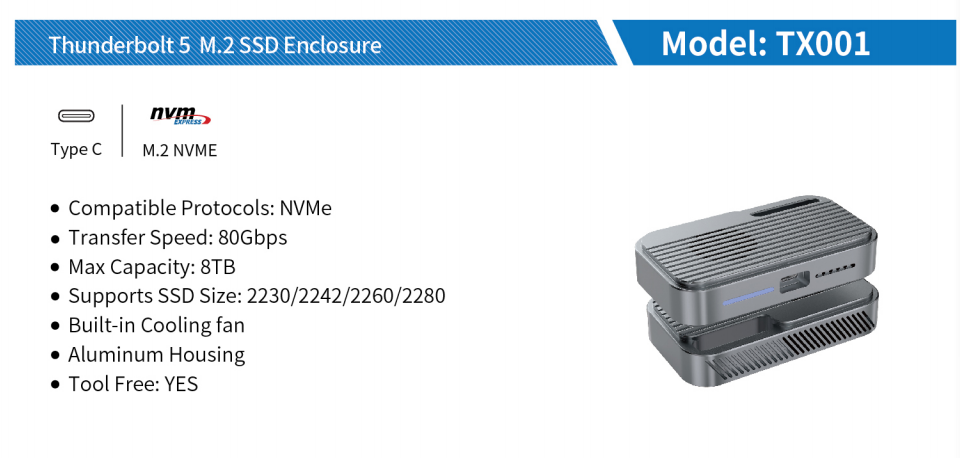
An M.2 SSD enclosure is a compact and handy device designed to house an M.2 solid-state drive (SSD), transforming these high-speed storage solutions into portable external storage options. If you have an M.2 SSD or are considering an upgrade, an M.2 SSD enclosure is the perfect companion to maximize your storage potential.
This setup allows you to enjoy the ultra-fast speeds of M.2 SSDs without the need for internal installation. Key applications include:
Cloning SSDs from PCs for quick system reinstallation.
Using them as backup SSDs, similar to large-capacity memory cards.
Recovering important information from critical personal computers.
Speeding up Mac Time Machine backups.
Using Windows on the go.
For tech enthusiasts looking to expand their storage capabilities or fully leverage the potential of M.2 SSDs, investing in an M.2 SSD enclosure is essential.
How to Choose the Right M.2 SSD Enclosure Based on Your Needs
When selecting an SSD enclosure, several factors must be considered, including the type of SSD, its form factor, and its size.
SSD Type
The connection type of the SSD enclosure depends on the device you plan to use it with and the SSD itself. Consider the following interface and physical connection compatibility when choosing an enclosure:
SATA: Serial ATA (SATA) is a common interface for connecting storage devices like SSDs and HDDs. If your SSD uses a SATA interface, you will need an enclosure that supports SATA connections. SATA enclosures typically connect to your device via USB ports, such as USB 3.0 or USB 3.1 Gen 2.
NVMe PCIe: NVMe (Non-Volatile Memory Express) is a high-speed interface designed specifically for SSDs that utilize the PCIe (Peripheral Component Interconnect Express) bus. If your SSD uses NVMe PCIe, you will require an enclosure that supports NVMe PCIe connections.
SATA SSDs are more affordable and offer decent performance, making them ideal for everyday tasks and general use. On the other hand, NVMe SSDs are pricier but offer significantly faster read and write speeds, making them perfect for professionals, gamers, and other users who demand high-performance storage. Some M.2 SSD enclosures are compatible with both SATA and NVMe PCIe SSDs, but be sure to double-check for compatibility.
Form Factor
The form factor determines the size of the enclosure and must be carefully considered. Common form factors include:
M.2: This is the most prevalent form factor, often used in laptops and other portable devices due to its compact size. M.2 SSDs come in various lengths to support different storage capacities and can connect via SATA or PCIe interfaces, with NVMe SSDs utilizing PCIe for faster performance.
2.5-inch: Similar in size to traditional hard drives (HDDs), this form factor is compatible with most laptops and desktops. It connects via SATA cables and is a common choice for SATA SSDs.
mSATA: Smaller than full-sized SATA SSDs, mSATA SSDs are designed for compact systems with limited space. They feature a compact form factor but are not interchangeable with M.2 SSDs. mSATA SSDs only support SATA interfaces.
PCIe Add-In Card (AIC): These SSDs resemble PCIe expansion cards and are suitable for high-performance systems. They connect via PCIe slots and support both AHCI and NVMe protocols, offering faster speeds than SATA SSDs.
U.2: U.2 SSDs are similar in size to 2.5-inch SSDs but are slightly thicker. They employ a different connection method and transfer data via PCIe interfaces. U.2 SSDs are typically used in high-end workstations, servers, and enterprise applications requiring larger storage capacities.
M.2 SSD Size
M.2 SSDs come in various sizes, primarily determined by their length and width. The size of an M.2 SSD is represented by a four- or five-digit number, where the first two digits indicate the width and the last two or three digits indicate the length in millimeters. Common M.2 SSD sizes include:
2230: Measuring 22mm x 30mm, these SSDs are small and have lower storage capacities, making them suitable for tablets or ultra-compact laptops.
2242: With dimensions of 22mm x 42mm, 2242 M.2 SSDs offer slightly larger storage capacities than 2230 SSDs and are commonly used in ultrabooks, tablets, and some laptops.
2260: These M.2 SSDs measure 22mm x 60mm and provide greater storage capacities than their smaller counterparts. They are often used in laptops and some desktops.
2280: The most popular size, 2280 M.2 SSDs measure 22mm x 80mm and offer a balance between storage capacity and physical size. They are widely used in laptops, desktops, and other devices requiring high-speed storage.
22110: Measuring 22mm x 110mm, these SSDs are the largest among common M.2 sizes and offer the highest storage capacities. They are typically used in high-performance desktops, workstations, and servers.
Setting Up Your M.2 SSD Enclosure in a Few Simple Steps
Installing an SSD in an enclosure is straightforward:
Open the enclosure (some brands offer tool-free designs for added convenience, while others may require loosening a few screws).
Align the pins and secure the drive to ensure it stays in place (make sure it is fully inserted).
Since external SSDs generate a significant amount of heat, it is advisable to use a thermal pad (usually included with the enclosure at no extra cost) to help maintain controllable temperatures during operation.
Tips for Maximizing the Use of Your M.2 SSD Enclosure
Invest in a versatile enclosure: Determine the number of M.2 SSDs you own (you may have more than one) and note their sizes. Choose an enclosure that can accommodate all SSD sizes to avoid purchasing multiple enclosures.
Use the fastest connection cable for your SSD enclosure: Some enclosures come with two interfaces: a USB-A cable and a USB-C cable. In some cases, the USB-C cable may offer faster transfer rates, but in most scenarios, the difference may not be significant.
Leverage high-quality connection cables: The cables included with the enclosure should be designed for efficient data transfer. These cables can also be used for other data transfer scenarios, extending their utility beyond the enclosure itself.
In conclusion, M.2 SSD enclosures are indispensable tools for users looking to harness the power of M.2 SSDs and create portable external storage solutions. These enclosures cater to a wide range of needs, including data recovery, system cloning, and faster backups. When selecting an M.2 SSD enclosure, it is crucial to consider factors such as SSD type, form factor, and size to ensure compatibility and optimal performance.