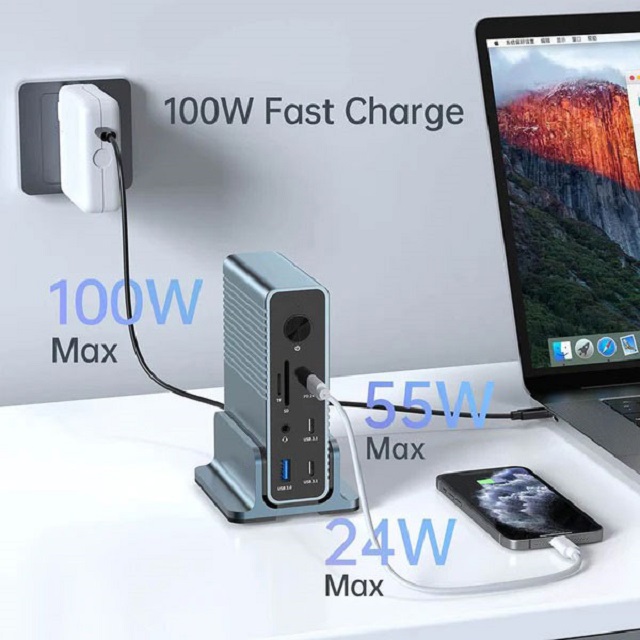
A docking station is a convenient and practical tool that enables laptops with limited ports to expand their functionality. With it, you can simultaneously connect a mouse, keyboard, 4K HDMI, DisplayPort, flash drive, and SD card, instantly transforming your laptop into a desktop computer. It not only supports multitasking but also charges the connected devices.
A docking station can turn a laptop into a fully - equipped workspace in just one simple step, effectively addressing the issue of reduced port availability, which is a common side - effect of the pursuit of lighter and more streamlined laptops. Nowadays, manufacturers often abandon important ports such as HDMI and USB 3.0, making it impossible to directly connect peripheral devices like mice, keyboards, or old monitors to laptops. This is where a docking station (also known as a hub) comes in handy, facilitating communication between accessories.
However, there is a common misunderstanding about docking stations. Many articles incorrectly regard docking stations and hubs as completely separate entities, causing potential buyers to be confused. They search for both "docking station" and "USB - C hub" online, and the search results show a variety of multi - port devices, some labeled as docking stations and some as USB hubs. In fact, the terms "Dock" and "Hub" have similar meanings, just with different linguistic expressions.
But they do have unique structural differences. A typical docking station is designed to fix a device (such as a port replicator), while a hub serves as a central port that can connect a display, laptop, and mobile phone simultaneously. Docking stations are larger in size and more feature - rich, with more than 10 ports for extensive connectivity. They also offer additional functions, such as support for multiple displays and higher power supply capabilities (usually equipped with a power source). On the other hand, USB - C hubs are miniature and portable devices with a reasonable selection of ports. They are usually bus - powered, drawing power from the connected devices.
How Does a Docking Station Work?
Imagine a small space shuttle approaching a huge space station. It aligns and adjusts its position and then gently docks with the space station. If the hatches of both the space shuttle and the space station are accurately aligned, the docking process is a success.
Through docking, the space shuttle can expand its operational range. Astronauts can enter and exit simultaneously to exchange food, water, and equipment. Similarly, in the field of computer technology, a docking station can expand the functionality of a device, allowing you to enjoy the advantages of numerous peripheral devices at the same time. It can turn your laptop into a large - scale workstation, and as you delve deeper, you'll discover even more functions.
You might think that a hub does the same thing, and indeed it does.
The Purpose and Functions of a Docking Station
Purpose
Nowadays, almost all brands focus on designing lightweight and portable laptops. However, modern laptops require more flexible ports. For example, if your laptop has only two ports, after plugging in the charger, you're left with just one port. This makes it inconvenient to use an SD card or micro - SD card. You can't watch 4K movies or mirror your laptop screen to an external display. Without a docking station, your user experience would be greatly compromised. A docking station can meet your needs by integrating all peripheral devices into one device.
Features
USB Ports (Wider Access): Almost every docking station has at least one USB port for data transfer and connecting external mice or keyboards, providing wider access.
Display (Multiple Screens): One of the important functions of a docking station is to expand your display. It can turn your laptop screen into a desktop - like setup. You can mirror, extend, or duplicate the source screen to an external display, making it convenient for watching movies and playing games. In just a few seconds, you can connect peripheral devices, HDMI, or DisplayPort to the docking station and then to a TV or monitor.
Charging: Most docking stations are equipped with up to 100W of power delivery (PD) to charge your laptop, which usually requires 65 - 85W of power. However, before making a purchase, you need to consider whether the docking station provides fixed or dynamic power. The good news is that the USB - C power delivery capacity is expected to reach 240W (PD) within the next two years.
In conclusion, a docking station is crucial for laptop users as it provides more connectivity options and breaks through port limitations. It transforms a laptop into an efficient workstation by offering various peripheral port options, enabling you to multitask while charging your electronic devices. Although there may be some issues such as jerky mouse movement or screen flickering from time to time, they can usually be easily fixed.