Nowadays, even high-end laptops often encounter the issue of insufficient ports. In such cases, multi-functional USB-C hubs come to the rescue. These hubs are powerful, equipped with all the essential USB-A ports, SD card slots, and even HDMI or DisplayPort outputs.
They are perfect for connecting additional monitors, keyboards, mice, and any other gadgets you have around. And that's not all! With a little experimentation, you can transform streaming sticks, gaming consoles, and even smartphones into fully functional computers. The possibilities are truly endless! Let's dive right into this guide, where we'll show you countless ways to use a USB-C hub and make the most of this handy little gadget!
Ways to Use a USB-C Hub for Daily Needs
By now, you've probably realized that docking stations come with a plethora of ports, which can be overwhelming at first glance. But that's actually great news! More ports mean more possibilities, making your life easier.
Our all-in-one USB-C hub multi-functional docking station solution is equipped with 15 ports. It can meet almost all your needs and provide the versatility your laptop requires at a reasonable price.
Now, let's talk about just how convenient a typical multi-port adapter can be. Here are some daily use cases:
1. Creating a Multi-Monitor Setup with a USB-C Hub
First, all you need is a compatible HDMI cable or DisplayPort connection.
Simply connect the hub to your device's USB-C port.
Then, link it separately to each monitor.
This enables extended display or the use of higher-resolution screens.
Our USB-C 15-in-1 hub is ideal for creating such multi-stream setups, supporting up to three external monitors. It is compatible with both Windows and Mac OS.
In short, it's a treat for those who need a large workspace or enjoy immersing themselves in realistic gaming worlds.
2. Expanding USB Connectivity and Data Transfer with a Hub
You can use a USB-C hub to expand USB connectivity and speed up data transfer. It comes with multiple USB-A and USB-C ports, so you can connect all your commonly used devices, such as keyboards, mice, USB drives, and printers.
Moreover, high-speed USB ports (like those in Uni's 15-in-1 docking station) make transferring large files a breeze - perfect for large-capacity videos and photos on external drives!
3. Powering Devices with a USB-C Hub
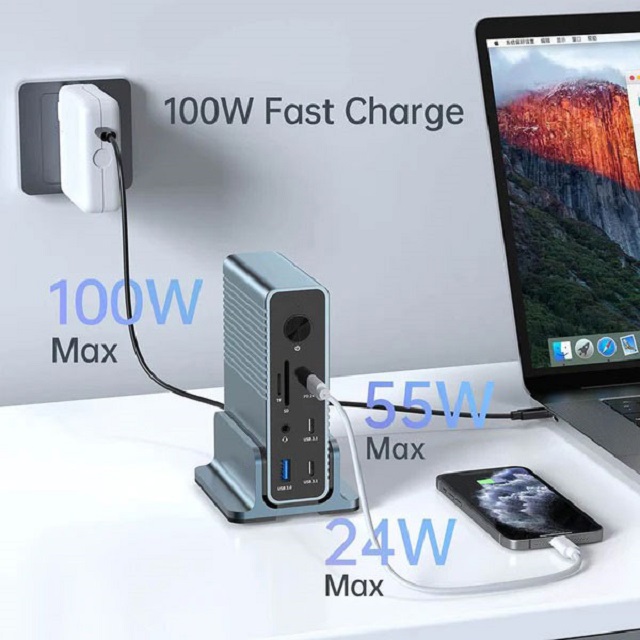
Traditional USB-C hubs can drain the battery of your laptop or device. However, modern hubs, like the USB-C 15-in-1 hub docking station, are equipped with USB-C Power Delivery (PD) ports.
These ports allow you to charge your laptop, smartphone, tablet, or other USB-C devices through the hub while still using other ports for various functions. With 100 watts of power, it can fully charge your laptop, ensuring uninterrupted productivity.
4. Achieving a Smooth Internet Connection with a USB-C Hub
Having a USB-C hub with an Ethernet port means bidding farewell to connection issues. It offers lightning-fast data transfer speeds, HDMI or DisplayPort video output, and power delivery capabilities, making it an all-around uninterrupted connectivity solution.
If you choose PUrplelec's USB-C 15-in-1 docking station, congratulations! You'll enjoy all these features, including a 1 Gigabit Ethernet port and 1000 Mbps LAN, which are perfect for network enthusiasts.
5. Audio and Video Options
You can use the 3.5mm audio jack to connect headphones, speakers, or microphones for better audio quality during video conferences or while enjoying your favorite music.
Additionally, it comes with audio/video output capabilities, allowing you to easily transmit audio and video to larger screens or sound systems for a more immersive experience. Our recommended USB-C all-in-one docking station perfectly meets all your needs!
6. SD and MicroSD Card Readers
You can think of a USB-C hub as a Swiss Army knife for photographers and videographers. With built-in SD and MicroSD card readers, you can easily transfer photos and videos from your camera's memory cards to your computer without the need for a separate card reader.
Managing media files has never been so simple and quick!
7. Docking Station Functions
Think of these hubs as your versatile tech tools, with uses that may exceed your imagination. A USB-C hub can turn your laptop into a desktop-like device, connecting multiple peripherals and monitors to create a more ergonomic and efficient workspace.
Our docking station excels in this regard. It simplifies cable management and enables multitasking with multi-monitor support, maximizing efficiency.
Simply plug your laptop's USB-C charger into the hub's power port, connect your mouse and keyboard to the USB 2.0 slots, and link an external monitor via HDMI. Then, connect the hub to your laptop, and voila! It achieves a seamless transition between portability and a full-fledged workstation.
8. Enhancing Portability with a USB-C Hub
USB-C hubs are renowned for their portability. They feature a stylish design and are easy to carry. Instead of lugging around multiple adapters, a single hub allows you to effortlessly connect your laptop to various devices and networks.
This article has introduced some simple steps to help you make the most of your USB-C hub. By following these tips, you can easily improve your laptop's connectivity, create a fully functional workstation, and boost your productivity.
Our USB-C 15-in-1 hub | docking station is truly remarkable. It combines all the features you need into one powerful device. It is super durable, made of braided nylon, and offers the convenience of a detachable cable.
With 15 ports, it meets all your requirements, from lightning-fast internet speeds of up to 1000 Mbps to powerful 100-watt power delivery that keeps your devices charged without draining their batteries. Moreover, it supports triple monitors and enables instant data transfer.