iPad Pro has powerful expansion capabilities, and you can connect an external display to it to enjoy a broader visual experience. During the connection process, you can choose to use the official adapter launched by Apple or select a third-party adapter according to your personal needs. However, when your demand for functions is not limited to basic connections, such as the desire for richer connection options, faster charging speed, and more ports for connecting various peripherals, pairing iPad with a docking station will undoubtedly become your best choice.
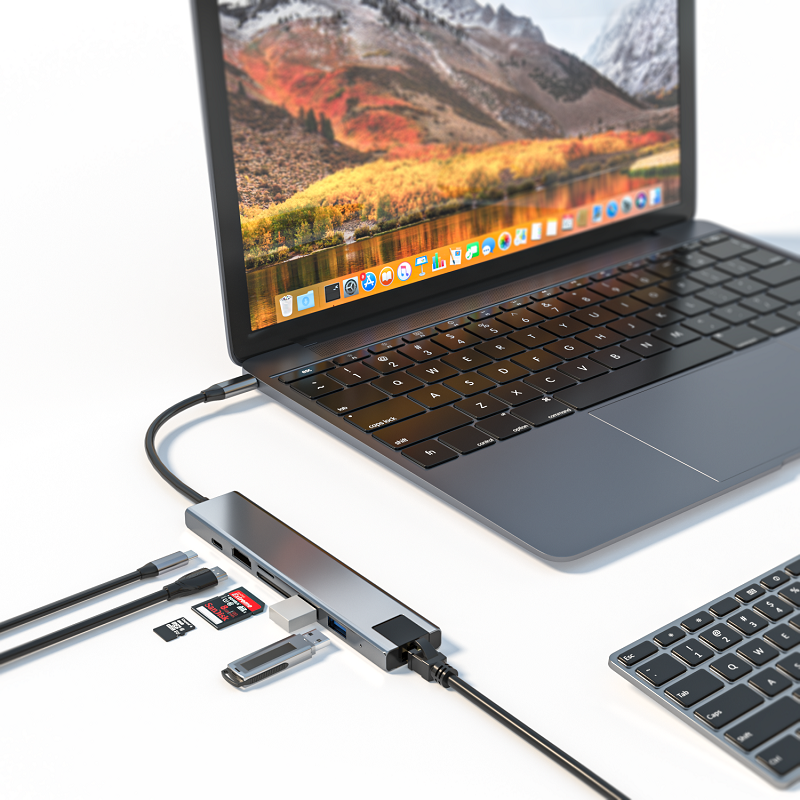
So, what is a USB-C docking station? Simply put, a USB-C docking station is a device that connects to a computer or laptop with the help of a USB-C port. It is like a multi-functional "interface converter" that provides a series of additional ports for you to connect various external devices. Usually, a USB-C docking station is equipped with an HDMI port for connecting to a high-definition display; an Ethernet port to ensure a stable network connection; and multiple other USB ports to meet your needs for connecting a variety of devices such as keyboards, mice, and mobile hard drives.
If you often need to connect external devices in daily use, a USB-C docking station will be your right-hand man. It can greatly simplify your operation process and save you the tedious steps of constantly plugging and unplugging cables. Just connect the dock to your device once, and then you can easily switch between various devices without having to worry about finding the right interface or frequently plugging and unplugging cables.
When choosing a high-quality USB-C docking station for your iPad Pro or MacBook, there are several key features that you need to pay special attention to. Here are some important factors you need to consider during the purchase process:
First, device charging capability is one of the important indicators to measure the quality of a USB-C docking station. A high-quality docking station should have the function of charging your devices, preferably charging iPad Pro and MacBook at the same time. In this way, you can connect external devices while ensuring that your devices always have sufficient power, without worrying about affecting the use due to insufficient power.
Secondly, HDMI output is also an indispensable function. If you plan to use the USB-C docking station with an external monitor, then make sure it has HDMI output function. In this way, you can easily connect the docking station to the monitor and use it as an extended desktop to enjoy a more spacious workspace or a more shocking viewing experience.
In addition, USB 3.0 ports are also one of the important features you need to pay attention to. As the latest generation of USB ports, USB 3.0 is much faster than the older versions. Choosing a docking station with USB 3.0 ports can help you give full play to their performance advantages when using devices with the docking station, and achieve more efficient data transfer and file sharing.
In addition, many docking stations are also thoughtfully equipped with audio output ports. This feature will be very practical if you want to connect speakers or headphones directly to the docking station to enjoy music or movies on your laptop or tablet. It allows you to get rid of the trouble of tangled cables and enjoy a more free and convenient audio experience.
Finally, an SD card reader is also a good feature of the USB-C docking station. It allows you to easily transfer files from the camera memory card directly to the computer or iPad without the need for cumbersome operations with other devices or software. This is undoubtedly a great convenience for users who often need to process photos or videos.









