
In the fast-paced world of enterprise IT deployment and B2B consumer electronics sourcing, selecting the right docking station architecture is no longer just about port count. The rapid evolution of high-speed interfaces has transformed docking stations from simple port replicators into complex, high-bandwidth communication hubs.
As data throughput demands escalate and multi-monitor setups become the standard in modern workspaces, understanding the fundamental differences between Thunderbolt 3, Thunderbolt 4, and the newly introduced Thunderbolt 5 is critical. This definitive guide breaks down the underlying architectures, PCIe bandwidth allocations, display capabilities, and security protocols to help ODMs, IT managers, and hardware buyers make future-proof procurement decisions.
I. The Evolution of Thunderbolt Technology in B2B Connectivity
Thunderbolt technology, co-developed by Intel and Apple, has consistently pushed the boundaries of what a single USB-C connector can achieve. By multiplexing PCIe (Peripheral Component Interconnect Express) data and DisplayPort (DP) video signals alongside Power Delivery (PD), Thunderbolt allows a single cable to handle massive workloads.
From Thunderbolt 3 to Thunderbolt 5: A Paradigm Shift
The transition across these generations is not merely a bump in speed. While early iterations focused on establishing a baseline of high-speed connectivity, the latest generations focus on standardization, mandatory minimums, and asymmetric bandwidth allocation. For B2B buyers, this means shifting focus from "maximum theoretical speed" to "guaranteed minimum performance."
II. Thunderbolt 3 Docking Stations: The 40Gbps Foundation
Introduced in 2015, Thunderbolt 3 (TB3) revolutionized the industry by bringing a staggering 40Gbps of bi-directional bandwidth to the universal USB-C form factor. It laid the groundwork for modern docking stations, eGPUs (external GPUs), and high-speed NVMe storage arrays.
Setting the Record Straight: Thunderbolt 3 and Dual 4K Display Support
A prevalent technical misconception in the consumer electronics market is the belief that Thunderbolt 3 can only support a single 4K monitor. This is factually incorrect. A properly engineered Thunderbolt 3 docking station fully supports dual 4K displays at 60Hz. The confusion stems from the host PC side: if a laptop manufacturer only routes a single DisplayPort (DP) stream to the Thunderbolt 3 controller, it will only output to one external monitor. However, the Thunderbolt 3 protocol itself, when supplied with dual DP streams from the host GPU, perfectly handles dual 4K @ 60Hz setups.
PCIe Bandwidth Limitations and Flexibility Issues
The primary drawback of Thunderbolt 3 in enterprise environments is its flexible certification standards. Intel allowed PC manufacturers to implement TB3 with either two PCIe lanes (16Gbps) or four PCIe lanes (32Gbps). This inconsistency meant that a B2B buyer could purchase a premium TB3 docking station, only to find that data transfer speeds to an external SSD were severely bottlenecked by the host laptop's two-lane implementation.
III. Thunderbolt 4 Docking Stations: Standardization and Reliability
Announced in 2020 alongside Intel's 11th Gen processors, Thunderbolt 4 (TB4) did not increase the maximum 40Gbps bandwidth. Instead, it solved the consistency nightmare of TB3 by raising the floor and enforcing strict mandatory requirements.
Doubling the Minimum PCIe Data Requirements (32Gbps)
Thunderbolt 4 eliminates the "half-speed" implementations of its predecessor. It strictly mandates a minimum PCIe data requirement of 32Gbps (up from TB3's 16Gbps). For creative professionals and enterprise users relying on external NVMe SSDs via their docking stations, TB4 guarantees peak read/write speeds of up to 3,000 MB/s, regardless of the laptop brand.
Hubbing Architecture and Multi-Port Expansion
One of the most significant architectural upgrades in TB4 is its support for Hubbing Architecture. While TB3 only supported linear daisy-chaining, Thunderbolt 4 controllers (like the Intel Goshen Ridge) allow a docking station to feature up to four downstream Thunderbolt ports. This tree topology means users can connect multiple high-speed Thunderbolt devices to a single hub independently; unplugging one device no longer breaks the connection for the others.
Mandatory Security: DMA Protection (Intel VT-d)
For corporate IT procurement, security is paramount. Direct Memory Access (DMA) attacks involve malicious peripherals bypassing the OS to read system memory directly. Thunderbolt 4 mandates Intel VT-d based DMA protection, ensuring that external devices connected to the dock cannot access secure system memory without authorization. This feature alone makes TB4 a mandatory requirement for government and financial sector deployments.
IV. Thunderbolt 5 Docking Stations: The 120Gbps Revolution
Thunderbolt 5 represents the next massive leap in peripheral connectivity. Based on the USB4 Version 2.0 specification and utilizing PAM3 (Pulse Amplitude Modulation 3-Level) signaling technology, TB5 is designed to meet the extreme demands of content creators, AI developers, and high-frequency traders.
Asymmetric Bandwidth Boost for Video Workloads
By default, Thunderbolt 5 provides 80Gbps of bi-directional bandwidth (double that of TB3 and TB4). However, its standout feature is Bandwidth Boost. When a docking station detects a video-intensive workload—such as connecting multiple 8K displays or high-refresh-rate 4K monitors (e.g., 144Hz/240Hz)—the TB5 controller dynamically reallocates its data lanes. It can provide an unprecedented 120Gbps of downstream video bandwidth, while maintaining 40Gbps for incoming data.
PCIe Gen 4 Integration (64Gbps Data Speed)
Thunderbolt 5 integrates PCIe Gen 4 technology, doubling the mandatory data transmission speed to 64Gbps. This enables docking stations to support external graphics cards (eGPUs) and AI accelerators with virtually no latency or bottleneck, effectively turning thin-and-light laptops into desktop-class workstations.
Thunderbolt Share and Advanced Networking
With Thunderbolt 5, PC-to-PC networking via a docking station becomes incredibly fast, supporting seamless screen sharing, keyboard/mouse control, and high-speed file transfers between multiple computers connected to the same TB5 network topology.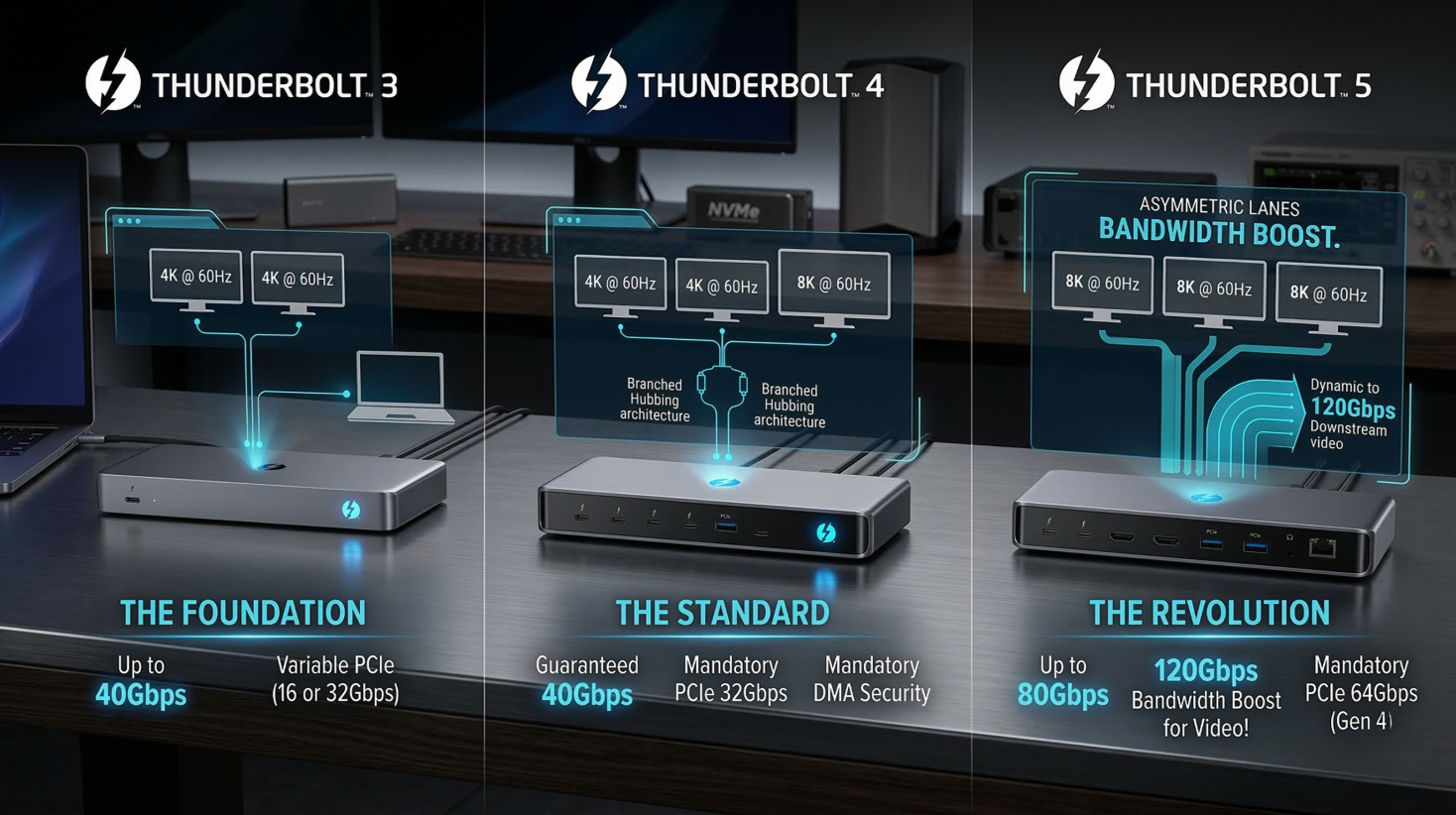
V. Master Technical Comparison Matrix
To simplify the procurement process, below is a hard-specs comparison of the different Thunderbolt generations alongside the base USB4 standard.
| Feature / Protocol | Thunderbolt 3 | Thunderbolt 4 | Thunderbolt 5 | USB4 (Base Spec) |
| Max Bandwidth | 40 Gbps | 40 Gbps | 80 Gbps (120 Gbps Boost) | 20 or 40 Gbps |
| PCIe Minimum Speed | 16 Gbps | 32 Gbps | 64 Gbps (PCIe Gen 4) | Not strictly mandated |
| Display Support | Single 4K (Dual 4K optional) | Dual 4K or Single 8K (Mandatory) | Multiple 8K / DP 2.1 | Single display (varies) |
| Power Delivery (Host) | Up to 100W | Up to 100W (Mandatory) | Up to 240W | Up to 240W |
| Security (DMA) | Optional | Mandatory | Mandatory | Optional |
| Hubbing Architecture | Daisy-chain only | Hubbing + Daisy-chain | Hubbing + Daisy-chain | Hubbing + Daisy-chain |
VI. Display and Topology Architectures in the Real World
Daisy-Chaining vs. Hubbing Topologies
Daisy-Chaining (TB3): Device A connects to Device B, which connects to Device C. If Device B is turned off or disconnected, Device C loses its connection.
Hubbing (TB4/TB5): A single Thunderbolt docking station acts as the central node. You can connect three separate Thunderbolt hard drives or monitors to the dock. Removing one does not affect the others. This is vastly superior for enterprise desk setups.
Power Delivery (PD) Across Generations
Modern workstations require significant power. While TB3 and TB4 topped out at 100W of power delivery to the host laptop, the integration of USB PD 3.1 Extended Power Range (EPR) allows Thunderbolt 5 docking stations to deliver up to 240W. This means even high-performance gaming laptops and mobile workstations can be fully powered and connected via a single cable.
VII. Strategic B2B Sourcing Advice for Docking Stations
For enterprise IT buyers, consumer electronics distributors, and brands looking for ODM partners, the hardware landscape is shifting rapidly. Here is how you should align your product roadmap and procurement strategy:
1. Phase Out Thunderbolt 3 in Enterprise Deployments
While Thunderbolt 3 ICs are highly cost-effective, their lack of guaranteed PCIe bandwidth, absence of hubbing support, and optional DMA security make them a liability for modern corporate environments. The risk of incompatibility and security vulnerabilities outweighs the cost savings.
2. Why Upgrading to Thunderbolt 4 (and USB4) is a Business Imperative
For the vast majority of current office deployments, Thunderbolt 4 and high-end USB4 docking stations are the absolute sweet spot. They guarantee dual 4K display output, ensure top-tier data speeds, and provide rock-solid security. Sourcing hybrid USB4/TB4 hubs guarantees maximum compatibility across both Intel and AMD fleets, reducing IT helpdesk tickets related to display issues.
3. Early Adoption of Thunderbolt 5 for Niche Markets
For B2B distributors catering to video production studios, architectural firms (CAD/CAM), or the premium gaming sector, securing Thunderbolt 5 ODM solutions now is a strategic advantage. As 8K monitors and PCIe Gen 4 external storage become mainstream, the 120Gbps bandwidth boost will transition from a luxury to an absolute necessity.
Partnering with Expert ODM Manufacturers
Navigating the complexities of high-speed signal integrity, thermal management, and protocol certification (Intel/Apple compatibility) requires deep engineering expertise. When sourcing next-generation Thunderbolt 4, USB4, or Thunderbolt 5 docking stations, partnering with an experienced ODM manufacturer ensures your products meet stringent compliance standards.
Whether you need customized multi-display hubs, reliable B2B bulk procurement, or cutting-edge Thunderbolt integration, choosing a manufacturing partner with a proven track record in high-speed connectivity is the key to dominating the consumer electronics market.








