








What ports are on each MacBook Pro?
MacBook Pro port configurations change between generations. Understanding the differences between these ports can help users better choose the appropriate expansion devices and external solutions.
Current MacBook Pro models have three USB-C-shaped Thunderbolt ports, one HDMI port, one SDXC card slot, one MagSafe 3 charging port, and a headphone jack. The 14-inch MacBook Pro with M5 uses Thunderbolt 4. The 14-inch and 16-inch models with M5 Pro or M5 Max use Thunderbolt 5. They do not have built-in USB-A or Ethernet.
USB-C describes the connector shape. Thunderbolt / USB 4, Thunderbolt 4, and Thunderbolt 5 describe capabilities such as data speed and display output. The label matters when choosing a dock, cable, or external display.
Apple's M4 Pro and M4 Max MacBook Pro models were the first MacBook Pro models equipped with three Thunderbolt 5 ports. M5 Pro and M5 Max models also have three Thunderbolt 5 ports. Thunderbolt 5 is backward compatible with Thunderbolt 4, Thunderbolt 3, and USB-C devices. It provides 80 Gb/s of bidirectional bandwidth; Bandwidth Boost can allocate up to 120 Gb/s in one direction for display-heavy traffic.
For MacBook Pro models with Thunderbolt 4, a 40 Gb/s Thunderbolt 4 dock is still a practical choice when the required displays, storage, and peripherals fit within that connection's capabilities.
Intel MacBook Pro models sold from 2016 through 2020 have two or four 40 Gb/s Thunderbolt 3 ports, depending on the size, year, and configuration. That older coverage remains relevant when identifying a used MacBook Pro or choosing a compatible dock.
MacBook Air has a different port and display configuration. See the separate MacBook Air ports guide for those models.
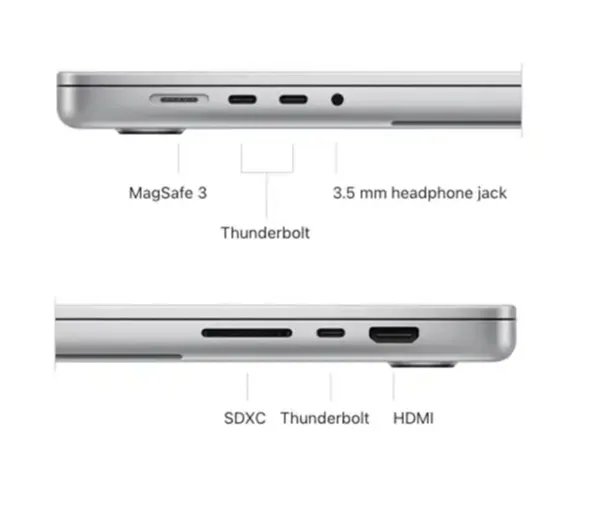
MacBook Pro built-in ports listed
| MacBook Pro model | Built-in ports |
|---|---|
| 13-inch M1/M2 MacBook Pro | Two Thunderbolt / USB 4 ports, plus a headphone jack. These models have no MagSafe 3, HDMI, or SDXC slot. |
| 14-inch M3 MacBook Pro | Two Thunderbolt/USB4 ports, one HDMI port, one SDXC card slot, plus headphone jack. |
| 14-inch M1/M2/M3 Pro, M1/M2/M3 Max and plain M4 MacBook Pro | Three Thunderbolt 4 (USB-C) ports, one HDMI port, one SDXC card slot, plus headphone jack. |
| 14-inch M4 Pro or M4 Max MacBook Pro | Three Thunderbolt 5 (USB-C) ports, one HDMI port, one SDXC card slot, plus headphone jack. |
| 16-inch M1/M2/M3 Pro or M1/M2/M3 Max MacBook Pro | Three Thunderbolt 4 (USB-C) ports, one HDMI port, one SDXC card slot, plus headphone jack. |
| 16-inch M4 Pro or M4 Max MacBook Pro | Three Thunderbolt 5 (USB-C) ports, one HDMI port, one SDXC card slot, plus headphone jack. |
| 14-inch M5 MacBook Pro | Three Thunderbolt 4 (USB-C) ports, one HDMI port, one SDXC card slot, plus a headphone jack. |
| 14-inch or 16-inch M5 Pro/M5 Max MacBook Pro | Three Thunderbolt 5 (USB-C) ports, one HDMI port, one SDXC card slot, plus a headphone jack. |
The 14-inch and 16-inch Apple silicon models listed above also have MagSafe 3. The 13-inch M1 and M2 MacBook Pro do not.
Specifications were checked against Apple's current MacBook Pro specifications on August 11, 2026.
Which MacBook Pro has four ports?
If "four ports" means four Thunderbolt 3 ports, look for an Intel MacBook Pro. Some 13-inch models from 2016 through 2020 have four Thunderbolt 3 ports, with two on each side. The 15-inch Intel models from 2016 through 2019 and the 2019 16-inch MacBook Pro also have four.
The 13-inch 2020 Intel model was sold in separate two-port and four-port configurations. The 13-inch M1 and M2 models have two Thunderbolt / USB 4 ports. Most 14-inch and 16-inch Apple silicon models have three Thunderbolt ports, plus separate HDMI, SDXC, MagSafe, and headphone connections.
How many external displays can each MacBook Pro support without a dock?
In the first three entries below, M1, M2, M3, and M4 refer to MacBook Pro models with the base chip, not the Pro or Max chip.
| MacBook Pro chip | Native external-display support |
|---|---|
| M1/M2 | One external display with up to 6K resolution at 60Hz. |
| M3 | Two external displays, one with up to 6K resolution at 60Hz and one at 5K/60Hz when the MacBook lid is closed. |
| M4 | Up to two native external displays. |
| M1/M2/M3/M4 Pro | Up to two native external displays. The supported resolution and refresh-rate combinations vary by generation. |
| M1/M2/M3/M4 Max | Up to four native external displays. The exact combinations vary by model and connection path. |
| M5 | Up to two native external displays. |
| M5 Pro | Up to three native external displays. |
| M5 Max | Up to four native external displays. |
These numbers are native maximums, not a promise that every display can run at its highest resolution and refresh rate at the same time. Check Apple's external-display support guide for the exact model and connection combination.
Mac docking stations and external displays
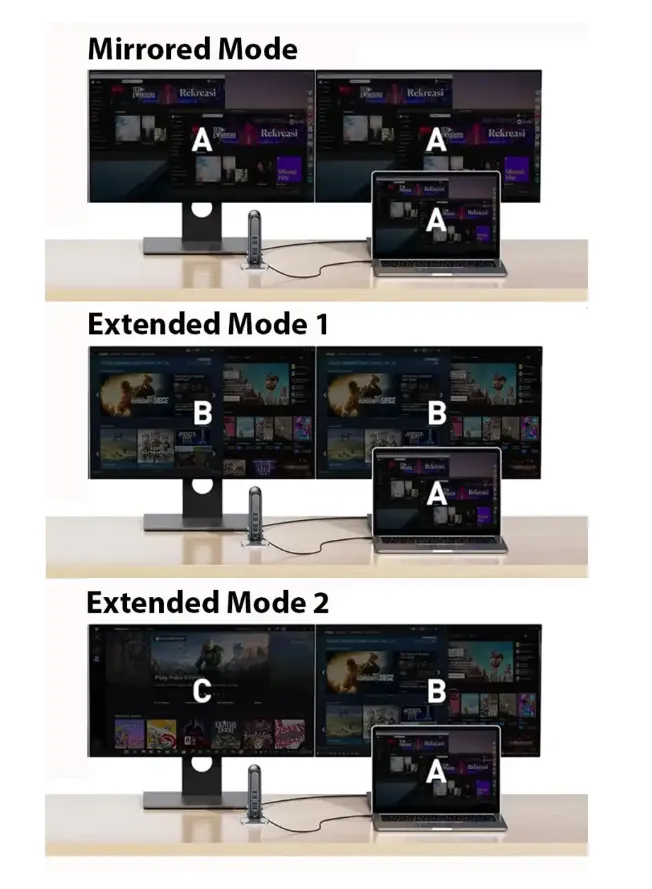
MacBook performance and native display capacity are separate. A dock can add physical connectors and route supported displays through one host port, but it does not increase the display limit set by the Mac's chip.
The 13-inch M1 and M2 MacBook Pro models natively support one external display, even through a Thunderbolt dock. The base 14-inch M3 supports a second external display only when the lid is closed. A dock with two HDMI ports does not automatically make both outputs available as independent native displays.
DisplayLink or InstantView software, used with a compatible USB-C docking station, can add software-driven displays. This is different from native Thunderbolt video. DisplayLink requires its macOS software and screen-recording permission, and software-driven displays have separate limitations.
M1/M2/M3/M4 Pro and Max models, the base M4 model, and the M5 family natively support more than one external display, with limits determined by the chip. A docking station still has to support the required resolution, refresh rate, port allocation, and host protocol.
Some docking stations advertise 8K output, but the result depends on the Mac, dock controller, cable, display, and connection path. Current M5 models can support an 8K 60Hz display over Thunderbolt or HDMI in supported configurations. Older generations use different combinations, so the built-in HDMI port is not a universal requirement and Thunderbolt support should not be assumed without checking the exact model.
When choosing from Mac docking stations, provide the exact MacBook Pro chip, number of displays, resolution, refresh rate, required ports, and charging requirement. This is more reliable than matching a dock only by the number of HDMI or DisplayPort sockets.
MacBook Pro ports FAQ
How many USB-C ports does a MacBook Pro have?
Current M5 MacBook Pro models have three USB-C-shaped Thunderbolt ports. The 13-inch M1 and M2 models and the base 14-inch M3 have two. Some Intel models have two or four Thunderbolt 3 ports.
Does a MacBook Pro have USB-A ports?
Current MacBook Pro models do not have built-in USB-A. A USB-C adapter, hub, or docking station is required for rectangular USB-A devices.
