HDMI cables are an important link between common A/V components and devices such as TVs, projectors, and receivers, which receive digital signals (1 and 0) and convert them into the stunning sound and images we rely on.
The HDMI standard was officially announced by the HDMI Forum on January 4, 2017, and officially released on November 28 of the same year. After its release, it quickly became the new standard for high-end TVs and audio-visual receivers. The latest products from brands such as LG, Samsung, Sony, TCL, and Vizio all adopt this standard, and the next-generation game consoles PlayStation 5 and Xbox Series X are also equipped with HDMI interfaces.
HDMI Technology Upgrade
1. Resolution and refresh rate support: Added support for higher resolutions and refresh rates, including 4K 120Hz and 8K 120Hz, which can present more delicate and smooth pictures.
2. Ultra High Speed Cable Category: Introducing a new HDMI cable category called "Ultra High Speed" (referred to as 48G during development), this type of certified cable can achieve the higher transmission speeds required by the new format. Ultra High Speed HDMI cables are backward compatible with older HDMI devices, and older cables are also compatible with new HDMI devices, but only new cables support the full 48Gbit/s bandwidth.
3. Physical and bandwidth features:
The physical connector and cable appearance are consistent with traditional HDMI cables, maintaining the compatibility and ease of use of the interface.
The bandwidth has been greatly increased from 18 gigabits per second in HDMI 2.0 to 48Gbps, which can carry resolutions up to 10K and frame rates up to 120 frames per second.
Higher resolutions and/or frame rates require new cables for optimal performance.
Cable Selection Tips
For most devices (such as TVs, game consoles, set-top boxes, and even some sound systems), users do not need to buy an 8K HDMI cable. A more affordable 4K HDMI 2.0 cable that supports up to 60fps will meet your needs. But if you have a PS5, Xbox Series X (or an Ultra HD Blu-ray player) and a TV that supports a refresh rate of 120Hz (twice the normal 60Hz), you will need an HDMI cable. Also called 8K cables, these cables can handle transmission speeds of 48Gbps, which is much higher than the 18Gbps of standard "high-speed" HDMI 2.0 cables, which can fully unleash the performance of high-end devices and bring a more extreme audio-visual experience.
USB-C to HDMI 8K Cable
This is USB-C to HDMI 8K Cable. This cable supports the newest technology of HDMI 8K output. Connect USB-C port with DP1.4 Alt Mode protocol (compatible with DP1.2 Alt Mode) enabled host devices to get the 8K video to HDMI (compatible with HDMI2.0/1.4) enabled TVs for display. HDMI output supports up to 7680*4320@60Hz or 3840*2160@144Hz video resolution (backward compatible resolution). Input devices include mobile phones, laptops, and hosts with USB-C interface.
DP1.4 to HDMI 8K Cable
This is DP1.4 to HDMI 8K Cable. This cable supports the newest technology of HDMI 8K output. Connect DP1.4 (compatible with DP1.2) port enabled host devices to get the 8K video to HDMI (compatible with HDMI2.0/1.4) enabled TVs for display.
HDMI to USB-C 8K Adapter
This is a HDMI to USB-C Adapter with Micro USB power delivery, easily add a USB-C display to HDMI enabled sources such as computers, laptops, notebooks, game consoles, tablets, and more. Support the latest standard HDMI, backward compatible with HDMI2.0, HDMI1.4, output resolution up to 8K@30Hz or 4K@120Hz. Connect HDMI equipped host devices, like the newest XBOX X series, PS5 game devices to the USB-C equipped monitors/TV to extend the video signal. The included Micro USB power port connects to either an available USB port on your source device or a USB wall charger to power the HDMI to USB-C adapter.
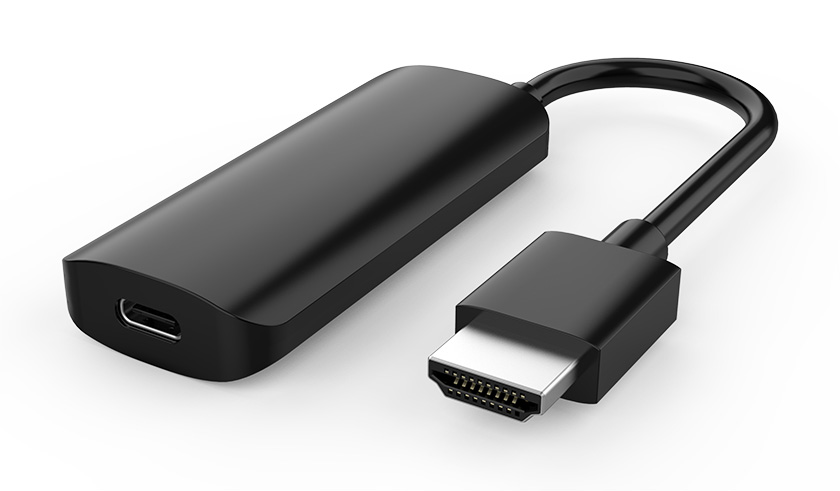
This is a HDMI to DP1.4 Adapter with Micro USB power port, lets you connect an HDMI enabled video source, such as Laptop, PC, desktop, Xbox, PS5, video game console...etc, to DisplayPort 1.4 (backwards compatible with DP1.2 specification) displays. The included Micro USB Power cable connects to either an available USB port on your source device or a USB wall charger to power the HDMI to DisplayPort converter.
Although we've talked about the standards, it's worth knowing the version numbers actually apply to devices – TVs and video sources – and not the cables themselves. What really matters is the cable's speed capacity – look out for anything rated for 18Gbps to keep up with 4K HDR, which should be just about any cable sold as "high speed".
HDMI cables support 48Gbps "ultra high speed" which is intended to support 8K video (and up to 10K), but it'll be a couple of years at least before there are widespread compatible devices. However, there are features such as variable refresh rate and eARC as well as 4K video at 120Hz which also require an HDMI cable. The PS5, Xbox Series X and certain LG 4K OLED TVs support HDMI, but you'll only benefit from getting a cable that supports the latest standard if you have both a console and TV that support those features.









