By PURPLELEC | 12 May 2025 | 0 Comments
M.2 SSDs: Form Factors, Types, and a Selection Guide
With the rapid development of storage technology, M.2 SSDs have attracted much attention for their unique advantages. M.2 does not refer to a specific storage technology, but a SSD form factor that resembles a chewing gum. It is small and thin, and takes up much less space than traditional 2.5-inch SSDs or mechanical hard drives, but can achieve up to 2TB of storage capacity, making it an ideal storage choice for devices such as portable computers, laptops, NUC mini computers and ultrabooks.

Users often wonder "Is M.2 faster than SSDs?" In fact, M.2 is a form factor of SSDs, so this question is not accurate. However, as a newer storage technology, M.2 SSDs include two types, SATA and NVMe. Due to different storage technology characteristics, they have their own advantages and disadvantages in terms of performance and cost, which inevitably leads to discussions.
SATA M.2 SSD: Classic and Economic Choice
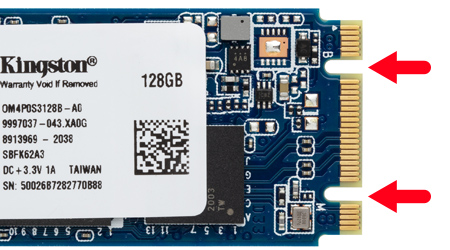
In the development of storage interfaces, SATA interfaces have long dominated. Traditional SATA hard drives require two cables, one to transfer data to the motherboard and one to connect to the power supply. When multiple hard drives are used, the cables are messy and may even affect the performance of the PC case. Thin devices are often difficult to accommodate. SATA M.2 SSDs came into being. It abandoned the dual-cable design of traditional SATA hard drives and perfectly adapted to devices with limited space.
Although the SATA interface used by SATA M.2 SSDs has a maximum data transfer rate of only 6Gbps, which is slower than the new interface and is a lower-performance SSD type, its bandwidth is still three to four times that of a rotating mechanical hard drive, and it is more popular and affordable. In December 2022, some manufacturers will no longer produce this type of product after launching the last SATA M.2 SSD, but for devices that do not have space to install a 2.5-inch SSD, SATA M.2 SSDs are still an excellent alternative. A simple way to identify SATA M.2 SSDs is that M.2 SSDs with both M and B keys are SATA types.
NVMe M.2 SSD: High-Performance Pioneer
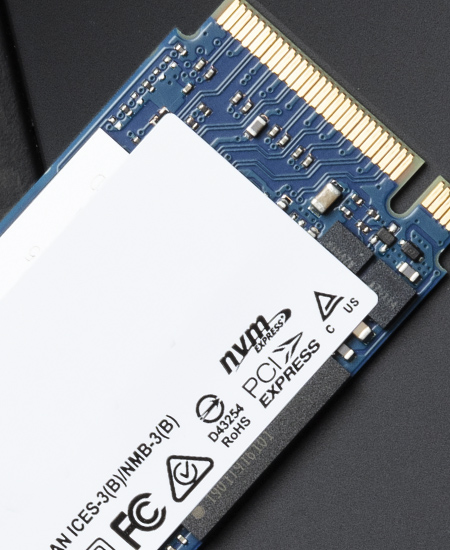
NVMe M.2 SSD uses the NVMe protocol designed specifically for SSDs, working with the PCIe bus to achieve a leap in storage performance. It uses the PCIe slot to communicate directly with the system CPU, getting rid of the slower SATA communication driver limitations. Only the M-keyed M.2 SSD is the NVMe type.
NVMe M.2 SSDs perform far better than SATA M.2 SSDs, with a theoretical transfer speed of up to 20Gbps, far exceeding the 6Gbps of SATA M.2. The PCIe bus supports multiple channel specifications, and although the M.2 form factor can usually only access x2 and x4 channels when using the PCIe bus, the maximum transfer speed can still reach 4GB/sec. Compared with common interfaces, the maximum throughput of SATA III used by new motherboards is 600MB/s, while the speed of NVMe hard drives can reach 3500MB/s, with significant performance advantages.
How to choose a suitable M.2 SSD?
System compatibility: Older devices may not be compatible with NVMe SSDs due to the lack of connections required for NVMe PCIe slots. You need to confirm the device support type before purchasing.
Boot speed requirements: If you pursue a fast startup of the computer system, installing the operating system on an NVMe SSD can achieve a significant speed improvement.
Storage planning: NVMe SSDs can be used in combination with SATA SSDs. The operating system and resource-intensive programs are installed on the NVMe hard drive, and small files, documents, etc. are stored on the SATA hard drive, taking into account both performance and cost.
Gaming experience: For gamers, NVMe M.2 SSDs can greatly improve game loading speed and overall performance, bringing a smoother gaming experience.
PCIe generation: There are different generations of PCIe bus, and the bandwidth doubles with each generation. SSDs use different generations of PCIe. The latest is PCIe 4.0, and PCIe 5.0 is still under development. The higher the generation, the stronger the performance.
Connection resource allocation: Some motherboards have limited PCIe connections, and you need to balance the connection between graphics cards and NVMe SSDs; in addition, some motherboards only allow NVMe devices to run at full speed with specific connection types, such as M.2 connections, so you need to pay attention when purchasing.
Unlocking efficient office work: A complete guide to connecting laptops to dual external monitors
Hard Drive Enclosure for M.2 NVMe & SATA with USB 3.2 & 10Gbps Transmission
Leave a Reply
Your email address will not be published.Required fields are marked. *