How Much Do Housing Materials Affect Docking Station Cooling?
Housing material affects docking station cooling. Aluminum alloys generally spread heat away from localized hot spots more readily than ordinary plastics, but the benefit also depends on contact between the chips and housing, the available surface area, and heat transfer to the surrounding air. Two aluminum housings can perform very differently if their internal structures differ. Evaluate the material as part of the complete thermal design.
A desktop setup may connect a display, an external drive and Ethernet while charging the laptop through the docking station. After a period of operation, one metal housing may feel noticeably warm while a plastic housing feels milder. That difference can reflect both surface temperature and how quickly each material transfers heat to your fingers. Touch alone cannot establish which unit has hotter chips.
Article contents
- Where does housing material affect the thermal path?
- How do aluminum, ordinary plastic and conductive plastic compare?
- Why does a hotter aluminum housing not necessarily mean worse cooling?
- Which use cases make housing cooling more important?
- How can two housing designs be compared fairly?
- Frequently asked questions
- How should OEM/ODM projects specify a housing?
01 / Thermal paths
Where does housing material affect the thermal path?
Heat in a docking station mainly comes from losses in controller chips, power conversion and power delivery paths. Designs with networking, video output or an internal SSD have their own heat sources. A port labeled "100W PD" describes a power delivery capability; it does not mean the docking station itself generates 100 W of heat. Its own heat generation depends on circuit power dissipation and losses along the power path.
For a design that uses its housing for cooling, one useful path to follow is: chip or PCB → thermal interface and structural contact → housing → surrounding air. Heat also leaves through other paths, including the PCB and internal air. The housing is one part of the system. Its material conductivity alone cannot determine the temperature of the complete unit.
If a substantial air gap separates the heat source from the housing, or a thermal pad does not make proper contact, heat has difficulty reaching the housing. Changing to a more conductive housing may then provide limited improvement. TI's discussion of thermal interface materials explains that small gaps between contact surfaces add thermal resistance, while suitable interface materials and good contact improve heat transfer. Evaluate a thermal pad's stated conductivity together with its thickness, fit and assembly conditions.
Once heat reaches the housing, it still has to enter the environment through surface convection and radiation. A small enclosure, an unfavorable mounting position or another device covering it can change this part of the process. The thermal resistance networks in TI's thermal design guide likewise consider components, interfaces, cooling structures and the environment as one system.
02 / Material comparison
How do aluminum, ordinary plastic and conductive plastic compare?
Both "metal housing" and "plastic housing" cover many designs. Aluminum alloy grades, wall thicknesses and finishes vary. Ordinary ABS or PC and plastics with thermally conductive fillers also need separate assessments.
| Material or structure | Role in cooling | Conditions to consider | What to check |
|---|---|---|---|
| Aluminum alloy housing | Generally helps spread heat from a localized source across a larger area of the housing. | The benefit requires effective contact with the heat source and enough surface area to release heat to the environment. | Contact locations between chips and housing, interface materials, and usable cooling surface area. |
| Ordinary plastic housing, such as ABS or PC | The housing itself generally conducts and spreads heat less effectively than aluminum alloy. | Internal heat sinks, metal parts, the PCB and ventilation design affect the complete unit. | The paths that carry heat out, component temperatures and operation under the target load. |
| Thermally conductive plastic housing | Specific fillers improve heat conduction, allowing material selection to suit the structure. | Grades vary substantially. Conductivity may also differ along the surface and through the thickness. | The exact grade, test direction, molding conditions and requirements such as electrical insulation. |
| Combined metal and plastic housing | Metal sections can conduct and spread heat while plastic sections provide other structural functions. | Effective contact between the metal and heat source matters more than the visible proportion of metal. | The purpose of each metal part, its thermal connections and the final installation. |
Thermally conductive plastics particularly require a full data sheet. For example, the SABIC LNP KONDUIT DTK22 data sheet lists separate conductivity values in the plane of the material and through its thickness. Heat traveling along a housing surface may encounter different behavior from heat crossing its wall. A "high conductivity" label cannot replace an assessment of the actual heat flow direction and structure.
Similar-looking metal housings can also serve different purposes. A mainly decorative metal panel has a different thermal role from a housing connected to the heat source to spread heat. Identify the actual connection between the source and the metal section.
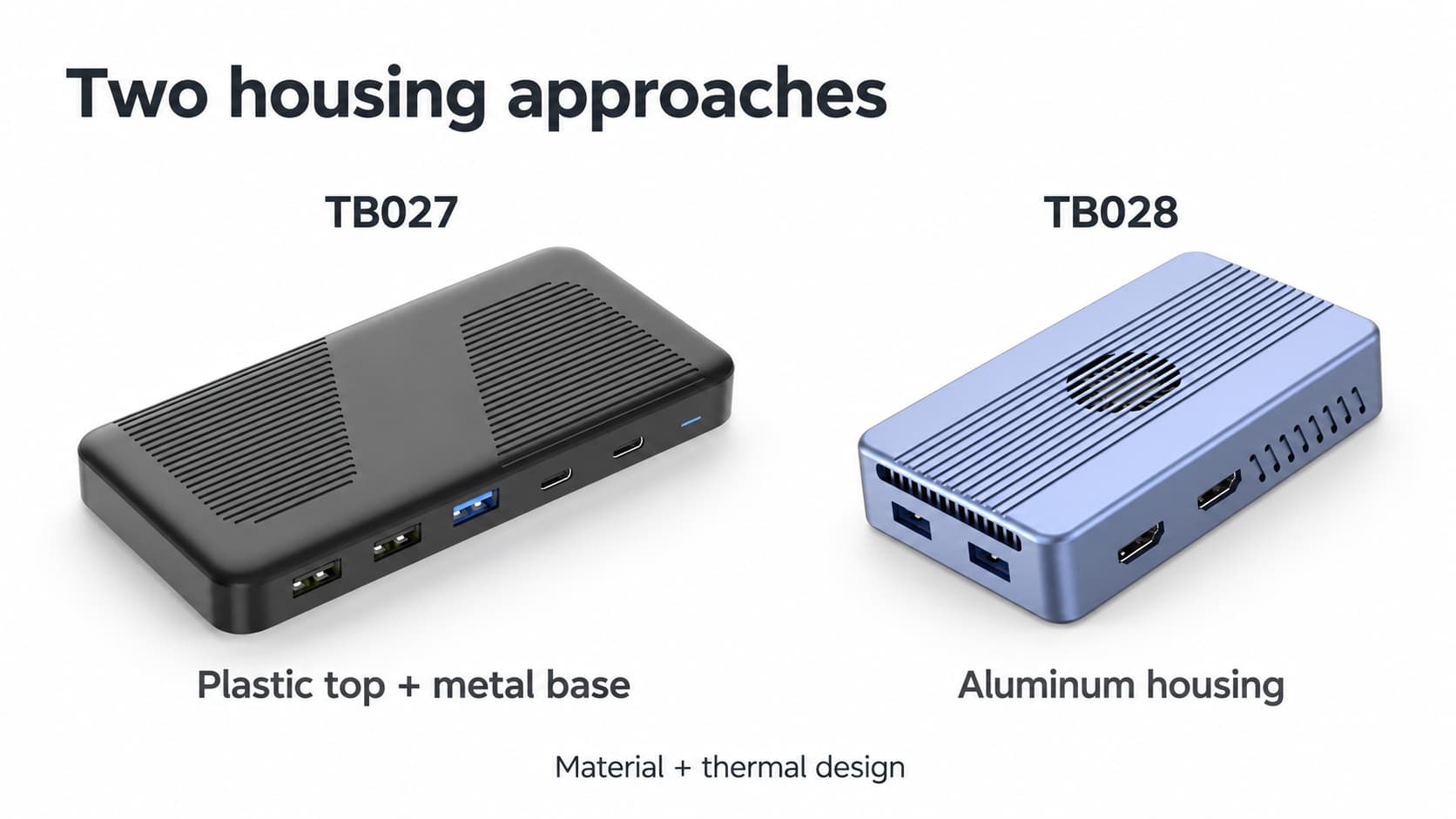
TB027 uses a plastic upper housing and a metal base. TB028 uses an aluminum alloy housing.
03 / Interpreting temperature
Why does a hotter aluminum housing not necessarily mean worse cooling?
When internal heat transfers effectively into an aluminum housing, its surface warms and the warm area may expand. A cooler plastic surface can still surround hotter components. A very hot metal housing can also indicate a higher thermal load or insufficient cooling area. Housing temperature, chip temperature and operating behavior need separate observation.
Touch provides only a rough indication. Materials at the same surface temperature can feel different because they exchange heat with the skin at different rates. Assess extended operation using key component temperatures, sustained data transfer, display output and power delivery behavior. Surface temperature should also meet the product's requirements for normal use.
Infrared measurements must account for surface material
Shiny metal reflects thermal radiation from surrounding objects. Using the same default emissivity setting for metal and plastic housings can introduce measurement error into the apparent temperature difference. FLIR's explanation of emissivity and reflected temperature shows that reflections can make readings appear either hotter or colder.
For housing comparisons, use contact sensors at consistent locations, or follow the instrument's requirements for emissivity settings and suitable high-emissivity measurement patches. Keep measurement positions, attachment methods and stabilized readings comparable. An uncorrected thermal image alone cannot establish which housing material performs better.
04 / Use cases
Which use cases make housing cooling more important?
Mobile workstations with a few peripherals and intermittent use
A setup mainly used for a keyboard and mouse, with occasional card access or a projector, may have a relatively light thermal load. Size, weight and mechanical strength can share the selection priorities. Check temperature and interface operation during continued use as well.
Fixed workstations running displays, networking, data transfers and charging together
When several functions operate together for long periods, check heat source locations, the housing's temperature distribution and sustained operation. Use the actual display resolution and refresh rate, network traffic, storage transfers and power delivery combination during evaluation. Powering one display alone does not represent the thermal load of all those functions running together.
Designs with an internal SSD, a fan or mounting under a desk
An internal SSD adds another heat source. A docking station with a fan also needs a suitable air path and room around its ventilation openings. Mounting under a desk, standing upright, lying flat or sitting close to other equipment changes the surrounding airflow. Compare these designs in their intended installation. Temperature differences between different configurations cannot all be attributed to aluminum or plastic housings.
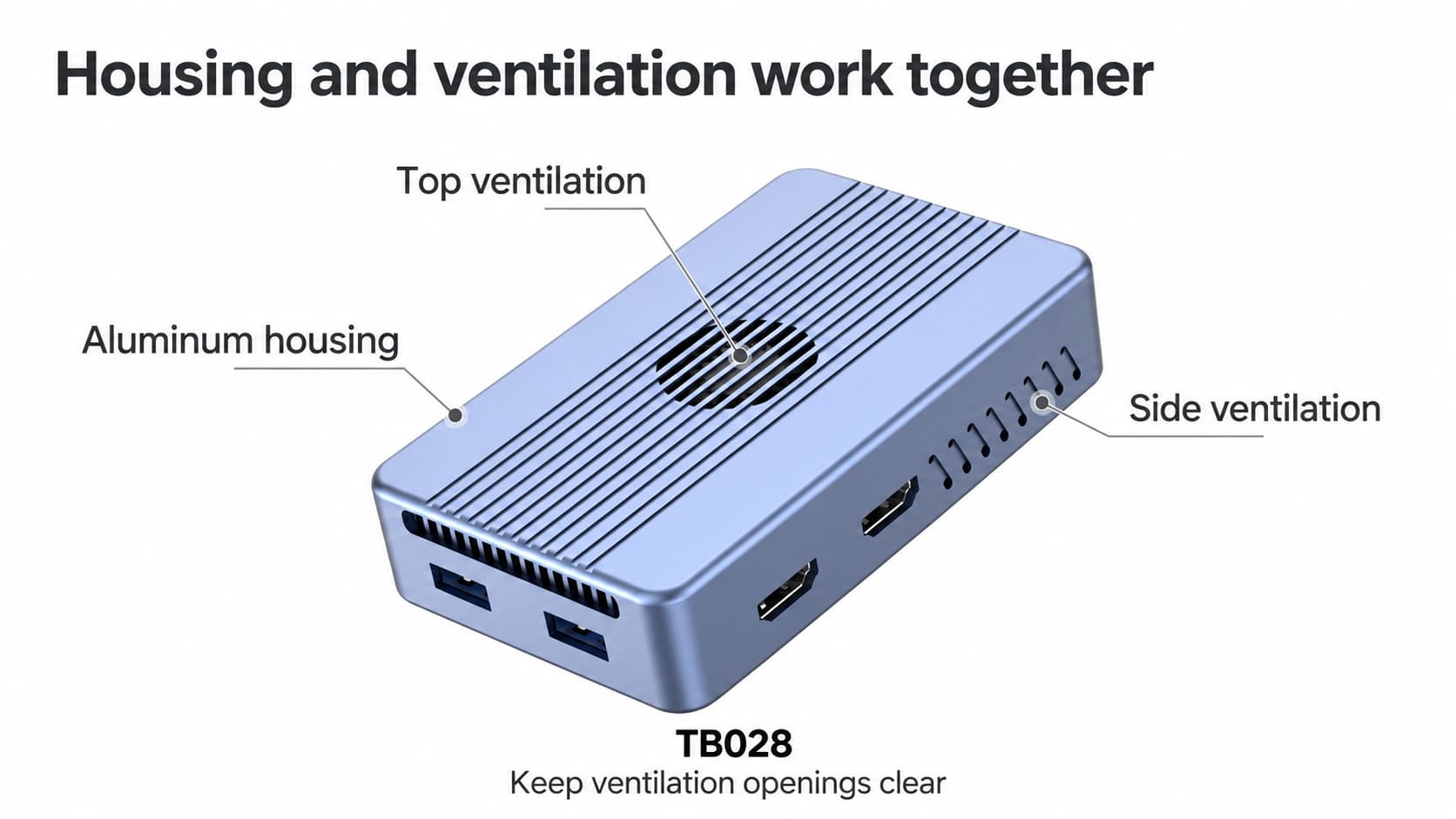
The aluminum alloy housing, ventilation openings and fan form part of TB028's thermal design.
05 / Comparison method
How can two housing designs be compared fairly?
To find out how much a housing change improves cooling, keep the circuitry, functional configuration and load as consistent as possible. Comparing two different docking stations can help select a complete product, but it cannot isolate the temperature difference caused by the housing material.
- Define the comparison. For a housing change on the same design, record dimensions, wall thickness, finish and contact structure. For different complete products, also list differences in chips, fans, SSDs and other configuration details.
- Keep the workload consistent. Use the same host, power supply, peripherals and tasks. Record actual power delivery and the unit's own power dissipation. Matching port counts do not establish matching workloads.
- Control the environment and placement. Keep ambient temperature, airflow, orientation and surrounding clearance consistent. An exposed desktop setup and mounting behind a display should not be treated as the same condition.
- Observe internal and external temperatures. Use suitable telemetry or specified measurement points for components, and a comparable method for housing temperatures. Continue recording until readings tend to stabilize.
- Record operating behavior too. Check sustained transfer speeds, connection status, display output and power delivery against the target requirements. If problems occur, investigate component temperatures together with power, cabling and protocol factors.
These conditions help identify what to improve next. If heat does not reach the housing effectively, examine interface contact and internal structure first. If a large area of the housing is already warm, assess the remaining cooling margin using component temperatures, available surface area and airflow. Changing material alone may leave the main bottleneck unresolved.
06 / Frequently asked questions
Frequently asked questions
Does an aluminum housing always cool better than a plastic one?
With similar structures and contact conditions, aluminum alloy generally helps conduct and spread heat. Complete product performance also depends on power dissipation, interface contact, surface area, airflow and placement. The material name alone cannot establish the result.
How many degrees can a change from plastic to aluminum save?
There is no temperature reduction that applies to every docking station. Compare key component and housing temperatures under the same configuration, load and environment. Internal and external temperature changes may not even move in the same direction.
What matters in a combined metal and plastic housing?
Check which sections contact the heat sources, spread heat and release it to the surroundings. A metal base, internal heat sink and decorative panel can have different roles. The visible proportion of metal cannot directly indicate cooling ability.
Do thicker walls or added cooling grooves always make a housing cooler?
Thickness changes heat spreading and heat storage. Surface geometry also changes effective area and airflow. The result depends on the design. Slower warming over a short period and a lower temperature during sustained operation need separate assessment.
07 / Project specification
How should OEM/ODM projects specify a housing?
Start with the functions that will run together, operating duration, environment and placement. Include the housing material, thermal connections and temperature acceptance requirements in the same specification. Brands developing a docking station can share their target interface mix and use case with the PURPLELEC docking station OEM/ODM team to discuss an enclosure design suited to the project.