In today's fast-paced, mobile-dominated world, laptops have become the core computing device for professionals, students, and even regular users. They are lightweight and portable, and can meet people's work, study, and entertainment needs anytime, anywhere. However, it's hard to have the best of both worlds. While laptops are excellent in portability, they also have obvious limitations: Compared with traditional desktops, they have fewer ports and connection options. At this time, docking stations came into being, and they are like a magic key that can open up a whole new world of functions for laptops. Next, let's explore the mysteries of docking stations in depth, and fully understand their advantages, core functions, operating mechanisms, and the key factors to consider when choosing the docking station that best suits your needs.
Table of Contents
Understanding Docking Stations: What Are They?
Benefits of Using Docking Stations
Key Features of Docking Stations to Look For
Explore Different Types of Docking Stations
Choose the Right Docking Station for Your Needs
Conclusion
Understanding Docking Stations: What Are They?
A docking station, often called a universal port replicator, is an external hardware device that bridges the gap between a laptop and various desktop peripherals.
Definition and Purpose
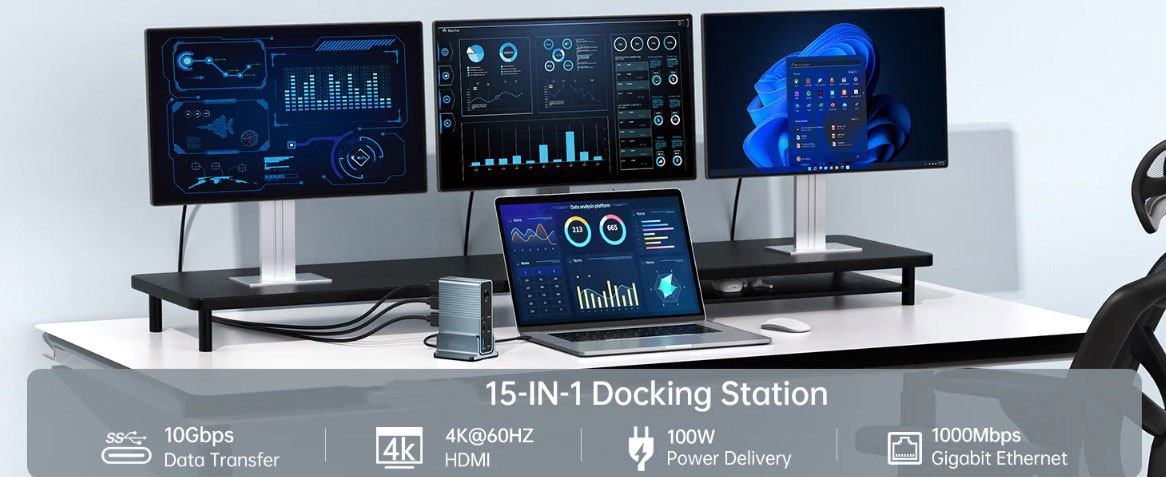
The main purpose of a docking station is simple and straightforward: it allows users to easily connect multiple devices, such as monitors, hard drives, printers, etc., to a laptop through a single connection. It can be thought of as an efficient centralized hub, which not only greatly simplifies the device connection process, but also allows users to instantly have abundant port resources, significantly improving work efficiency. For example, in an office scenario, users only need to connect their laptop to a docking station to simultaneously connect monitors, keyboards, mice, printers and other office equipment, quickly building a fully functional workstation without repeatedly plugging and unplugging devices, saving a lot of time and energy.
Working Principle
The docking station is usually connected to a laptop with a USB-C, Thunderbolt or USB 3.0 cable. Once connected, it can connect all peripherals through this cable. This ingenious design effectively solves the problem of messy cables when multiple devices are connected, making the desktop more tidy and orderly. In addition, many modern docking stations also have power delivery capabilities, which means that while connecting devices, they can also charge laptops, ensuring that devices always have sufficient power to meet the needs of continuous use.
Physical design
Most docking stations are fixed designs and become permanent devices on the desk. They are of various shapes and sizes, and have a wealth of configuration options to fully meet the personalized preferences and space constraints of different users. Whether you are a student with limited desktop space and pursue simplicity and efficiency, or a professional who needs a dual-monitor configuration and has high requirements for work efficiency, you can find a port replicator that suits your needs. For example, some small docking stations are small and space-saving, suitable for users who often work on the move; while large docking stations are rich in functions and have complete interfaces, which are more suitable for fixed office scenarios.
Benefits of using a docking station
Investing in a docking station can bring you many practical values, making it an indispensable assistant in your workspace.
Simplified workspace
One of the most intuitive advantages of using a port replicator is that it can greatly simplify cable management. With just one cable, you can connect your laptop to the docking station, completely saying goodbye to the headache of cable entanglement in the previous workspace. This simple connection method not only improves the aesthetics of the office environment, but also significantly improves work efficiency - less time to organize cables means more energy can be devoted to important tasks. Imagine how pleasant it is to be able to quickly start efficient work mode on a busy work morning without spending time sorting out messy cables.
Multi-monitor support
For users who are keen on multitasking, the port replicator's support for connecting multiple monitors is a boon. This feature can greatly expand the screen space and allow users to extend the display content to multiple screens, especially for data analysis, programming, design and other work that requires high screen space. For example, data analysts can display data reports on one monitor, run analysis software on another monitor, and check information on the laptop screen at the same time, working on multiple screens together, greatly improving the smoothness and efficiency of the workflow.
Enhanced connection options
Docking stations are usually equipped with a variety of ports, covering common interfaces such as USB, HDMI, Ethernet, and audio jacks. This powerful versatility allows users to connect printers, external storage devices, headphones and other devices at the same time. By expanding the connection options, users can easily build an efficient and convenient working environment, avoiding the inconvenience caused by frequent plugging and unplugging of devices. For example, when printing a document, there is no need to worry about finding the right interface. You can quickly complete the printing task by directly connecting the printer through the docking station.
Portability and flexibility
In this era of increasing mobility, flexibility is essential. Whether in the office, at home, or in a shared office space, the docking station can help you quickly build a complete workstation. When you need to go out, just remove the laptop from the docking station and you can easily carry it; when you return, you can effortlessly reconnect the docking station to restore the original configuration of the workspace. This convenient feature allows users to quickly adapt to work needs in different scenarios and achieve seamless switching of work efficiency.
Key features to pay attention to in the docking station
When purchasing a docking station, in addition to paying attention to basic port availability, you also need to focus on the following key attributes, which will have a significant impact on your experience.
Port type and number
First, you need to know the type of device you need to connect. Although USB ports are standard for docking stations, it is recommended to choose docking stations with video output interfaces such as HDMI and DisplayPort to meet the diverse device connection needs. A reasonable combination of ports can ensure that you can connect all the necessary accessories without any obstacles. For example, if you need to connect a projector for a presentation, then a docking station with an HDMI interface can easily achieve this function; if you need to connect an external high-resolution monitor, the DisplayPort interface can provide better display effects.
Power supply capability
If you want to reduce the number of cables that need to be managed and simplify the desktop layout, then a docking station that supports power supply function will be an ideal choice. This type of docking station can charge your laptop while connecting other devices, ensuring that your device is always fully charged and ready to go. For example, when you are out working, you only need to carry a docking station and a power cord to meet the needs of device connection and charging at the same time, without carrying an additional charger, which reduces the burden of travel.
Display support
When evaluating a docking station, you need to fully consider your own display settings. If you plan to use multiple monitors, make sure your docking station can meet your needs, whether it is dual 4K monitors or a combination of monitors with different resolutions. Good display support not only improves work efficiency, but also provides a better visual experience. For example, for users who work in design, a multi-monitor configuration with high resolution and accurate color can enable them to see design details more clearly and accurately grasp color matching, thereby improving the quality of their design work.
Device Compatibility
Before purchasing a docking station, be sure to carefully verify its compatibility with the laptop port and operating system. Some port replicators may have a preference for certain brands or models of devices, which may cause connection problems if your device is not supported. It is recommended to understand the compatibility of the docking station in advance by studying customer reviews and checking product specifications to avoid unnecessary trouble during use. For example, some older laptop models may not support the latest USB-C interface docking stations, so you need to confirm this before purchasing to avoid financial losses.
Explore Different Types of Docking Stations
Understanding the rich variety of docking station types on the market will help you accurately select the product that best suits your needs.
USB docking station
USB port replicators are one of the most common types of docking stations, and are popular for their wide compatibility. They are usually connected via USB 3.0 or USB-C interfaces, and can provide high-speed data transfer rates while being able to charge devices. High-end models of USB docking stations may also support dual-monitor setups and come with additional features such as audio output. For example, ordinary office users can use USB docking stations to connect devices such as keyboards, mice, printers, etc. to meet daily office needs; while for some light entertainment users, docking stations that support audio output can allow them to get a better audio experience when connecting to a monitor to watch videos.
Thunderbolt docking station
Thunderbolt docking stations rely on Intel's high-speed technology to achieve amazing data transfer rates. This type of docking station is especially suitable for creative professionals with extremely high performance requirements, such as video editors, 3D modelers, etc. They can easily drive multiple 4K monitors and provide strong power support for connected devices. However, the price of Thunderbolt docking stations is relatively high, which is also one of the factors that users need to consider when choosing. For example, when video editors are working with high-resolution video materials, they need fast data transfer speeds to ensure the smoothness of the editing process. Thunderbolt docking stations can meet this need well and greatly improve work efficiency.
Hybrid docking stations
Hybrid docking stations cleverly combine USB and Thunderbolt connection methods to provide users with a more comprehensive solution. This type of docking station can adapt to a wider range of device types and application scenarios to meet the diverse needs of different users. For example, for users who need to connect ordinary USB devices and occasionally have high-speed data transfer needs, hybrid docking stations can take both into account and provide a flexible and convenient connection experience.
Stand-alone replicator and port replicator
Stand-alone docking stations have onboard processing capabilities and can achieve advanced functions such as video conversion, bringing users more powerful performance support. In contrast, port replicators mainly focus on port expansion and do not have independent processing capabilities. Users can choose according to their actual needs, and both have their own advantages. For example, for users who need to perform complex video processing and have high performance requirements, stand-alone docking stations can better meet their needs; while for ordinary office users, the basic port expansion function of port replicators can meet daily use.
Choose the right docking station according to your needs
Faced with a wide range of docking station products, how do you choose the one that suits you best? This requires you to consider many factors and make careful considerations.
Evaluate your workspace
First, conduct a comprehensive evaluation of your current workspace. Carefully examine the available space on your desk and consider whether it is more appropriate to choose a vertical or horizontal docking station. If space is limited, a compact docking station is undoubtedly the best choice. It can provide you with the necessary port expansion function without taking up too much space. For example, on a small dormitory desk or shared office workstation, a compact docking station can cleverly integrate into the environment without affecting the placement of other items.
Analyze your peripherals
Carefully inventory the peripherals you use frequently. Make it clear whether you need to connect multiple monitors or just a few USB peripherals. Make sure the selected docking station can accommodate all necessary devices, so as to avoid the embarrassing situation of insufficient interfaces in subsequent use and save time and energy. For example, if you need to connect two monitors, a keyboard, a mouse, and a mobile hard drive at the same time in your daily work, when choosing a docking station, you must ensure that it has enough ports and types to meet the connection needs of these devices.
Budget considerations
Budget plays a key role in the purchase decision process. High-end docking stations with rich features and excellent performance are often expensive, but there are also affordable products on the market that can also provide basic expansion functions. Before purchasing, it is recommended that you prioritize the functions that are most important to you based on your own financial situation, and then filter out high-quality options with high cost performance within your budget. For example, for students with limited budgets, you can choose a docking station with a relatively affordable price and functions that meet daily learning needs; while for professionals with high performance requirements and sufficient budgets, you can consider investing in a high-end docking station for a better user experience.
Make sure your investment is future-proof
Technology is developing rapidly, and it is important to invest in forward-looking products to ensure that the docking station will continue to meet needs for some time to come. Choose a docking station that can adapt to technological development trends, such as supporting higher display resolutions, faster data transfer rates, etc. This forward-thinking approach will keep your docking station competitive for years to come, avoiding the cost of frequent replacements due to outdated technology. For example, as 4K and 8K monitors become more popular, choosing a docking station that supports high-resolution display output will easily adapt to these new monitors in the future, giving you a clearer and more stunning visual experience.
Conclusion
As we move into 2025, docking stations are becoming increasingly important, successfully bridging the gap between laptop mobility and powerful computing power. By deeply understanding the advantages, core functions, various types, and key purchase factors of docking stations, users can fully utilize the value of port replicators, significantly improve work efficiency, create a neat and tidy workspace, and achieve seamless switching between mobile and fixed office modes. Embrace this innovative technology and let it help you take your laptop experience to a whole new level, more calmly cope with various challenges in the wave of the digital age, and efficiently achieve your work and life goals.