As laptops become thinner and lighter, they have fewer ports. When you need to connect an external monitor, SD card, or various peripherals, a suitable USB-C docking station can make your device go from single-function to full-featured and seamless. However, not all docking stations are the same - some are built for heavy users who need to run dual 4K monitors, while others are more suitable for users who want lightweight and easy-to-carry devices.
We have summarized the best USB-C docking stations in 2025 based on actual usage experience, product reliability, and the functions that really matter in daily use.
Best USB-C Docking Stations of 2025
Whether you want a dual-monitor setup, high-speed data transfer, or a neat workspace with no cable clutter, here are 3 of the best USB-C docking stations worth considering in 2025, each with its own unique advantages:
1. Purplelec DS035D USB-C Docking Station (14-in-1)
The DS035D USB-C Docking Station (10-in-1) is ideal for multitaskers. Whether you want to work on multiple projects at once or want to see everything at a glance, it can meet your needs. It supports three external monitors, even on M1 and M2 MacBooks, which are usually difficult to be compatible with multiple monitors. The dock is equipped with two HDMI ports and a DisplayPort port, which can connect three monitors, and each monitor can display different content.
In terms of power, this best USB Type-C docking station can provide up to 100W of power to your laptop and 30W of power to other devices. With its USB 3.2 Gen 1 port, file transfers are smooth. A rich selection of ports allows you to easily connect audio devices, Ethernet, and traditional USB-A peripherals.
Advantages:
.Supports triple displays (including M1/M2 MacBook)
.100W laptop power supply + 30W USB-C charging
.Compact layout with all necessary ports (HDMI, DisplayPort, Ethernet, USB-C and USB-A 3.2)
.Fast 5 Gbps file transfer via USB 3.2 Gen 1
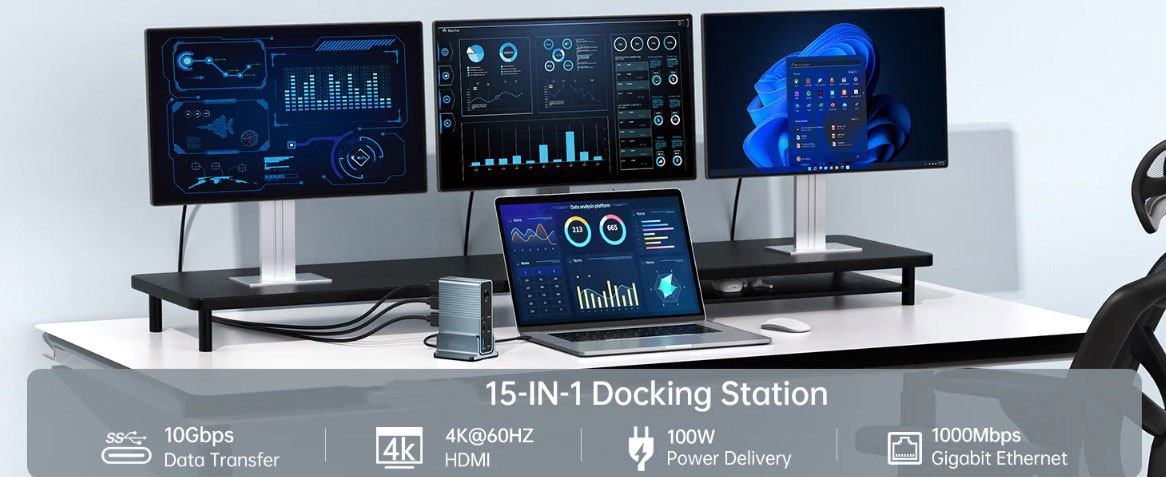
2. Purplelec DS015 USB-C Docking Station (15-in-1)
If you regard your desk as the core of everything, including video calls, file transfers, streaming, editing and other work, then the Purplelec DS015 USB-C Docking Station (15-in-1) is a powerful docking station built for serious multitaskers like you. This top-notch USB Type-C docking station has up to 15 ports, providing you with everything from SD card slots to triple display support, as well as two Power Delivery ports (85W for laptops and 18W for phones or tablets).
Its uniqueness lies in the built-in 100W power adapter and support for single-screen 4K@60Hz Full HD display, which is not available in every docking station. It is perfect for crea-tives, professionals, and anyone who wants to reduce the use of adapters and pursue faster speeds.
Advantages:
.85W laptop charging + 15W device charging at the same time
.Triple display output via dual HDMI and DisplayPort
.Equipped with SD/microSD card reader, AUX, Ethernet and three USB-A ports
.Equipped with 100W power adapter for higher reliability
.Single display output 4K@60Hz
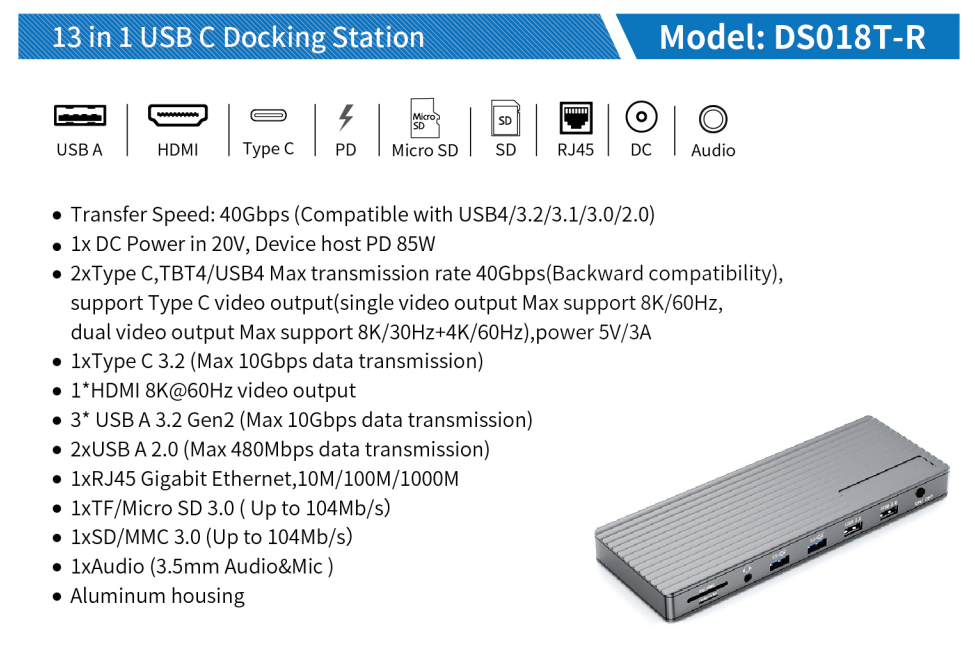
3. Purplelec DS018R Thunderbolt Docking Station (13-in-1, Thunderbolt 4)
For users with Thunderbolt 3 or 4 laptops, the Purplelec DS018R Thunderbolt Docking Station (13-in-1, Thunderbolt 3) remains one of the most powerful and future-proof options on the market. It is designed to handle high-end workflows, whether it is 5K displays, massive data transfers or high-load charging, it can do it.
Its most prominent feature is the Thunderbolt 3 port, which supports 5K@60Hz resolution when used alone, and dual 4K@60Hz resolution when paired with the HDMI port. It comes with a 180W power adapter that can provide 85W of power to a laptop and 18W of power to a small device. In addition, it is equipped with dual card readers, a reliable Ethernet interface, and ample USB-A and USB-C ports, making it a strong contender on any heavy user's desk.
Advantages:
.Thunderbolt 3: 40Gbps bandwidth and up to 5K@60Hz video support
.85W laptop charging + 18W USB-C PD charging
.Supports dual monitors to display 4K@60Hz simultaneously
.Includes 180W power adapter and Thunderbolt 3 cable
.Equipped with SD and microSD card slots, as well as AUX and Ethernet interfaces
.Ideal for high-performance MacBooks (non-M1/M2) and Windows laptops
Features to Consider When Choosing a USB-C Docking Station
Choosing the best USB-C docking station isn’t just about picking the one with the most ports—it’s about finding the right mix of performance, compatibility, and usability for how you work. Here are the key features you should pay attention to:
Display Support
If you use multiple monitors, this is a top priority. Some docks only mirror displays, while others offer true extended desktop support—especially important for macOS users on M1/M2 chips, which have limited native display output.
Look for: Dual or triple 4K display support (especially 60Hz if you want smooth motion), and DisplayPort/HDMI combos for flexibility.
Pro tip: On Macs, look for docks that specifically state “triple display support” for M1/M2—it’s not a given.
Power Delivery (PD) Capabilities
A good dock should charge your laptop while it’s connected. Better ones charge your phone and other devices at the same time. The wattage matters here.
Look for: At least 85–100W PD for laptops, and 15–30W for phones or tablets.
Bonus: Some docks share power across multiple ports, while others deliver full speed independently—read the fine print if fast charging matters to you.
Port Selection (and Placement)
Think about what you actually plug in day-to-day—external drives, SD cards, Ethernet, or audio gear—and how often. Also, port placement matters more than you’d expect.
Look for: A mix of USB-C, USB-A (preferably 3.2 Gen 1+), SD/microSD card readers, Ethernet, and a 3.5mm jack if you use wired audio.
Nice to have: Front-facing ports for quick access and enough spacing to avoid cable crowding.
Data Transfer Speeds
If you work with large files—video, photos, or databases—port speed is critical. USB-C and Thunderbolt offer blazing-fast speeds, but not every port on a dock is created equal.
Look for: USB 3.2 Gen 1 or Gen 2 ports (5–10Gbps), or Thunderbolt 3/4 if your laptop supports it.
Avoid: Docks that only include USB 2.0 ports for data unless they’re clearly meant for peripherals like a mouse or keyboard.
Compatibility and OS Support
Not all USB-C docks work seamlessly across operating systems, and many require DisplayPort Alt Mode and Power Delivery to be fully functional.
Look for: Explicit macOS and Windows support. If you’re using Linux or ChromeOS, double-check compatibility.
For Macs: Be aware of display limitations on older M1 chips—some docks have workarounds, but not all.
Build Quality and Design
If it’s going to live on your desk, it should feel solid, not plasticky. And if you travel, durability is non-negotiable.
Look for: Aluminum or metal housings for better heat dissipation and durability.
Also consider: Cable length (too short is annoying), anti-slip bases, and whether the dock sits flat or vertical depending on your setup.
Power Adapter (Included or Not)
It’s often overlooked, but the included power supply can make a big difference—both in performance and in what you’ll need to carry or buy separately. Docks that come with their own high-wattage power adapter (ideally 100W+), especially if you’re running multiple displays and charging a laptop.
Conclusion
The value of a good USB-C docking station does not depend on the number of ports, but whether it can achieve a delicate balance of power, transmission speed and ease of use according to your working mode. Whether you need efficient multitasking with dual 4K displays, professional scenarios that rely on stable Ethernet connections, or just need to simply charge your laptop and connect basic devices - the key is to focus on your core needs.
When choosing, avoid blindly pursuing redundant functions, but guide yourself with core dimensions such as display support, power delivery, and port layout to match the actual usage scenario. When you accurately lock in the functional points that you value most, you can select a docking station that can truly improve your daily work efficiency from a wide range of products, so that device connection will never be compromised and become an accelerator of productivity.