When selecting new devices or peripherals, Thunderbolt 4 and USB 4 often leave people at a loss. Each has its own characteristics, making it a daunting task to choose between them. Do you know the differences between the two? And how can you make a choice based on your own needs? This article will take you deep into their world and help you make a wise decision.
Introduction
Thunderbolt 4
Developed by Intel, Thunderbolt 4 represents the latest generation of Thunderbolt interfaces. As a high-speed and versatile connector, it integrates data, video, and power transmission into a single cable. It is widely used in laptops, desktops, as well as peripherals such as monitors, docking stations, and external hard drives.
USB 4
USB 4 is the latest version of the Universal Serial Bus (USB) standard, developed by the USB Implementers Forum (USB-IF). It focuses on backward compatibility with previous USB versions while improving performance and functionality, such as enhancing data transfer rates and power delivery capabilities.
Speed and Performance
Thunderbolt 4 Speed
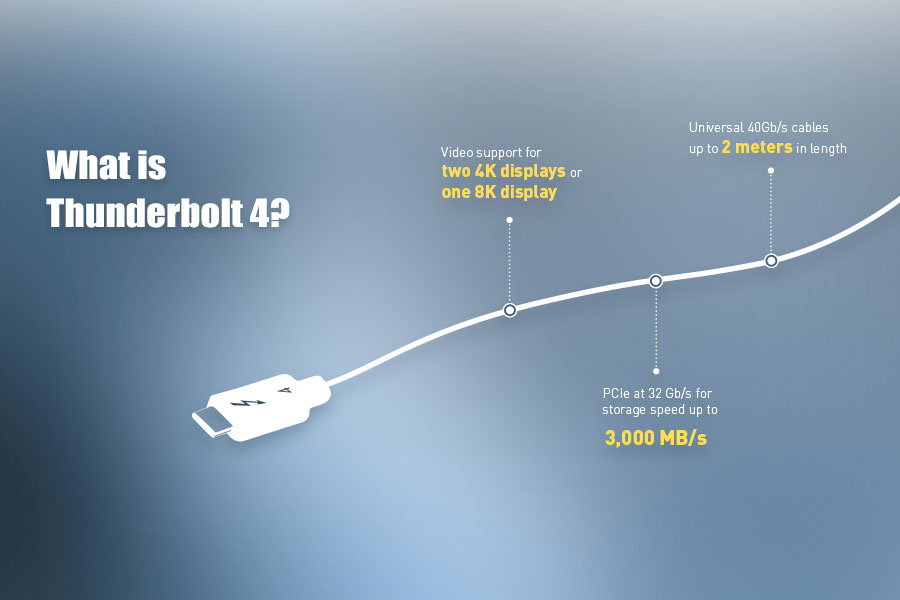
Thunderbolt 4 boasts an astonishing data transfer speed of up to 40 Gbps. With such a high speed, it can transfer large files like 4K videos or high-resolution images in just a few seconds. Moreover, it supports up to two 4K monitors or one 8K monitor, making it ideal for users who require multiple high-resolution screens.
USB 4 Speed
USB 4 also offers impressive data transfer speeds, ranging from 20 Gbps to 40 Gbps, depending on the specific implementation. This means that, like Thunderbolt 4, it can quickly and efficiently transfer large files. In terms of monitor support, USB 4 can handle a single 8K monitor or two 4K monitors, similar to Thunderbolt 4.
Compatibility
Thunderbolt 4 Compatibility
One of the advantages of Thunderbolt 4 is its compatibility with previous generations of Thunderbolt and USB devices. You can use a Thunderbolt 4 port to connect Thunderbolt 3, USB 4, USB 3, and USB 2 devices, providing a wide range of functionality. However, it should be noted that appropriate adapters or cables may be required to connect some older devices.
USB 4 Compatibility
USB 4 also offers excellent backward compatibility, seamlessly working with USB 3, USB 2, and even some Thunderbolt 3 devices. Additionally, the introduction of USB 4 has promoted the adoption of the USB Type-C connector as a standard. Its reversible design makes it easy to plug in.
Data Transfer Capability
Thunderbolt 4 Data Transfer
As mentioned earlier, Thunderbolt 4 provides data transfer speeds of up to 40 Gbps. In addition to its remarkable speed, it supports daisy-chain connections, allowing you to connect up to six Thunderbolt devices in a single chain. This feature makes it easier to create an interconnected workspace with multiple peripherals.
USB 4 Data Transfer
USB 4 can achieve data transfer speeds of up to 40 Gbps (depending on the implementation). Although it does not support daisy-chain connections, it offers other practical features, such as USB Power Delivery and alternate modes like DisplayPort, which enable you to connect monitors and other peripherals using a single cable.
Power Delivery
Thunderbolt 4 Power Supply
Thunderbolt 4 supports power output of up to 100 watts, enabling you to quickly charge laptops or other devices. This feature is particularly beneficial for users who want to reduce cable clutter and charge their devices using a single cable.
USB 4 Power Supply
Similar to Thunderbolt 4, USB 4 also supports power output of up to 100 watts, providing fast charging capabilities for compatible devices. This makes USB 4 an ideal choice for users who wish to simplify their charging setup and reduce cable clutter.
Cost
Thunderbolt 4 Cost
Thunderbolt 4 technology is generally more expensive than USB 4, whether it is for devices that support the technology or peripherals that use it. The higher cost stems from the advanced features and superior performance offered by Thunderbolt 4, making it a more high-end option for users who demand top-tier performance.
USB 4 Cost
USB 4 is usually more affordable than Thunderbolt 4, making it a more accessible choice for many users. The lower price does not mean a significant compromise in performance, as USB 4 still offers impressive data transfer speeds, power delivery, and compatibility.
Security
Thunderbolt 4 Security
Thunderbolt 4 has enhanced security features compared to its previous generation. It supports Intel VT-d-based Direct Memory Access (DMA) protection, which helps prevent unauthorized access to computer memory and sensitive data.
USB 4 Security
Although USB 4 does not have the same level of security features as Thunderbolt 4, it still ensures the security of data transfer and device charging.
Conclusion
In conclusion, Thunderbolt 4 and USB 4 each have their own strengths and weaknesses. Thunderbolt 4 offers better performance, daisy-chain functionality, and enhanced security. USB 4, on the other hand, is more cost-effective and has excellent compatibility. You can make the most suitable choice between the two based on your specific needs and budget.