By PURPLELEC | 28 May 2025 | 0 Comments
USB connectors: types, evolution and buying guide
In today's increasingly popular electronic devices, USB connectors play a crucial role as a bridge for communication and power supply between devices. But facing various types such as USB A, USB B, USB C, many people feel confused. This article will take you to a deeper understanding of their differences, helping you choose the most suitable USB connector according to your needs.
1、 USB technology: the cornerstone of connection and power supply
Since its inception in 1996, Universal Serial Bus (USB) technology has rapidly replaced slower serial and parallel ports. Its main goal is to standardize the communication and power supply of computer peripherals and simplify the device connection process. From initially used to connect basic devices such as keyboards, mice, printers, etc., to now supporting smartphones, tablets, audio and video devices, the application scope of USB continues to expand.
One major advantage of USB technology is its integration of data transmission and power supply, without the need for additional configuration of data speed or address, greatly improving the convenience and efficiency of use. With the development of technology, USB standards are constantly updated, and the latest USB4 standard has increased the transmission speed to 80Gbps, demonstrating its powerful evolutionary ability.
2、 Detailed explanation of USB connector types
(1) USB-A: Classic 'Old Face'
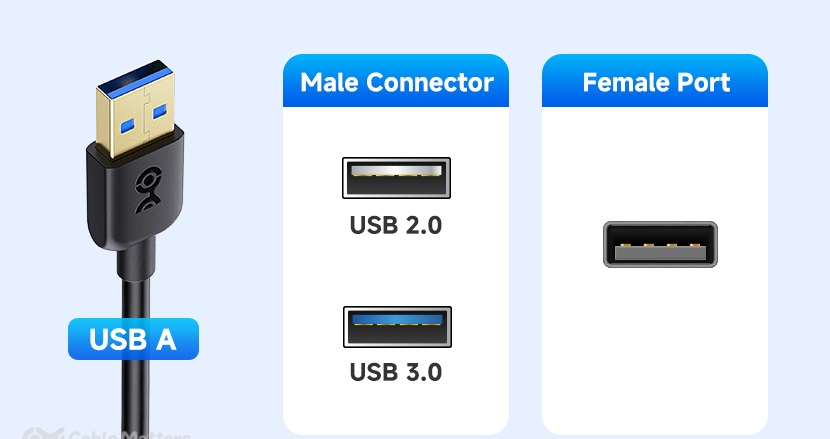
USB-A is the most common USB connector, which can be found everywhere on personal computers, laptops, chargers, and other devices. It is a standard rectangle with four metal pins inside, and has been a commonly used interface for data transmission and power supply for over 20 years. However, USB-A adopts an irreversible design and requires attention to direction when inserting, which can cause inconvenience to some extent.
It supports multiple versions such as USB 1.1, USB 2.0, USB 3.0, USB 3.1, etc., and different versions have differences in speed and power output. For example, USB 2.0 can reach a speed of 480Mbps, while USB 3.0 can increase it to 5Gbps, and the internal USB 3.0 port is usually blue for users to distinguish. Despite the rise of new interfaces such as USB-C, USB-A is still widely used in many devices.
(2) USB-B: Exclusive Interface for Large Devices

The USB-B connector is square with angled edges and is commonly used to connect large peripheral devices such as printers, scanners, and external hard drives to ensure stable data transmission and power output. It is different from USB-A, which is mostly used for host connection, while USB-B is mainly used for device connection, realizing the connection between peripheral devices and computers.
There are also various variants of USB-B, with traditional USB-B 2.0 used for devices such as printers, while USB-B Mini and USB-B Micro are commonly found in portable devices such as older cameras and hard drives. At the same time, it supports versions such as USB 2.0 and USB 3.0. The USB 3.0 version has a larger interface, more pins, and the interior is also blue, which significantly improves transmission speed and performance compared to the old version.
(3) USB-C: the 'spokesperson' for future technology

The USB-C, launched in 2014, has become a highlight with its symmetrical design, and its reversible feature solves the problem of insertion direction. It has a flat and compact port with a flat oval hole, widely used in modern devices such as smartphones, laptops, tablets, etc., and supports multiple functions such as data transmission, charging, and video transmission.
In terms of performance, USB-C has obvious advantages. Through the DisplayPort Alt Mode, it can achieve video transmission, which USB-A and USB-B do not have; Supports higher data transfer rates, up to 80Gbps under the latest USB4 V2 standard; The power supply capacity has also been greatly improved, providing up to 240 watts of power, which can quickly charge high power consuming devices such as gaming laptops and monitors. In addition, Thunderbolt technology is often integrated with USB-C ports, such as Thunderbolt 5 which has a data transfer speed of up to 120Gbps and supports daisy chain connection of multiple devices, making it highly favored by professional users.
In addition to the main types mentioned above, Micro USB and Mini USB were once popular in older devices, but with technological development, Micro USB is gradually being replaced by USB-C, and Mini USB has been basically eliminated.
3、 The Evolution Path of USB Technology
The development of USB technology has always revolved around faster data transfer, stronger power supply capabilities, and higher device compatibility. In 1996, USB 1.0 had a speed of only 12Mbps, but in 2000, USB 2.0 increased the speed to 480Mbps, becoming the mainstream standard at that time.
In 2008, USB 3.0 was released, and the speed jumped to 5Gbps; In 2013, USB 3.1 was launched with a speed of 10Gbps and the introduction of USB Type-C interface; In 2017, USB 3.2 increased its speed to 20Gbps through multi-channel operation; USB4 was released in 2019, initially supporting a speed of 40Gbps and compatible with Thunderbolt 3; In 2023, USB4 V2 will double its speed to 80Gbps. Nowadays, USB-C has become mainstream, marking the transition of USB technology towards a universal integrated solution.
4、 How to choose the appropriate USB cable
Choosing the appropriate USB cable requires comprehensive consideration of compatibility, data transmission requirements, and power requirements. Due to the different shapes and sizes of USB-A, USB-B, and USB-C, as well as their varying physical compatibility, adapters may be required for interconnection.
To ensure device safety and performance, certified and durable USB data cables should be selected to avoid purchasing counterfeit and inferior products. Meanwhile, the length and flexibility of the cable can also affect the charging speed and ease of use. Although the USB standard is backward compatible with older versions, choosing the right connector type is still crucial. Carefully examining the cable specifications is necessary to make a wise choice that meets your own needs.
HDMI 2.2: Opening a new era of high-definition audio and video
What is Thunderbolt 5? Redefining the standard for high-speed connections
Leave a Reply
Your email address will not be published.Required fields are marked. *