By PURPLELEC | 29 March 2025 | 0 Comments
How to Choose the Right USB Hub for Your Laptop
In today's digital age, laptops have become an indispensable assistant in both our professional and personal lives. From daily office tasks such as processing documents and creating presentation decks, to leisure activities like watching movies and playing games, as well as learning, charging, and participating in remote meetings, laptops are deeply involved throughout. With the explosive growth of smart devices, such as USB flash drives, external hard drives, wireless keyboard and mouse receivers, printers, and digital drawing tablets, all need to be connected to laptops, making the demand for more USB ports increasingly urgent. USB hubs have emerged as an effective solution. However, with a wide variety of options on the market, how can you accurately select the one that suits your needs? Don't worry. The following comprehensive guide will clear the fog for you.
I. Thoroughly Analyze Your Own Needs
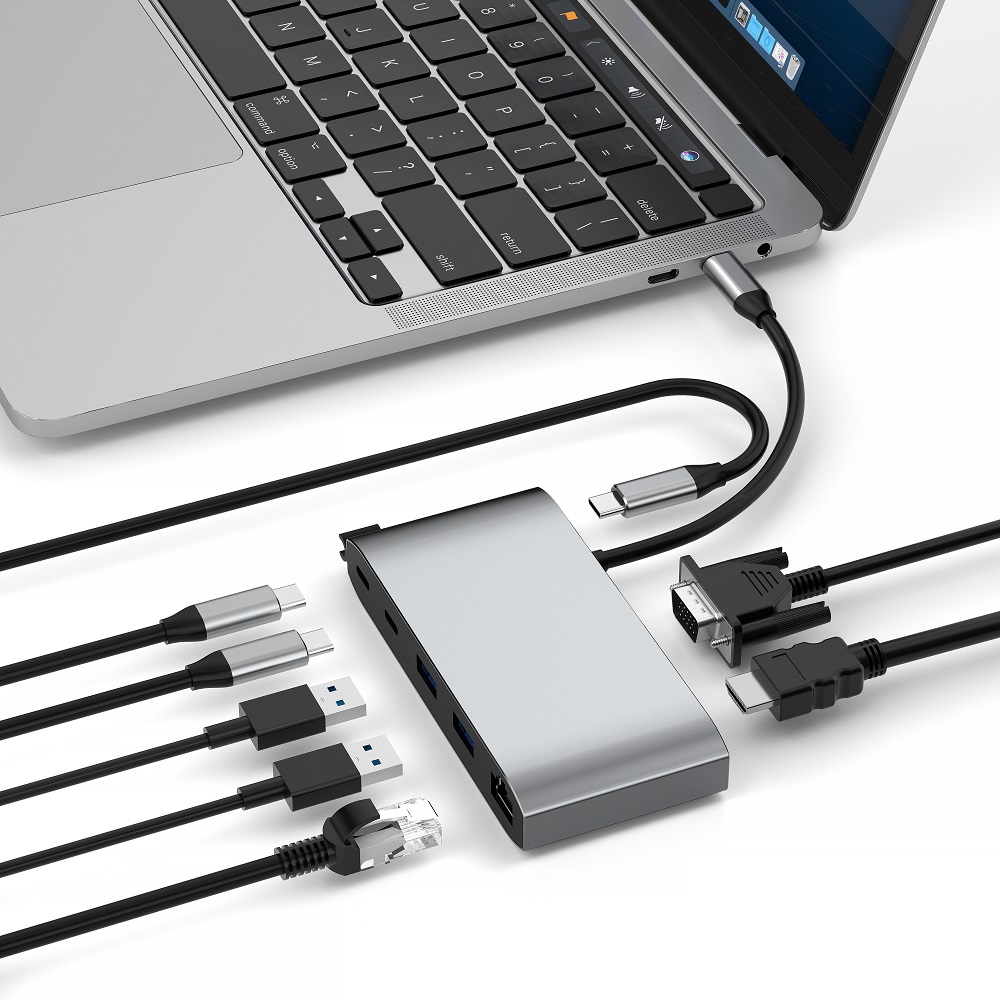
Before starting to shop, take a moment to carefully sort out your actual requirements. First, inventory the types and quantities of devices you plan to connect. If you only need to connect a mouse, keyboard, and USB flash drive in daily use, then a few basic USB - A ports can easily handle it. If you have new - style devices that support USB - C interfaces, such as the latest mobile phones, tablets, and even some high - speed external hard drives, you must choose a hub that is compatible with USB - C to ensure efficient and smooth data transfer. In addition, you also need to consider whether there are special functional requirements. For example, if you often need to connect an external monitor for presentations or expand the screen space, then you need to pay attention to hubs with HDMI interfaces. If the network in your office environment is unstable and you rely on a wired network to ensure network connection quality, a hub integrated with an Ethernet interface is the "favorite". Clearly defining your needs is the key first step towards making the right choice.

II. Weigh Portability and Functionality
If you are a "frequent flyer", constantly on the go between cities and facing diverse daily office scenarios, from high - speed train carriages and airplane cabins to client meeting rooms and shared office spaces, then a compact and lightweight hub is your best partner. Such hubs are usually small in size and can be easily stuffed into a computer bag or pocket without adding much burden, and can be used conveniently anytime and anywhere. Conversely, if you work at a desk for a long time and have high requirements for device functionality, hoping to connect multiple types of devices at once to achieve efficient office work, such as connecting an external monitor for dual - screen or even multi - screen collaborative work, connecting a printer to batch - process files, and accessing a professional drawing tablet for creation, a docking station with rich functions and a complete range of interfaces is the ideal choice. Although it is larger in size and less portable, its powerful connection capabilities and rich functions can fully meet complex office needs and greatly improve work efficiency. You need to carefully weigh between the convenience of portability and the power of functionality according to your own usage scenarios.
III. Ensure Compatibility and High Performance
Compatibility is one of the core considerations when choosing a USB hub. Be sure to confirm that the selected hub is seamlessly compatible with the operating system of your laptop. Whether it is the mainstream Windows, macOS, or the less common Linux system, it should be able to be used immediately after plugging in, avoiding annoying situations such as driver incompatibility and device unrecognition. At the same time, pay attention to the data transfer speed of the hub. Different interface versions, such as USB 2.0, USB 3.0, USB 3.1, USB 3.2, and even the latest USB4, have huge differences in transmission rates. For example, the bandwidth of USB 2.0 is only 480Mbps, and it takes a long time to transfer large files; while USB 3.0 can reach up to 5Gbps, and USB 3.1 Gen2 can soar to 10Gbps. If you need to connect a high - speed external hard drive or transfer 4K high - definition video materials, you need to select a hub that supports high - speed transmission, and pay attention to whether its actual transmission performance is consistent with the promotion. Beware of "false promotion" to ensure that it meets the strict requirements of devices for data transfer speed.
IV. Consider Power Delivery and Charging Function
In the fast - paced life, device battery anxiety often plagues us. Therefore, whether the hub has the functions of power delivery and charging is of great importance. Some high - end hubs can not only achieve data transfer but also power the connected devices, and even directly charge the laptop. For users who rely heavily on devices for work and entertainment throughout the day, this function can be a "lifesaver". For example, when working outside, through a hub that supports the PD fast - charging protocol, you can connect multiple devices to work while replenishing the battery of the laptop, effectively extending the device's battery life and avoiding work interruptions due to low battery. When choosing, pay attention to the power supply power of the hub and the supported charging protocols to ensure compatibility with your own devices and continuously "power" the devices.
V. Pay Attention to Build Quality and Design Details
Build quality is directly related to the service life and stability of the hub. High - quality hubs usually use durable materials. For example, the aluminum alloy shell not only has an excellent texture but also has excellent heat dissipation performance. It can effectively dissipate the heat generated by the device during long - term high - load operation, avoiding performance degradation and device failures due to overheating. At the same time, pay attention to whether the internal circuit design of the hub is reasonable and whether it has safety protection mechanisms such as over - current protection, over - voltage protection, and leakage protection to comprehensively protect the safety of devices and data. In terms of design, whether the interface layout is reasonable cannot be ignored. A reasonable interface spacing can prevent device plugs from squeezing each other and being inconvenient to plug and unplug, ensuring that multiple devices can be stably connected at the same time. In addition, some hubs are also thoughtfully designed with indicator lights to intuitively display the device connection status and data transfer situation, providing convenience for user operation.

VI. Refer to Reviews and Recommendations
Before making a purchase decision, never ignore this crucial step of referring to others' experiences. In the Internet age, information is extremely accessible. Browse the usage reviews shared by other users on e - commerce platforms and professional technology forums, as well as the professional evaluation reports issued by technical experts, to deeply understand the performance of the hub in real - world usage scenarios. From device compatibility, transmission speed stability, durability, to product appearance design and operation convenience, comprehensively master the product's advantages and disadvantages. A hub that has received a large number of positive reviews and has a good reputation for customer service can give you peace of mind when buying and a comfortable experience when using, providing a solid guarantee for the entire user experience.
VII. Reasonably Plan Your Budget
Price is an important factor affecting the purchase decision. When choosing a USB hub, a reasonable budget needs to be set in advance. The prices of hubs on the market vary widely, ranging from basic models for dozens of yuan to high - end products for thousands of yuan. However, it should be remembered that blindly pursuing low prices and choosing hubs with poor quality may save money in the short term, but it is very likely to encounter frequent problems in subsequent use, such as unstable transmission, damaged interfaces, and poor device compatibility, ultimately having to repurchase and increasing costs. On the contrary, making a moderate investment in a high - quality hub, although it costs more upfront, can save you a lot of trouble with its excellent performance and stable quality. In the long run, it has a higher cost - performance ratio. Carefully screen within your budget and strive to find the perfect balance between cost and function to achieve the best input - output ratio.
Conclusion
Choosing a suitable USB hub for a laptop is actually a comprehensive consideration journey around multiple dimensions such as needs, performance, quality, and price. Deeply understand your own needs, accurately weigh portability and functionality, strictly control compatibility and performance, comprehensively consider power delivery and charging functions, closely pay attention to build quality and design details, fully refer to others' review suggestions, and reasonably plan your budget. Be cautious and thoughtful at every step. Don't miss out on a high - quality hub that can greatly enhance the laptop usage experience and work efficiency due to temporary budget constraints. Make a wise decision, and in subsequent use, you will gain a seamless and efficient digital work and life environment.
Function, definition and working principle of USB C to HDMI adapter
Thunderbolt 4 certified docking station: ideal for efficient connection of multiple devices
Leave a Reply
Your email address will not be published.Required fields are marked. *