By PURPLELEC | 12 July 2025 | 0 Comments
USB-C to Lightning Cable, A New Charging Option for iPhones
Battery life being short is a common drawback of many mobile devices, and iPhones are no exception. It's quite frustrating when your phone runs out of power at a critical moment, especially right before you're about to head out.
The Evolution of Charging Cables
Let's first take a look at the iPhone charging cables. In the past, most iPhones used USB-A charging cables for high-speed and reliable charging. Nowadays, with faster charging speeds, using a USB-C to Lightning cable can significantly speed up the charging process. For instance, if you charge your phone for just 5 minutes before going out and find that the battery is at 20%, after a quick shower, you can use a 20W charger to rapidly charge your iPhone 12 Pro Max from 20% to 55%.
Getting to Know the USB-C to Lightning Cable
A charger consists of an adapter and a cable. The cable has two ends: one is a USB interface, and the other is a Lightning interface. A USB-C to Lightning cable has a USB Type-C connector at one end and a Lightning connector at the other. Moreover, the Lightning terminals on all USB-C to Lightning cables are silver-white instead of gold. To charge your device to 50% in just 30 minutes, you'll need a USB-C to Lightning charging cable and a charger with a power rating higher than 20W for your iPhone.
The standard length of an official Apple USB-C to Lightning cable is 2 meters (6.6 feet). When you purchase a new iPhone, iPad, iPad Pro, AirPods, or other devices, you'll receive this type of cable.
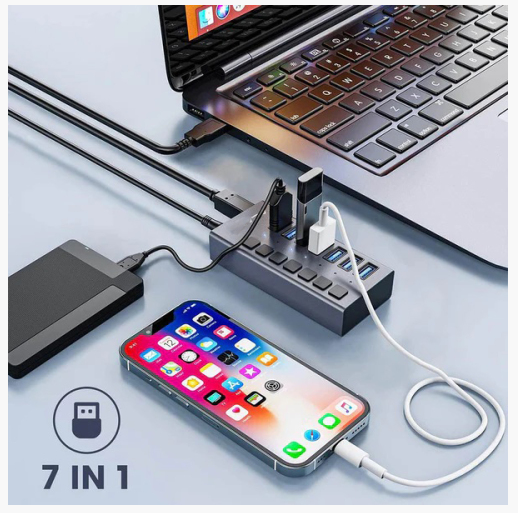
Comparison between USB-A and USB-C to Lightning Cables
Design and Shape
The USB-A interface can only be inserted in one specific direction at the bottom of the USB port, which means its design isn't particularly cool or slim. In contrast, the USB-C interface has undergone upgrades in design, functionality, and charging quality. It seems to have changed the game. Whether it's for data transfer, speed, or improving charging speed, the USB-C can handle it all. In addition, its user-friendliness has made it popular among well-known tech giants. It's no wonder that Samsung, Google, and Microsoft are switching to the USB-C interface, and it's not surprising that Apple has chosen it for its upgrades.
Data Transfer Speed
When it comes to data transfer between devices, we can compare these two types of cables. Generally, USB-C interfaces support high data transfer rates. However, when connected to a Lightning interface at the other end, both can provide a data transfer rate of up to 480Mbps, which is fast enough to transfer large files in just a few minutes. So, there's no difference in the data transfer speed provided via the Lightning interface, regardless of which cable or device is connected.
Power Compatibility
First, you should know that when it comes to charging, it's hard to find a USB-A charger with a power rating higher than 12 watts. In fact, the USB-A charging adapter that Apple usually includes in the packaging of iPhones and iPads is a basic 5V 1A device, so the maximum charging power is only 5W, which is less than one-third of the actual charging power of the devices. Moreover, the 5W charging speed remains stable, and it won't change no matter which device you charge.
The situation is different with USB-C charging adapters and USB-C to Lightning cables. Most of them support a USB PD (Power Delivery) power of 15W or higher, and most are USB-C adapters. So, assuming your iPad or iPhone can handle this power, these adapters will charge much faster than a 10W USB-A adapter. This includes all the USB-C charging adapters that come with MacBooks and MacBook Pros. All of these adapters can charge iPhones and iPads at 18W via a USB-C to Lightning cable.
There won't be a huge difference in charging speed for iPhones, but iPads may benefit more. In other words, you can also use this cable with Apple 18W, 20W, 29W, 30W, 61W, 87W, or 96W USB-C power adapters to charge your iOS devices. You can even use the fast-charging feature on some iPhone and iPad models. The charging speed of the same cable will vary when used with chargers of different power ratings.
In the long run, the USB-C to Lightning cable will come out on top.
PS: When it comes to chargers, the most important thing is to read the specifications of the charging adapter you purchase to understand the power it can provide. Also, note that if it's a multi-port adapter, the power of each port may be different. For example, if a charger has both USB-A and USB-C ports, the charging speeds may still vary.
Recommended Choice and Usage Instructions
The USB-C to Lightning charging cable is definitely the better option. Faster charging speeds mean you can save time. Just hang the charger on the wall and move around freely. Why not buy one now? You can purchase it from uniAccessories, which offers more advanced features.
Connecting a USB-C to Lightning cable is very simple. The following steps will help you understand the specific operation and charging mechanism of your device:
1、Insert the USB Type-C connector into the USB-C port of the charging adapter.
2、Then, plug the Lightning connector into the device you want to charge.
3、Insert the adapter into a power outlet and turn it on.
However, when looking for the right charger for different devices using the same USB-C to Lightning cable, you may get confused because you can use the same cable with different Apple 18W, 20W, 29W, 30W, 61W, 87W, or 96W USB-C power adapters to charge your iOS devices.
You can use any of the adapters listed below (make sure they comply with applicable safety standards) to charge devices with a Lightning interface, such as your iPhone, iPad, Apple Watch or iPod, AirPods, AirPod Pro, Magic Mouse and keyboard, and Apple TV remote control.
HDMI 1.4 vs 2.0: In-depth Comparison and Connection Guide
USB-C to HDMI: A Convenient Option for Big-Screen Connection
Leave a Reply
Your email address will not be published.Required fields are marked. *