By PURPLELEC | 13 June 2025 | 0 Comments
In-depth Understanding of USB-C to Ethernet Adapter
What is a USB-C to Ethernet Adapter?
An Ethernet adapter is a sophisticated hardware solution designed for establishing wired network connections. Whether you're on the go or in the office, it ensures fast data transmission.
This adapter can be connected to laptops that are compatible with USB C and Thunderbolt 3. It can also be used on tablets, desktop computers, and other devices without built-in Ethernet ports.
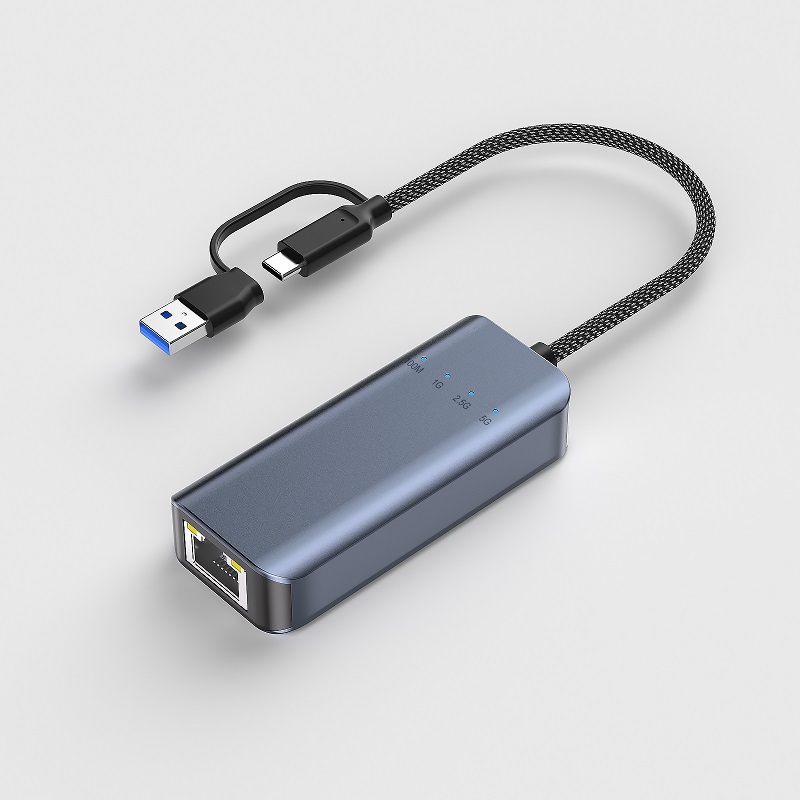
A high-quality USB C to Ethernet adapter allows individuals to easily connect to a wired network without compromising the connection quality. As a result, the data transmission speed and the reliability of information exchange remain consistent.
The Ethernet adapter has powerful functions. It can not only exchange video, data, power, and audio signals but also be used for power exchange and Internet connection. It is a clever addition to your accessory collection, enabling you to stay connected to the network at all times. With it, individuals can keep abreast of business and office activities, facilitate rapid communication, and make timely business decisions.
How to Choose the Adapter That Best Suits Your Needs?
When purchasing the best USB C to Ethernet adapter, there are two key characteristics that require careful consideration:
Compatibility
Compatibility is the primary factor because Ethernet adapters can support multiple operating systems. If you want the accessory to work properly on a specific device, configuration is necessary. This step is particularly crucial in enterprises, academic institutions, and the medical field.
For Mac and Windows systems, drivers need to be installed for the adapter to work successfully; otherwise, the accessory will not function properly. You can download the drivers from specific websites or use portable storage devices to execute the relevant files.
Chromebooks usually have built-in Ethernet adapters with relevant drivers already installed, so there is no need to purchase one separately. However, on Linux systems, the choice of the best USB C to Ethernet adapter depends on the kernel version.
Speed
The information exchange speed of an Ethernet adapter is a key parameter. It not only affects the adapter's functionality but also its service life. To ensure the maximum speed, it is necessary to ensure that the capacity of the Ethernet adapter matches that of the Ethernet switch, router, and LAN cable.

Advantages of Using a USB-C to Ethernet Adapter
Time-saving
If your enterprise frequently needs to share large amounts of data, an Ethernet adapter can play a significant role. It can reduce the transmission time from several days to just a few hours. Moreover, all devices in the company can enjoy high-speed Internet, ensuring the timeliness of information exchange.
Quality Improvement
An Ethernet adapter can ensure that data is not affected by electromagnetic interference. Exposing data to the external environment may severely damage the image quality and prolong the data transmission time. However, the best USB C Ethernet adapter will not degrade the image quality or suggest unreasonable file extraction. In addition, it can effectively improve the transmission speed.
Considerations for Compatibility of Different Types of Connections
When purchasing the best Ethernet adapter, the main consideration is the device to which it will be connected. Currently, most devices are equipped with USB C ports, but other ports such as USB A and USB Micro are also common standard configurations.
In addition to providing Internet connectivity, the best USB C to Ethernet adapter should also have the function of connecting peripheral devices. For example, you may need additional ports to connect a mouse, keyboard, memory card, or USB flash drive. In short, the number of ports must be considered to ensure compatibility.
If you often go out, such as for remote work, using an unstable Wi-Fi is obviously not a wise choice. Another important factor for compatibility is portability. You certainly don't want to carry a bulky adapter that takes up too much space.
Transmission speed is one of the most critical factors when purchasing an Ethernet adapter. Therefore, when choosing, factors such as data exchange, Internet speed, and download capacity should be fully considered.

Setting Up a USB-C to Ethernet Adapter
First, insert the USB C end of the adapter into the USB port of the required device. Then, wait for the laptop or desktop computer to recognize the adapter and automatically install the drivers.
The second step is to pick up the Ethernet cable and plug it into the other end of the adapter. Make sure both ends are securely connected to avoid damage to the connection.
Next, select the network icon at the bottom right corner of the computer taskbar. Hover the cursor over the icon to display the Ethernet access permission. On Windows 11, it will show "Connected," and on Windows 10, it will show "Internet access."
Troubleshooting Tips
If the computer fails to recognize the Ethernet adapter, you can follow these steps for troubleshooting:
。Ensure that the cable is connected correctly and securely. A loose cable may cause the Ethernet adapter to not work properly.
。Secondly, check if the cable is damaged.
。Try using a different USB C port to establish the connection.
If the driver is not installed:
。Make sure that the adapter and the network cable are not scratched.
。Right-click on Windows and then click "Device Manager." Go to "Network adapters" and search for the Ethernet adapter to configure the settings.
。If the firewall or antivirus software is hindering the configuration or installation, temporarily disable them.
。Finally, ensure that the operating system is compatible with the driver. You may need to browse the system requirements for more detailed information.
A high-quality USB C to Ethernet adapter can simplify the operation process and make information exchange more convenient. You can easily add devices to the office or home network, allowing everyone to stay closely connected.
Guide to Connecting and Configuring an Ethernet Adapter on Mac
Unlocking HDMI Connection Puzzles: A Comprehensive Analysis from Adaptation to Compatibility
Leave a Reply
Your email address will not be published.Required fields are marked. *