By PURPLELEC | 21 July 2025 | 0 Comments
Differences and Choices between Thunderbolt and USB-C
It can be challenging to understand the nuances of Thunderbolt and USB-C and their docks/hubs. However, by considering factors such as data transfer speeds and power supply options, we can identify their unique attributes. Although these standards overlap in some ways, port and standardization issues make the situation more complicated. Next, you will learn how USB and Thunderbolt standards affect daily life, including the impact of long USB-C cables on data transfer speeds and how to unleash the maximum potential of high-resolution displays, charging, and streaming. At the same time, you will also learn the difference between USB4 and Thunderbolt 4, highlighting the importance of manufacturer specifications.

USB Technology Review and Common Types
First, let's review USB technology and its common types:
USB 1.1 and 2.0: Slow data transfer speeds, USB 2.0 has a maximum speed of 480Mbps, which can be called "turtle speed".
USB 3.0, 3.1, and 3.2: Known as SuperSpeed USB, the speed is greatly improved. USB 3.0/3.1 Gen 1 offers speeds up to 5Gbps, USB 3.1 Gen 2 supports up to 10Gbps, and USB 3.2 Gen 2 reaches 20Gbps.
USB4: The latest version, providing data transfer speeds up to 40Gbps, backward compatible with USB 3.2, USB 2.0 and Thunderbolt 3. USB4 Gen 4 will reach 80Gbps.
USB connector types
USB Type A: Rectangular interface, widely used in computers, laptops and other devices.
USB Type B: Common in old printers and scanners.
USB Type C: Oval reversible interface, supports high-speed data transfer, power supply and multiple protocols, such as USB 3.1, USB 3.2, Thunderbolt 3, DisplayPort, etc.
Thunderbolt and USB-C: Origins and Differences
Thunderbolt and USB-C have different origins: Thunderbolt originated from the cooperation between Apple and Intel, while USB-C was created by the USB Developer Forum. Thunderbolt's superior performance is mainly due to the technical support of Apple and Intel. In order to maintain its leading position, Apple worked with Intel to develop a protocol that can transmit power and video at the same time, namely Thunderbolt launched in 2011. USB-C was not launched until 2014.

Thunderbolt version introduction
Thunderbolt 1 and 2: Use mini DisplayPort connector to provide bidirectional data transmission speed, Thunderbolt 1 is 10Gbps, Thunderbolt 2 is increased to 20Gbps, and both support daisy chain connection of six devices.
Thunderbolt 3: Use USB-C interface, provide 40Gbps bidirectional data transmission speed, compatible with a variety of devices and protocols, and backward compatible with USB-C devices.
Thunderbolt 4: Provides 40Gbps bidirectional bandwidth, backward compatibility, supports power delivery (100W), 4K or 8K visual experience, and has advanced security features.
Comparison of USB-C and Thunderbolt ports and technologies
At first glance, the Thunderbolt 3/4 interface may be similar to the USB-C interface, but Thunderbolt introduces advanced features such as daisy chain connection, high-speed data transfer rate, and support for 5K monitors. USB-C refers to the port type, while Thunderbolt refers to the technology and interface. Only USB-C ports equipped with USB 3.2 Gen 2 are compatible with Thunderbolt 3, and the functions may be limited.
Difference between USB-C hub and Thunderbolt docking station
Thunderbolt 3 hub
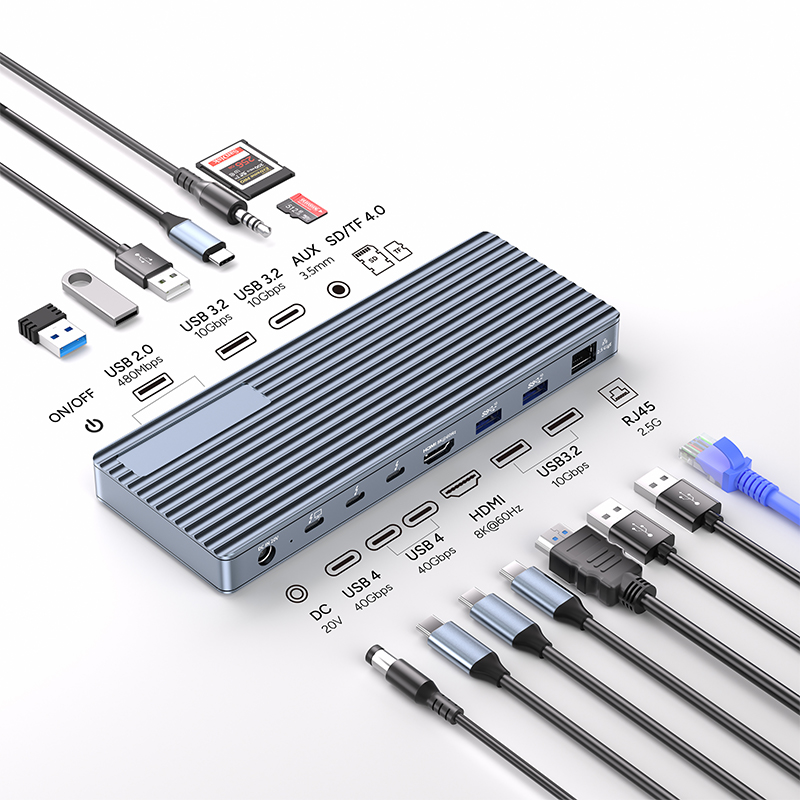
Compatible with USB-C and Thunderbolt 3/4 devices, providing rich connection options, including USB ports, Ethernet, audio jacks, and display output. It has high-speed data transfer capabilities and supports advanced features of Thunderbolt devices.
Designed primarily for Type-C devices, they are partially compatible with Thunderbolt devices. They can connect devices with USB ports, Ethernet and audio jacks, and allow external displays to be connected. However, USB-C docking stations have lower data transfer rates than Thunderbolt 3 hubs (USB4 docking stations may be more powerful).
Limitations:
Data transfer speed: USB-C may reduce the fast data transfer speeds of Thunderbolt.
Display output: USB-C docking stations may have difficulty supporting multiple monitors or matching the display performance of Thunderbolt docking stations.
Power delivery: USB-C docking stations often have limited power delivery capabilities.
Peripheral device limitations: USB-C docks may not fully support all of Thunderbolt's unique peripherals.
Comparison of USB-C, USB4 and Thunderbolt 4
USB-C is a connector type, while USB4 and Thunderbolt are technologies. Both USB4 and Thunderbolt 4 have a maximum data transfer speed of 40Gbps, but the minimum connection speed and power requirements are different. USB4 has a minimum connection speed of 20Gbps or 40Gbps, with a minimum power requirement of 7.5W; Thunderbolt 4 always supports a connection speed of 32Gbps and a power of 15W.
Cable size impact:
Thunderbolt cables can maintain a speed of 40Gbps even if they are over 2 meters.
USB4 cables have a limited transmission distance, and the speed stabilizes at 20Gbps after exceeding 2 meters.
Apple's cooperation with Intel: Macs based on Intel and Apple Silicon
Apple's manufacturing preferences have undergone a shift: before 2020, it cooperated with Intel to use its processors, and its products were called Intel-based Macs; starting in 2021, Apple began to use its own chip processors (M1 and M2), and its products were called Apple Silicon.
Summary and Outlook
Understanding the difference between Thunderbolt and USB-C is the key to making full use of their functions. Thunderbolt has attracted much attention for its superior functions and faster data transmission speeds, while USB-C is more widely used and can be connected to Thunderbolt devices. With the introduction of USB4 and Thunderbolt 4, their power has only grown. USB-C docks and Thunderbolt hubs are essential tools for expanding your device connectivity, but there are issues to keep in mind regarding data transfer rates, display output, power delivery, and peripheral compatibility. As the technology landscape changes, it’s critical to stay up to date on the evolving specifications and standards for these ports.
Comprehensive Guide to DisplayPort Daisy-Chain Multi-Monitor Setup
HDMI 2.1 vs DisplayPort 1.4: A Comprehensive Comparison and Selection Guide
Leave a Reply
Your email address will not be published.Required fields are marked. *