By PURPLELEC | 23 May 2025 | 0 Comments
Thunderbolt 4 and USB4 hubs and docking stations: A new revolution in connectivity
In the field of computer connection and expansion, Thunderbolt 4 and USB4 hubs and docking stations, as representatives of cutting-edge technology, are leading the innovation of device connection methods. They not only inherit the compatibility of the old connection standards, but also bring users a more efficient and convenient experience with significant performance advantages.
Why do you need hubs and docking stations?
For laptop and tablet users, limited device ports often become a problem that hinders efficient work. Desktop computers and Macs are often equipped with abundant ports on the front and back, but the number of ports on laptops and tablets is relatively scarce. At this time, multi-function adapters, hubs, and powerful docking stations become "saviors". They can not only add ports and slots for connecting hard drives, memory sticks, memory card readers, printers and other devices, but also provide access to wired input tools such as keyboards and mice, and can even easily connect one or two external displays, with Gigabit or higher Ethernet interfaces, to achieve stable wired network access. All docking stations and hubs tested support at least two 4K external displays at 60Hz refresh rate; one 8K display can be supported under Windows system, and one 6K display can be supported under Mac system, meeting users' needs for high-definition multi-screen display.
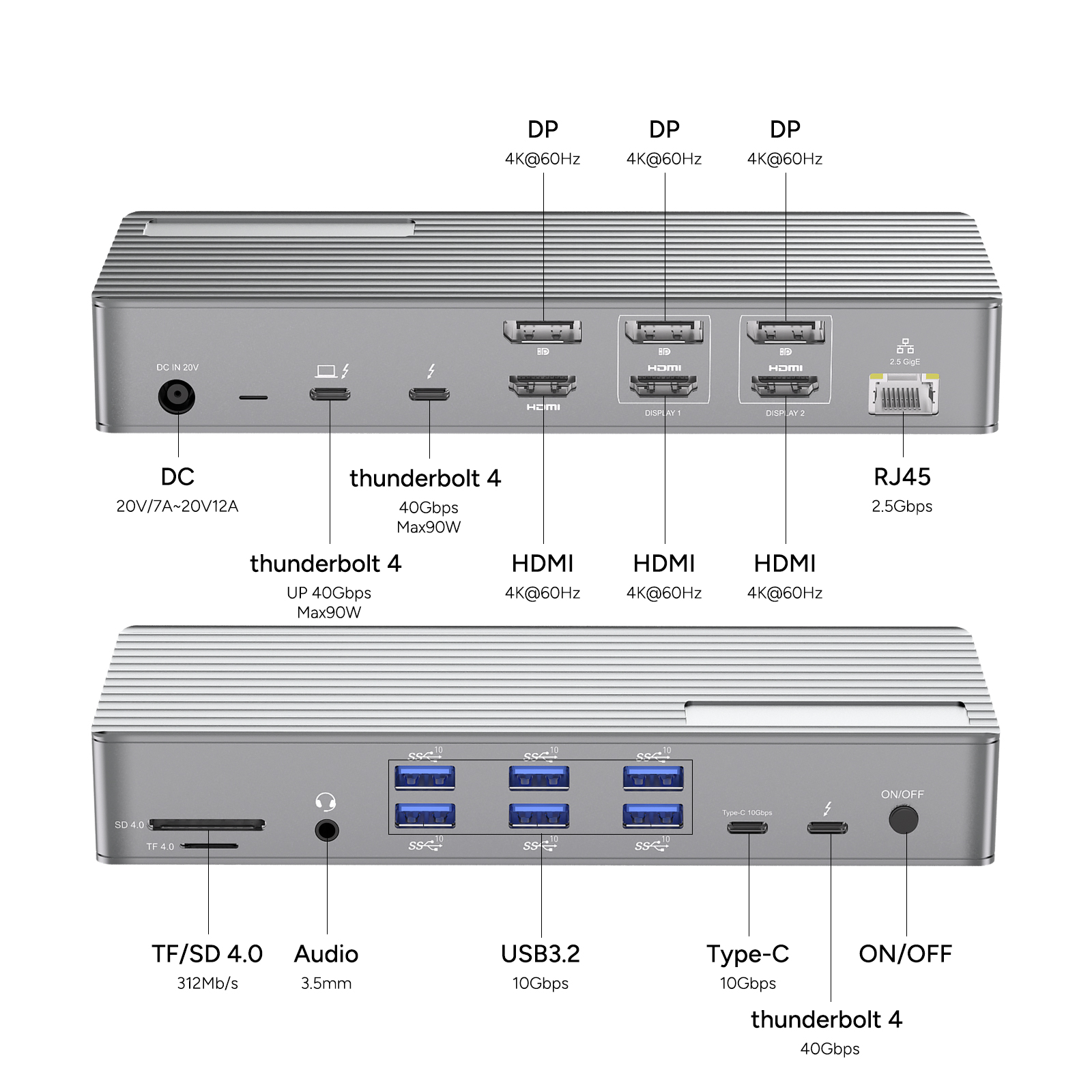
Thunderbolt 4 and USB4: New heights of connection standards
Both Thunderbolt 4 and USB4, as the latest connection standards, use the simple and reversible USB-C connector, which is very common on most new computing devices. They completely subvert the transmission speed limitations of the old USB 3.0/USB-A connector and the low-speed USB-C variants, while maintaining backward compatibility with USB-C and Thunderbolt 3, allowing new and old devices to connect seamlessly.
Speed comparison of different interfaces
The traditional USB-A interface, that is, the old rectangular connector we are familiar with (it must be inserted in a specific direction, and the direction is often contrary to intuition), has obvious differences in bandwidth. The USB 3.0 standard can reach up to 5Gbps, while USB 2.0 can even go as low as 480Mbps. However, among the many device models tested this time, many are equipped with a 10Gbps USB-A interface with a faster transmission speed. In addition, the charging capacity of the device is also worth paying attention to. The charging power of some docking stations and hubs can reach 7.5W.
The initial speed of the USB-C interface is 5Gbps, and the maximum can reach 20Gbps, but 10Gbps is more common in daily use. When choosing a device, its charging power is also critical. Currently, the maximum charging power of USB-C devices can reach 20W.
Thunderbolt 3 (TB3) can achieve high-speed transmission of 40Gbps, but unlike Apple, some Windows PC manufacturers have not fully utilized the full performance advantages of TB3. Thunderbolt 4 (TB4) and USB4 have strict requirements for manufacturers. Only when they fully meet technical advantages such as 40Gbps bandwidth can products be certified, which also makes TB4 more reliable among PC users.
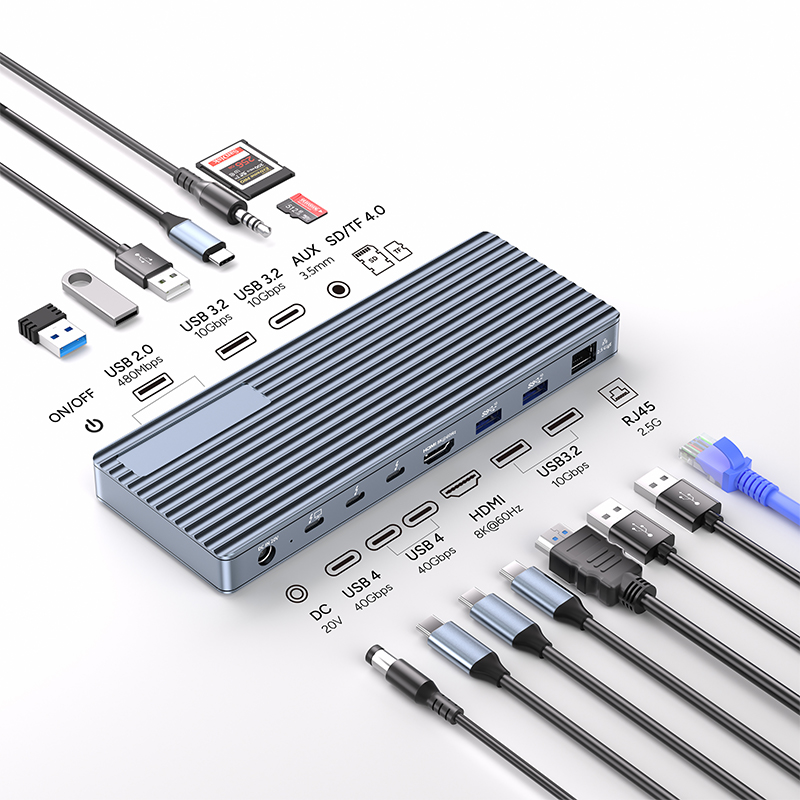
For Apple users, the difference between TB3 and TB4 is not very noticeable. However, TB3 has a unique advantage in daisy chain device connection - when using TB3 to connect a device chain, removing any device except the last device in the chain may cause the entire device chain to be interrupted. This feature has special uses in specific scenarios.
Given the previous inconsistency in connection standards, many hub and docking station manufacturers recommend that Windows users give priority to devices certified by Thunderbolt 4 or USB4, while Mac users are compatible with older USB-C (such as the 12-inch MacBook) and Thunderbolt 3 systems.
Performance Advancement
TB4 and USB4 also bring faster PCIe (Peripheral Component Interconnect Express) with speeds up to 32Gbps and storage speeds up to 3,000MBps, which is twice the minimum requirement of Thunderbolt 3. Although newer MacBooks already have this performance, it undoubtedly provides a direction for upgrading other devices. It is worth mentioning that the available bandwidth of the Thunderbolt port on the right side of some early TB3 MacBooks is relatively low, so you need to pay more attention when using it.
Looking to the future, although Thunderbolt 5 has an amazing speed of 80Gbps (video transmission up to 120Gbps), docking stations equipped with TB5 are not expected to be available on a large scale until mid-2025. However, users don't have to worry, even if TB5 laptops are released, existing TB4 docking stations and hubs will still be compatible with them, ensuring the continuity of equipment investment.
USB4: Redefining the new standard for high-speed connectivity
Thunderbolt 4 and USB4 hubs: Unlocking a new experience of efficient connection
Leave a Reply
Your email address will not be published.Required fields are marked. *