By PURPLELEC | 30 May 2025 | 0 Comments
Choosing the Best SSD: NVMe, SATA, and M.2 Explained
In the field of modern computers, M.2 SSDs (Solid State Drives) stand out as high-performance storage devices with their unique advantages. This type of small device can be directly connected to a computer motherboard. Next, we will delve into all aspects of M.2 SSD, including its definition, types, characteristics, installation points, and significant advantages.
M. What is SSD 2?
M. 2 SSD is a solid-state storage device optimized for small size and high performance, which can be directly installed on the motherboard. It is commonly used in devices with strict space requirements, such as ultrabooks and small desktop computers. In addition, through the external box, M.2 SSD can also be used as a portable hard drive, greatly improving the flexibility of data storage and transmission.
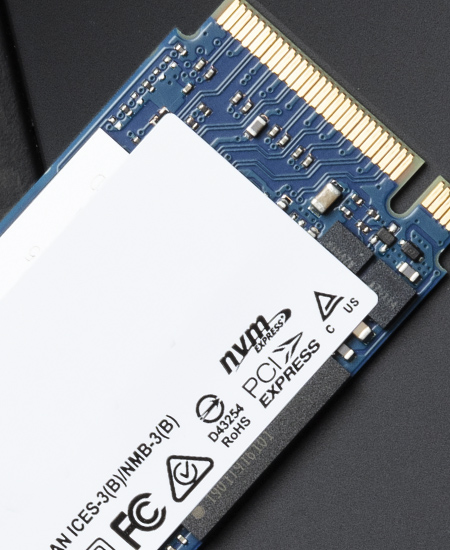
M. SSD supports both SATA and PCIe interfaces, which enables it to adapt to various devices and system configurations. In terms of physical form, it is rectangular in shape, with a width typically of 22 millimeters and a length ranging from 60 to 110 millimeters. Compared with traditional hard drives (HDD) and SATA SSDs, M.2 SSDs adopt solid-state flash memory technology without mechanical components, which not only greatly improves read and write speed, but also enhances reliability and reduces the risk of data loss caused by physical damage.
M. Types of SSDs
M. SSDs are mainly divided into two types: SATA based and NVMe based, each with its own characteristics and suitable for different scenarios.
Although SATA based M.2 SSDs have relatively slow speeds, they are affordable and can meet daily computing needs. They are an ideal replacement for traditional 2.5-inch SSDs in space limited scenarios, especially suitable for small devices such as ultrabooks. Its data transfer rate can reach up to 6Gbps (about 550-600MB/s), significantly faster than traditional hard drives, but still not as fast as NVMe SSDs.
The M.2 SSD based on NVMe performs exceptionally well in terms of performance. The NVMe protocol is designed specifically for SSDs, and with the help of a high-speed PCIe interface, its read and write speeds can reach four times that of SATA SSDs. The transfer speed on PCIe x4 channels can reach up to 31.5Gb/s, making it ideal for high-performance scenarios such as gaming, content creation, and professional workloads. In addition, NVMe SSDs support up to 64000 parallel operation commands, significantly improving data throughput and reducing latency.

M. Key features of SSD 2
M. The 2 interfaces are not only used for SSDs, but can also connect devices such as graphics cards and Wi Fi modules, demonstrating powerful versatility. At the same time, the application of 3D NAND technology significantly increases the storage density of M.2 SSDs without increasing their size, meeting users' demand for high-capacity storage.
M. The size of 2 SSDs is represented by specific codes, such as 2230, 2242, etc. The first two digits represent the width (22 millimeters), and the last few digits represent the length (millimeters). Its length ranges from 30 millimeters to 110 millimeters, with different lengths corresponding to different storage capacities. In addition, the different key types of M.2 SSD, such as B, M, and B+M, determine its compatibility with the motherboard and the number of data transmission channels. The M key is commonly used for NVMe SSD, while the B+M key is commonly used for SATA SSD.
M. Installation of SSD 2
M. The SSD is directly connected to the motherboard through a unique edge connector, and its design with up to 67 pins eliminates the need for additional power and data cables, making the installation process easier. When installing, be sure to align the SSD groove with the motherboard slot to avoid damaging the device. After installation, it is necessary to check the BIOS settings to ensure that the system can recognize the SSD properly.
M. Advantages of SSD 2
M. SSDs have many significant advantages. In terms of speed and performance, the NVMe based M.2 SSD can achieve ten times the transfer speed of traditional SATA SSDs, with a data transfer rate of over 7500MB/s, significantly reducing file transfer and program loading time, and significantly improving overall system performance.

In terms of space utilization, M.2 SSDs are compact in size and do not require additional data cables, saving internal space and making the system architecture more concise, making them particularly suitable for devices with strict space requirements.
In terms of energy consumption, M.2 SSDs consume less power than traditional hard drives, effectively extending the battery life of mobile devices such as laptops and tablets, while also aligning with the energy-saving concept of modern electronic devices.
Looking ahead, the development of technologies such as PCIe 5.0 SSD and NVMe over Fabrics (NVMe oF) will further break through the limits of data transmission speed, bringing more powerful performance improvements to data centers and high-performance computing environments.
Ethernet Technology and Network Device Selection: Splitters vs. Switches
Must see for gamers! How to choose high-quality Ethernet cables
Leave a Reply
Your email address will not be published.Required fields are marked. *