By PURPLELEC | 02 April 2025 | 0 Comments
Laptop docking station: a powerful assistant for convenient office work
In the era of mobile office, laptops have become the preferred equipment for people to work anytime and anywhere with their lightweight and portable features. When you are on the road, whether in a cafe, library, or waiting for a flight or a bus, a laptop can help you complete your work tasks easily. However, when you return to the office and desire the flexibility and efficiency of a workstation, the limitations of laptops gradually become apparent. External auxiliary monitors, mice, and more comfortable keyboards are routine operations to improve the office experience, but this process will instantly turn the originally simple and stylish laptop into a "gathering place" for a bunch of messy cables. Not only is plugging and unplugging devices cumbersome, but the desktop also becomes messy, greatly affecting office efficiency and mood.
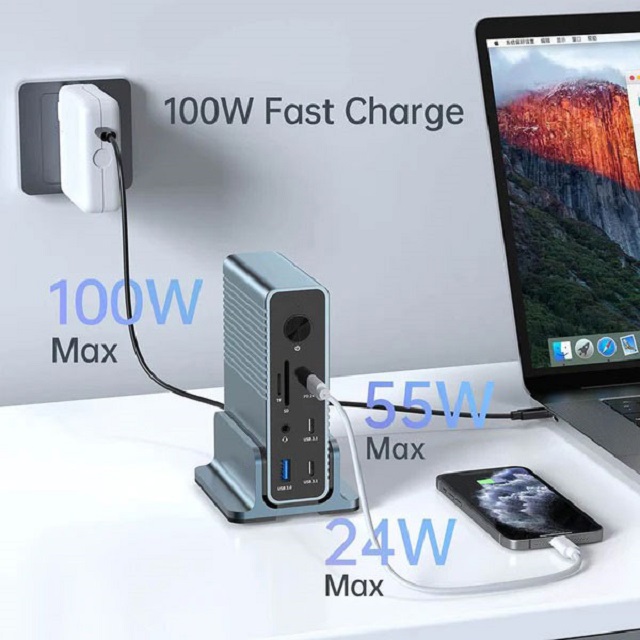
At this time, the laptop docking station made a shining debut, providing a perfect solution to this dilemma. The laptop docking station usually looks like a small box, quietly placed on the desktop. It is like an intelligent hub. One end can connect to a display (single screen or multiple screens) and various peripherals necessary for work, such as printers, scanners, speakers, etc., and the other end can connect your laptop seamlessly with just a simple connection. Once the connection is successful, all external devices are automatically recognized and connected. You can enjoy the portability of a laptop computer, as well as the spacious operating space and flexible device expandability of a desktop computer. The office scene can be switched instantly, and efficient office work can be easily achieved.
However, when purchasing an expansion dock, consumers often face many difficulties. On the one hand, the price range of expansion docks is wide, ranging from entry-level products of around 100 yuan to high-end products of several thousand yuan. While the price is expensive, the performance and quality are uneven. On the other hand, facing a wide range of expansion dock products, it is difficult to intuitively judge which one is the most suitable for you only by the port list and specification parameters. To help everyone solve this problem, the author tested dozens of expansion docks and selected the best ones according to different usage scenarios. The following is a detailed introduction to a very distinctive product - Purplelec Dual Expansion Dock Bracket.

The Purplelec Dual Expansion Dock Bracket breaks the inherent pattern of traditional expansion docks as "just a box with additional ports". Its design is very clever. It can be neatly placed under the laptop, slightly raising the computer and forming an ergonomic tilt angle. When using the computer for a long time, it can effectively reduce neck and eye fatigue and improve the comfort of use. In terms of port layout, there is a rich set of ports on the back of the stand, including multiple USB ports, which can easily connect common devices such as mouse, keyboard, U disk, mobile hard disk, etc.; it is also equipped with three display output interfaces to meet the needs of multi-screen display, whether it is multitasking, creative design, or data analysis, it can greatly improve work efficiency. The reasonable design of these ports is convenient for connecting devices and ensuring that the desktop is neat and orderly, and the cables will not be entangled with each other and hinder operation. In addition, there is a hardware switch on the back, which can easily control the opening and closing of the docking station; the small rubber strip on the top is even more considerate to play an anti-slip role, ensuring that the laptop is placed steadily and will not slip accidentally.
It is worth mentioning that there is also a NVMe solid-state drive slot reserved at the bottom of the docking station. Although the SSD is not included when purchased, users can insert an adapted solid-state drive (most conventional products on the market can be used) to give the docking station additional storage space. This design is extremely practical in actual use. When you are working at your desk and do not need to carry certain files, digital assets or applications with you, you can store them in the docking station's SSD and unload them from your laptop, freeing up its storage space and improving its running speed. For example, when gamers connect their gaming laptops to the docking station, they can easily access the large game library stored on the docking station's SSD and enjoy a smooth gaming experience without worrying about insufficient laptop storage space.
In terms of connection, the Purplelec dual docking station bracket connects to the laptop via two USB-C plugs. The two plugs are arranged together through a small plastic sleeve, which can fit tightly into the compact port layout of popular laptops such as the MacBook Air. If your laptop has a larger spacing between USB-C ports, just pull the sleeve back and separate the plugs for easy adaptation. In actual use, most ports on the docking station can operate normally using only one of the cables, but to enable the two 4K HDMI ports on the back, both cables need to be connected at the same time. It’s important to note that the two USB-C ports need to be on the same side of the laptop, as the cable is limited in length and cannot go around the left and right sides of the laptop to connect. Therefore, be sure to carefully check the port arrangement of your device before purchasing this docking station.
All-round docking station DS018R: powerful functions to meet diverse office needs
Purplelec Triple Display Thunderbolt 4 Docking Station
Leave a Reply
Your email address will not be published.Required fields are marked. *