By PURPLELEC | 14 July 2025 | 0 Comments
HDMI, DisplayPort, USB-C: A Comprehensive Analysis of Interfaces for 4K Resolution
HDMI, DisplayPort, and USB-C are key interfaces found in laptops, TVs, monitors, high-end graphics cards, and gaming consoles. These interfaces offer a wide range of functionalities, but to simplify matters, this article focuses solely on versions capable of delivering 4K resolution at higher refresh rates. After reading, you will discover all possible (and cost-effective) solutions for 4K resolution.
Upon completion, you will know whether you can use HDMI-to-DisplayPort and USB-C-to-HDMI adapters without compromising video quality.

HDMI: Specifications and Iterations
HDMI made its debut in 2001 and has since evolved into a massive industry, with seven versions available on the market. It has consistently supported smooth visuals, high-resolution images, and immersive audio through continuous iterations.
Indeed, HDMI has transformed TVs, monitors, projectors, streaming devices, and gaming consoles into the ultimate entertainment platforms. However, only specific versions can support 4K resolution at higher frame rates.
HDMI 1.4: Bandwidth Limitations Hinder 4K Capabilities
Images are composed of tightly packed pixels on the screen, which collectively form the displayed image. The more data these pixels receive, the clearer and brighter the image becomes. With a bandwidth of up to 10.2 Gbps, HDMI 1.4 represented a breakthrough in this field, enabling 4K video transmission.
However, it also has limitations. HDMI 1.4 cannot support 4K resolution at higher refresh rates. While it does support 4K, the frame rates vary:
4K (4,096 x 2,160) @ 24Hz
4K (3,840 x 2,160) @ 30Hz
1080p @ 120Hz
As you can see, HDMI 1.4 is not suitable for higher refresh rates. In short, as resolution increases, unwanted image flickering persists.
HDMI 2.0: Clear and Bright 4K Video
HDMI 2.0 was introduced with a specific data transfer speed of 18 Gbps.
Compared to HDMI 1.4, HDMI 2.0 can transmit 4K video at up to 60 FPS. It not only supports 4K at higher refresh rates but also illuminates videos with deep colors. Unfortunately, the fully-featured HDMI 2.0 cannot support 8K. If you are a gaming enthusiast, HDMI 2.0 may not be suitable for you.
HDMI 2.1: Beyond 4K Resolution
While HDMI 2.0 does not support mechanisms beyond 4K (at higher refresh rates), HDMI 2.1 raises the bar. With a transmission rate of up to 48 Gbps, HDMI 2.1 supports 4K at 120Hz and 8K at 60Hz. The latest gaming consoles, such as the PlayStation 5 and Xbox Series S, are equipped with HDMI 2.1 ports. Additionally, HDMI 2.1 supports eARC (Enhanced Audio Return Channel), enabling audio transmission from the TV to soundbars and other audio/video receivers.
DisplayPort (DP): Achieving Up to 16K
DisplayPort and HDMI have engaged in fierce competition to maintain their positions in the consumer market. However, since both can transmit audio and video simultaneously, their competition has yielded fruitful results for end-users. Like HDMI, DisplayPort has secured a place in desktop computers, laptops, and other peripheral devices.
Although HDMI and DisplayPort share many similarities, DisplayPort holds a slight advantage in terms of high bandwidth. Recall the first lesson I taught you: the more information pixels receive, the better the image quality.
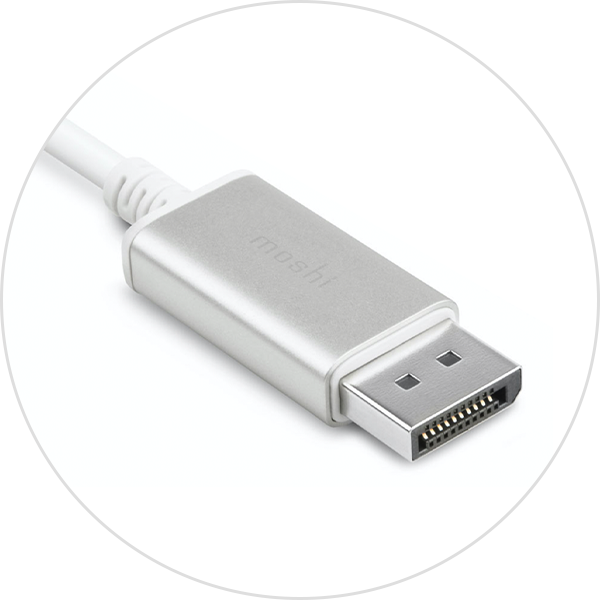
The DisplayPort versions that support 4K and higher frame rates are as follows:
DisplayPort 1.0 and 1.1 support 4K at 30Hz and 4K at 60Hz.
DisplayPort 1.3 (32 Gbps) supports 4K UHD at 60Hz and 5K at 60Hz.
DisplayPort 1.4 (32 Gbps) ensures 8K video at 60Hz.
DisplayPort 2.0 boasts an astonishing transmission rate of 80 Gbps, capable of carrying a 16K payload.
USB-C Display Functionality: Ideal for Laptops
The USB-C interface has only recently gained popularity. Initially introduced for data transfer and power supply, USB-C has evolved into an all-rounder interface. In addition to rapid power supply, USB-C is renowned for its display capabilities. When transmitting video signals via USB-C, Alternate Mode technology is utilized. This technology enables USB-C to send audio/video signals to interfaces such as DisplayPort or Thunderbolt. However, the supported resolution depends on the DisplayPort version used, which, in most cases, should be DP 1.4. This means you can unlock 8K resolution at 60 frames per second using a DisplayPort-to-USB-C interface.

Frequently Asked Questions
Which is better: HDMI, DisplayPort, or USB-C?
HDMI, DisplayPort, and USB-C are unique interfaces with various special features. Your preference for these interfaces depends on your budget and intended use.
For example, USB-C is ideal for laptops equipped with USB-C ports. In addition to charging, USB-C Alt Mode allows you to send video signals using a DisplayPort connector. Interestingly, DisplayPort was the first audio/video protocol to operate via USB-C.
On the other hand, HDMI is well-suited for TVs, streaming devices (e.g., Roku), Blu-ray players, and the latest gaming consoles. For instance, the PlayStation 5 comes equipped with an HDMI 2.1 port and cable. Furthermore, HDMI 2.1 offers a bandwidth of up to 48 Gbps, making it more stable (and popular) than HDMI 2.0. As the newest member of the HDMI product line, HDMI 2.1 has been applied to expensive monitors and TVs.
Compared to HDMI, DisplayPort is less common in home entertainment devices but dominates the gaming industry. Therefore, you will find DisplayPort (along with HDMI) in graphics cards and 4K monitors. You can also use the following cables for connection conversion.
Does using a USB-C-to-HDMI adapter affect video quality?
Using a USB-C-to-HDMI adapter does not result in a loss of picture quality for two reasons. First, both support high-speed data transfer. Second, the USB-C-to-HDMI adapter does not convert the signal but merely sends the digital signal from the USB-C output to the HDMI input. However, you must ensure that your monitor supports the correct HDMI specification. Any HDMI cable or converter can support 4K quality at 30Hz on displays, projectors, and TVs equipped with an HDMI 1.4 port.
Can I convert from DisplayPort to HDMI?
Yes, using a UNI DisplayPort-to-HDMI cable, you can achieve a 4K (3840x2160) resolution at 30Hz. This is convenient if your graphics card has only one HDMI port. Additionally, using Uni's cable, you can easily set up a docking station to connect a second monitor. This DisplayPort-to-HDMI cable provides a 4K (3840x2160) resolution at 30Hz and is backward compatible. If your graphics card has only one HDMI port, this will greatly facilitate your computer usage.
It is an excellent choice for smoothly and quickly adding a second monitor to your docking station.
Can USB-C replace HDMI or DisplayPort?
USB-C is unlikely to replace HDMI in the short term. However, the future of DisplayPort appears bleak. Let's delve deeper into this topic.
USB is primarily known for its exceptional power supply capabilities. HDMI, on the other hand, is a visual display interface jointly introduced by Sony, Philips, Panasonic, and Toshiba. Consequently, HDMI has found widespread application in TVs, monitors, and projectors. These two interfaces have learned to coexist harmoniously. A USB-C-to-HDMI cable can instantly connect your laptop and phone to your TV. Therefore, any notion of USB-C replacing HDMI is misguided.
However, with the popularity of "one-size-fits-all" solutions, DisplayPort may face challenges in the future. Interestingly, Apple, Dell, HP, Microsoft, and Intel are all rushing to adopt the USB-C interface, relegating DisplayPort to enthusiast-level gaming only.
Conclusion
I have attempted to introduce all HDMI and DisplayPort versions that support 4K and higher resolutions, as well as how to utilize USB-C Alternate Mode. Based on your needs, you can make an informed purchasing decision. Whether you choose DisplayPort, HDMI, or USB-C, be sure to consider bandwidth capacity. The greater the bandwidth, the better.
Unlock the 4K HDR Visual Feast: A Comprehensive Guide to Buying HDMI Cables
HDMI 1.4 vs 2.0: In-depth Comparison and Connection Guide
Leave a Reply
Your email address will not be published.Required fields are marked. *