By PURPLELEC | 16 June 2025 | 0 Comments
Which is Better for Gaming: HDMI or DisplayPort?
When setting up your gaming gear, you might be puzzled: which one is more suitable for gaming, HDMI or DisplayPort? Don't underestimate this detail. The ports and cables you use can actually affect frame rate, resolution, and input lag. Next, we will conduct a detailed analysis of the functions of these two ports, compare their differences, and help you find the port that can bring you a smoother and clearer gaming experience.
Introduction to HDMI and DisplayPort
Before comparing their specifications, let's first understand their functions. Both HDMI and DisplayPort are digital interfaces for transmitting video and audio from devices to displays, but they were designed with different use cases in mind, which also determines their current performance.
Detailed Explanation of HDMI

HDMI (High-Definition Multimedia Interface) was launched in 2002. It aimed to provide a simpler way to connect TVs, soundbars, game consoles, and home theater systems by replacing the messy analog video and separate audio cables with a single digital connection.
HDMI has undergone continuous upgrades. HDMI 1.4 supports 120Hz 1080p resolution and introduced ARC (Audio Return Channel). HDMI 2.0 further supports 60Hz 4K resolution and HDR. The latest versions, HDMI 2.1 (and 2.1a), have increased the bandwidth to 48Gbps, enabling them to handle 120Hz 4K resolution and even 60Hz 8K resolution. They also add gaming-specific features such as Variable Refresh Rate (VRR) and Auto Low Latency Mode (ALLM).
Detailed Explanation of DisplayPort
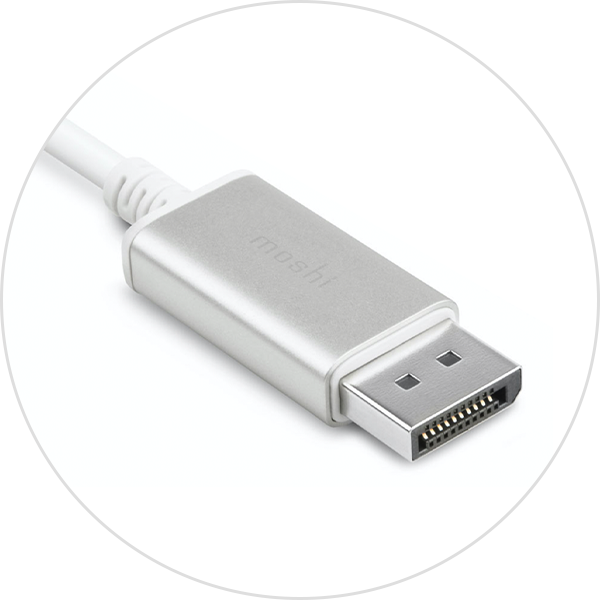
DisplayPort was introduced a few years later, in 2006. Developed by VESA, it is mainly aimed at PCs and professional displays and is designed for high resolution, high refresh rates, and multi-display setups.
DisplayPort 1.2 introduced Multi-Stream Transport (MST) technology, which allows multiple displays to be connected in a daisy-chain manner. DP 1.4 added Display Stream Compression (DSC) technology, enabling visually lossless display of 240Hz 4K or 60Hz 8K. Thanks to the UHBR20 signal, the current DP 2.1 specification pushes the speed to an astonishing 80Gbps, which is sufficient to support 240Hz 4K or 120Hz 8K uncompressed display. Moreover, DisplayPort includes adaptive sync by default, which is the basis for technologies like AMD FreeSync and NVIDIA G-Sync Compatible, and can eliminate screen tearing and stuttering.
DisplayPort vs. HDMI: Which Port is Better for Gaming?
Bandwidth, Resolution, and Refresh Rate
Bandwidth determines the amount of video data transmitted from the graphics card or console to the display. Higher bandwidth means higher resolution and smoother frame rates.
You can see that DisplayPort 2.1 takes the lead in terms of raw bandwidth, providing ample space for high refresh rates and 8K resolution without compression.
HDMI 2.1 follows closely behind and can handle 4K@120Hz well, especially for game consoles like PS5 and Xbox Series X.
Here's a quick look at how each version of HDMI and DisplayPort stacks up:
| Standard | Year | Raw bandwidth | 4K max Hz (un-compressed) | 4K max Hz (with DSC*) | 8K max Hz |
| HDMI 1.4 | 2009 | 10.2 Gbps | 30 Hz | - | - |
| DisplayPort 1.2 | 2010 | 17.28 Gbps | 60 Hz | - | - |
| HDMI 2.0 | 2013 | 18 Gbps | 60 Hz | - | - |
| DisplayPort 1.4 | 2016 | 32.4 Gbps | 120 Hz | 240 Hz | 60 Hz with DSC |
| HDMI 2.1 | 2017 | 48 Gbps | 120 Hz | 240 Hz | 60 Hz with DSC |
| DisplayPort 2.1 | 2022 | 80 Gbps | 240 Hz | 480 Hz | 120 Hz (un-compressed) |
Adaptive Sync and Gaming Smoothness
A smooth gaming experience is not just about frame rate; it's also about avoiding screen tearing and stuttering. This is where adaptive sync comes into play.
The DisplayPort standard includes adaptive sync functionality by default. It is the cornerstone of AMD FreeSync and NVIDIA G-Sync Compatible displays and works perfectly on most modern gaming monitors.
HDMI 2.1 has added new features such as Variable Refresh Rate (VRR), Auto Low Latency Mode (ALLM), and Quick Frame Transport (QFT). These features help reduce latency and improve response speed, especially on newer TVs and game consoles.
However, even with HDMI 2.1, some displays still do not fully support G-Sync over HDMI. Therefore, if you are using an NVIDIA GPU, DisplayPort is usually a safer choice.
HDR and Color Performance
Both HDMI and DisplayPort support HDR and high color depth, but they handle them slightly differently.
HDMI 2.1 includes Dynamic HDR and Source-Based Tone Mapping, which allows the source device to process HDR more efficiently and reduce latency.
DisplayPort 1.4 and higher versions rely on DSC to provide higher refresh rates while maintaining 10-bit HDR visual effects without significant quality degradation.
For most gamers, the HDR experience depends more on the display itself rather than the port, but HDMI does offer some additional features on supported TVs.
Latency and Input Lag
The good news is that when comparing HDMI and DisplayPort at the same resolution and refresh rate, there is almost no measurable difference in input lag. The real differences in latency usually come from the display's internal processing or game mode settings, not the cables or ports.
Audio and Home Theater Advantages
Both HDMI and DisplayPort support high-quality digital audio, but HDMI has an edge in home theater setups.
It supports eARC (Enhanced Audio Return Channel), which allows high-quality audio such as Dolby Atmos or DTS:X to be streamed back from TV apps to the sound system with just one cable.
DisplayPort can send audio to the display but does not support audio return, so it is less flexible for complete home theater use.
Multi-Display Support
DisplayPort is more suitable for multi-display setups. Thanks to MST technology, you can connect multiple screens to one port in a daisy-chain manner, which is very useful for flight simulation, productivity, or streaming setups.
HDMI does not support MST. You need a separate HDMI port for each display or use an active splitter, which can be expensive and may not necessarily support high refresh rates.
Cable Length and Setup Flexibility
The effective transmission distance of an HDMI 2.1 cable is about 5 meters (about 16 feet). Beyond this distance, you need to use an active HDMI cable or a fiber-optic HDMI cable to maintain signal quality.
DisplayPort 2.1 recommends keeping passive cables below 3 meters, but newer "DP 2.1b" active cables can extend the distance while still supporting high-end bandwidth.
For in-wall or long-distance cabling, both standards offer high-quality active cable options, but they come at a slightly higher price.
Console Compatibility
If you are gaming on a PS5 or Xbox Series X|S, HDMI is the only option. These consoles output by default through HDMI 2.1 and support 4K@120Hz, VRR, and ALLM via HDMI, so there is no need for an adapter.
Although there are HDMI to DisplayPort adapters, they usually strip away key features like VRR and are best used as a last resort rather than a permanent solution.
Summary
So, should I use DisplayPort or HDMI for gaming?
If you are using a PC gaming monitor and want the best refresh rates, adaptive sync, and multi-display support, choose DisplayPort 1.4 or 2.1.
If you are gaming on an Xbox/PS5 console, using a TV, and want simple, high-quality, and widely compatible audio and video, HDMI 2.1 is your best choice.
How to Daisy-Chain Displays with DisplayPort: A Comprehensive Guide
Guide to Connecting and Configuring an Ethernet Adapter on Mac
Leave a Reply
Your email address will not be published.Required fields are marked. *